Why AI Database Tools Are a Must-Have in 2026
In 2026, AI database tools have become essential for modern teams. This article explains why businesses adopt AI-powered databases to automate workflows, scale data, and gain real-time insights.
For the longest time databases have been the quiet foundation of how businesses operate. The database teams have spent a big amount of time to wire them up with integrations, dashboards, and automations and yet most of the heavy lifting was still done manually. Each metric had to be manually defined, every workflow created, and you had to be watchful of your data.
Fast forward to 2026, we have seen changes to this foundation. With advancements in database technology, a database is not just an entity in which data is stored. The modern-day database comes with Artificial Intelligence (AI) embedded within the system to assist you with making sense of your information, discovering patterns that you may have overlooked, recommending actions based on your competitive analysis, and taking care of many of the more tedious tasks behind the scenes.
AI-powered databases are not some futuristic concept anymore, they’re becoming the practical engine behind everyday operations. This post walks through what an AI database is, why they matter in 2026, what features you should care about, and five notable AI database tools for you to consider.
What is an AI database?
An AI database is a database system that doesn’t just store information in rows and columns, but it also understands it, works with it, and augments it with machine intelligence.
Instead of requiring someone to query the dataset manually, it can summarize a document, extract structured fields from an invoice, suggest labels, run semantic search on messy text, or even auto-generate an initial draft of a record based on a prompt.
As another example, you may upload a PDF folder of resumes into the database. The AI in the database will "scan" all of the resumes that you have uploaded and pull out the skills(s), education(s), past job history, and will then rank the candidates based on the criteria that you have set.
In essence, an AI Database is still a standard database in regard to creating tables and defining the structure of data and relationships between tables, as well as applying the various forms of analysis available for standard databases. But with the addition of AI capabilities, AI Databases result in decreased human effort in data entry and interpretation, less chance of human error during data entry and interpretation, and allowing users to get reports more quickly on their analytical results.
Why are AI databases important in 2026
There are a few practical reasons teams are adopting them now:
- Data volume and formats exploded: We now store more documents, images, chat logs, and rich media than ever before. While traditional SQL-style queries do not allow one to see "what did the contract actually say" or "which resume fits the job description", AI processes the many layers of unstructured data and makes sense of it in a more structured way. This helps teams turn messy inputs into AI ready data they can actually analyze and act on.
- Speed and accuracy matter: A team must get the right answers quickly when it comes to finding the right data input, customer ticket, or analysis. For this reason, no matter the size of the company, it is cost prohibitive to check each contract, lead, brand asset, invoice, or product insight manually. AI increases both speed and accuracy of translating data into actionable insights.
- Integration pressure: Businesses want one place to enrich, store and act on data; AI databases shrink multiple tools into one flow, moving from collecting data to using it instantly, and giving teams a real edge over slower competitors.
Companies are increasingly turning to in-platform AI features that let them run and fine-tune models directly next to their data generating insights, predictions, and automation native to how they already work. By 2026, AI databases won’t be a “nice-to-have”, they will be the operating system of every fast-moving team.
Key features to look for in an AI database
If you’re evaluating AI databases, don’t be distracted by marketing. Rather look for practical capabilities that actually reduce work:
Few AI database industry use-cases
Marketing
- Analyze campaign performance across channels in real-time
- Generate ad content and brand insights using generative AI
- Auto-categorize customer feedback and trend signals
Sales & CRM
- Auto-score leads based on behavior and profile fit
- Summarize sales calls, scan stacks of business cards and extract next steps
- Predict deal closure probability and revenue forecasts
Product
- Analyze feature requests and bug reports from multiple sources
- Classify product telemetry data for user patterns
- Trigger alerts for performance issues or churn signals
Operations
- Convert invoices, shipments, and vendor docs into structured workflows
- Auto-assign tasks based on workload and SLA rules
- Build dashboards for real-time operational metrics
IT & Operations
- Monitor logs and detect anomalies
- Summarize incident reports, assign priority and apply classification rules
- Auto-trigger escalation and communication workflows
5 Best AI database tools
Below is a list of five AI database solutions worth evaluating:
1) Stackby AI Database
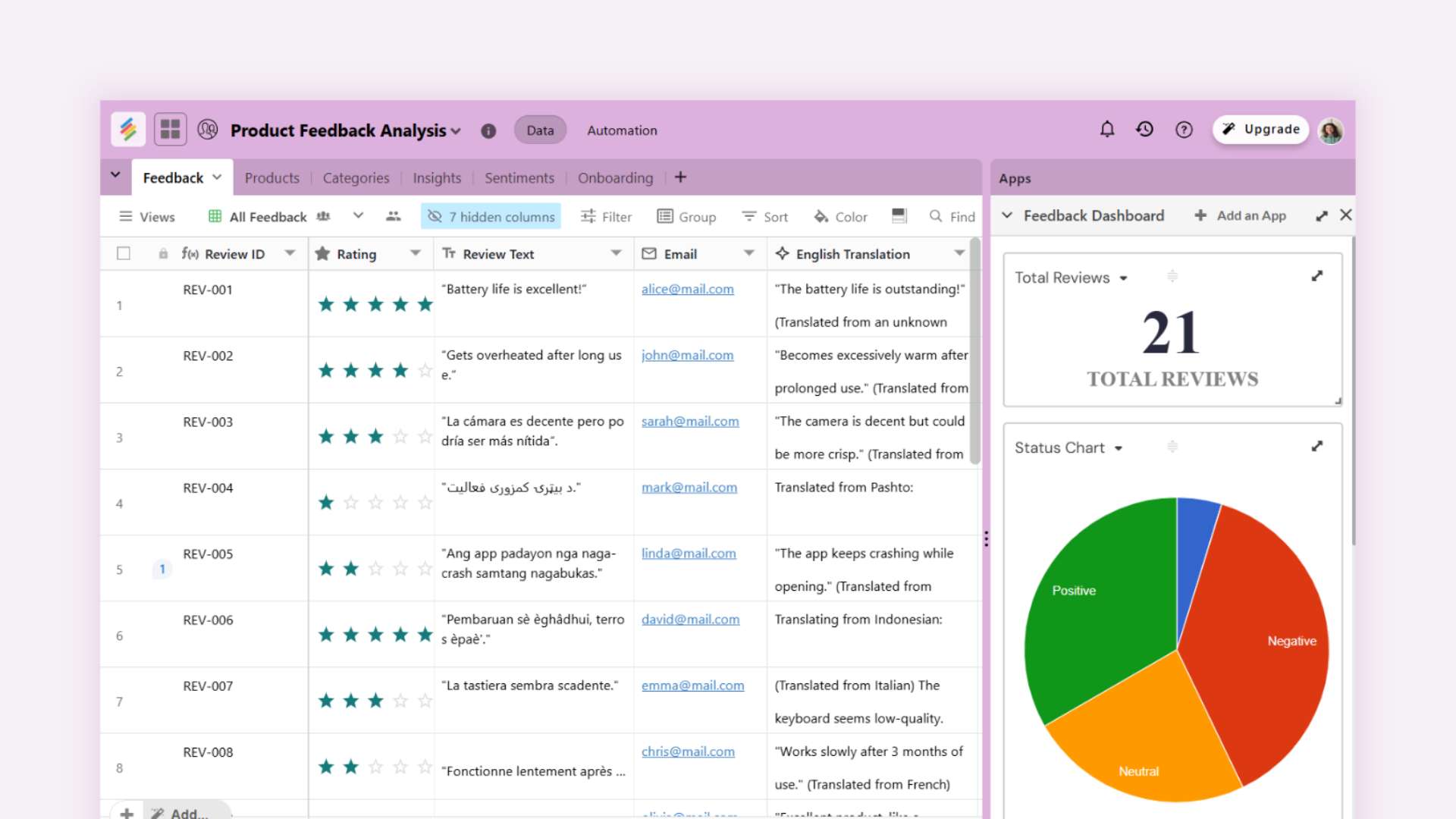
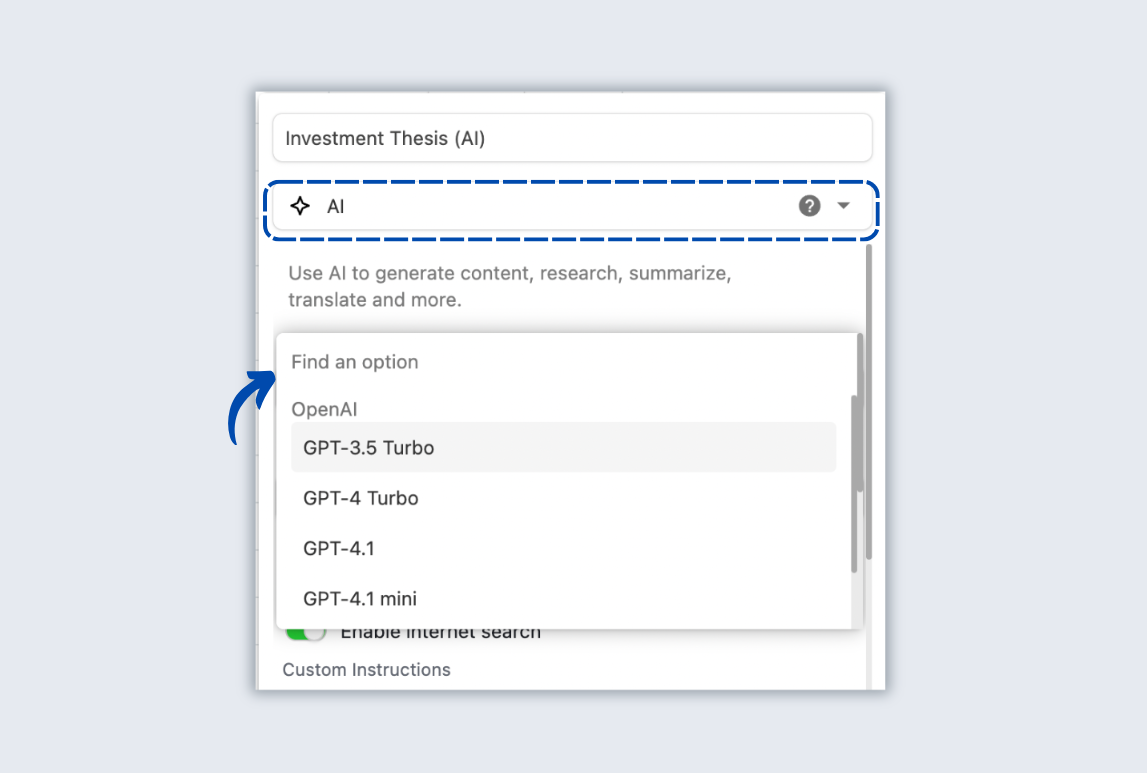
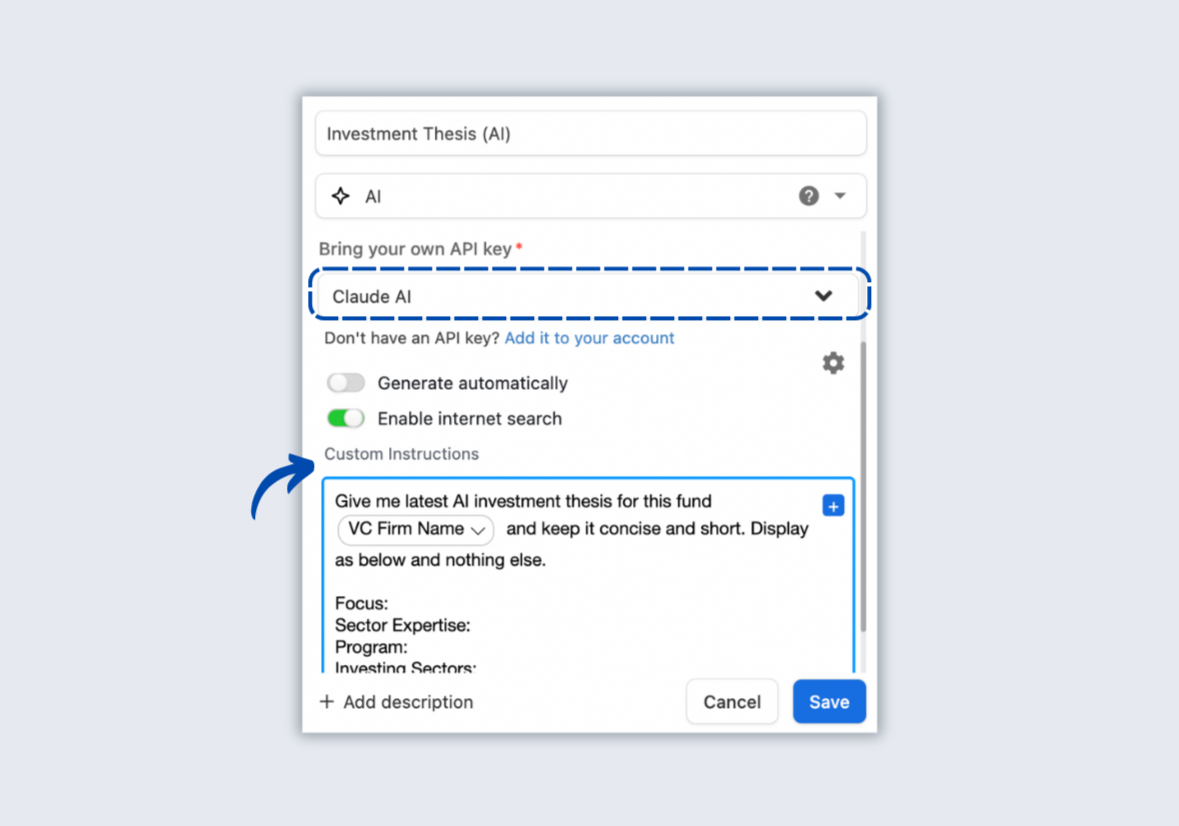
Stackby has quietly moved from a flexible database to one of the most practical AI-powered data platforms of 2025. It is a spreadsheet-style no-code database platform with added AI field agents and an AI Co-Builder, letting teams embed LLMs directly into table fields, create databases from prompts, and use AI templates for common workflows. You bring your own API key (OpenAI, Gemini, Anthropic) and run model calls inside fields or automations.
What makes it unique
- It’s built for non-technical teams: spreadsheet familiarity plus database features.
- AI is “first class” in columns and templates, not bolted on as an afterthought.
- Powerful forms (two-column layouts, signatures, media), plus built-in dashboard apps, keep collection, analysis and visualization in one place.
Key features
- AI Field Agents: custom agent per column to summarize, extract, translate, recommend.
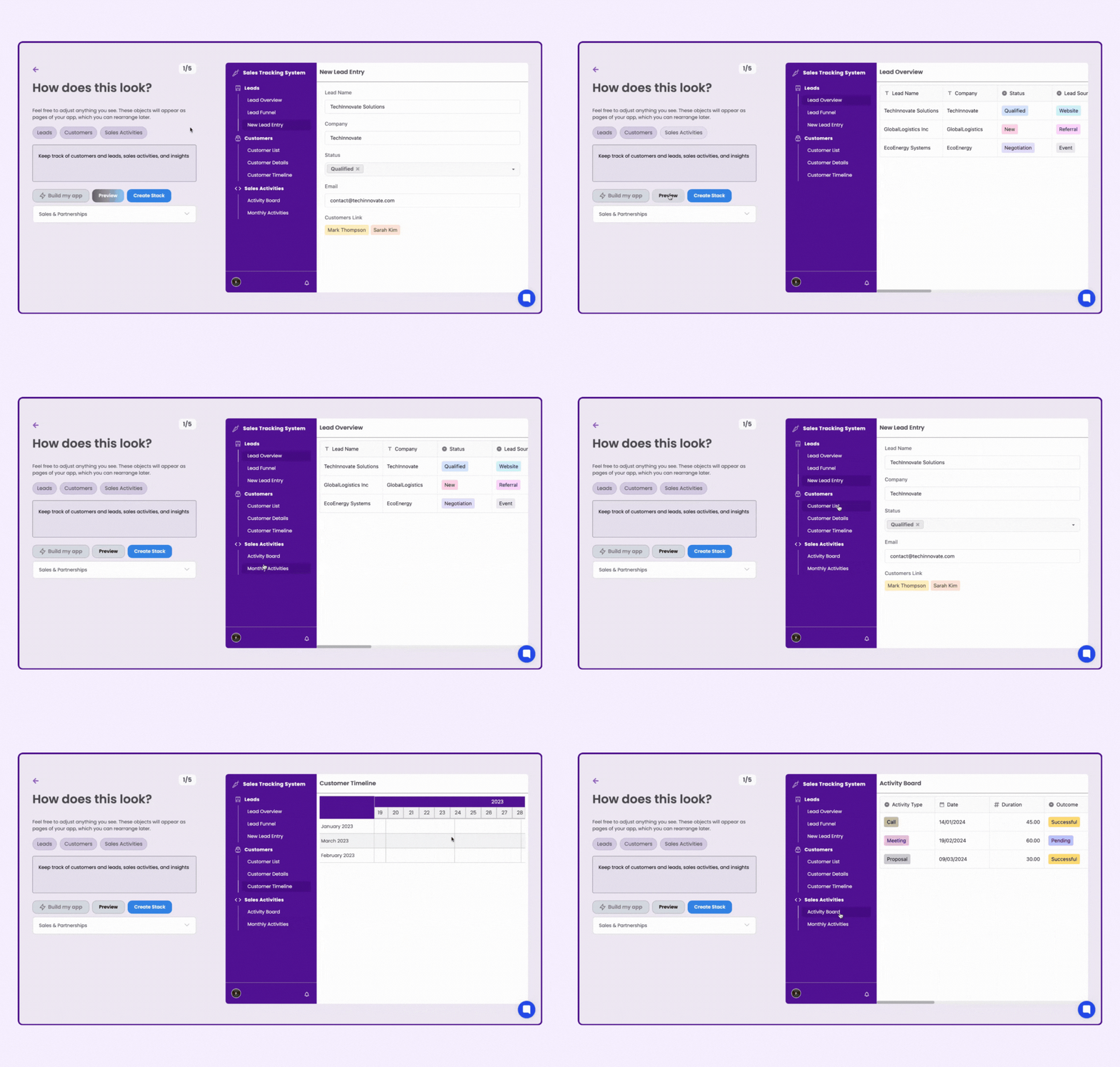
- AI Co-Builder: create a database or workflow from a plain-language prompt (no setup required).
- 30+ power-ups and 30+ column types for advanced data modeling.
- File upload + OCR compatibility via forms, and templates for common document workflows.
- Internal automations and 50+ integrations and app marketplace for data insights (Charts, Pivot, Summary).
Pros
- Low learning curve for business users.
- You can query both structured and unstructured data.
- Pre-built templates and video guides can decrease the time between data input and valuable output.
- You control AI costs by bringing your own model key.
- Affordable compared to other AI powered databases.
Cons
- Heavy AI usage may still require thoughtful API cost management (since you supply the key).
- For extremely large vector searches or production ML infra, you might still need specialized vector DBs.
2) Snowflake Cortex
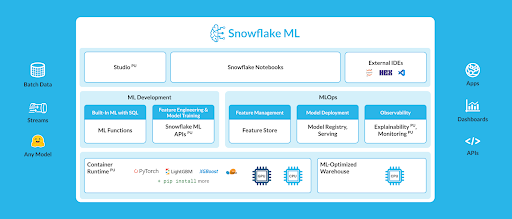
Snowflake Cortex allows for the execution of ML models directly against their data in the Snowflake Cloud. Users can perform operations such as transformer component execution as well as execute multimodal AI functions, i.e. text image audio etc., based on an organization's centralized data within Snowflake. This is powerful for organizations that are not looking to move out of their secure cloud.
When to pick it
Large enterprises with governance needs and petabytes of data and when you want AI processing within your data platform.
Upside / downside
Great for scale and governance, but not built for non-technical, spreadsheet-style users. An overkill for small teams.
3) Baserow AI Database
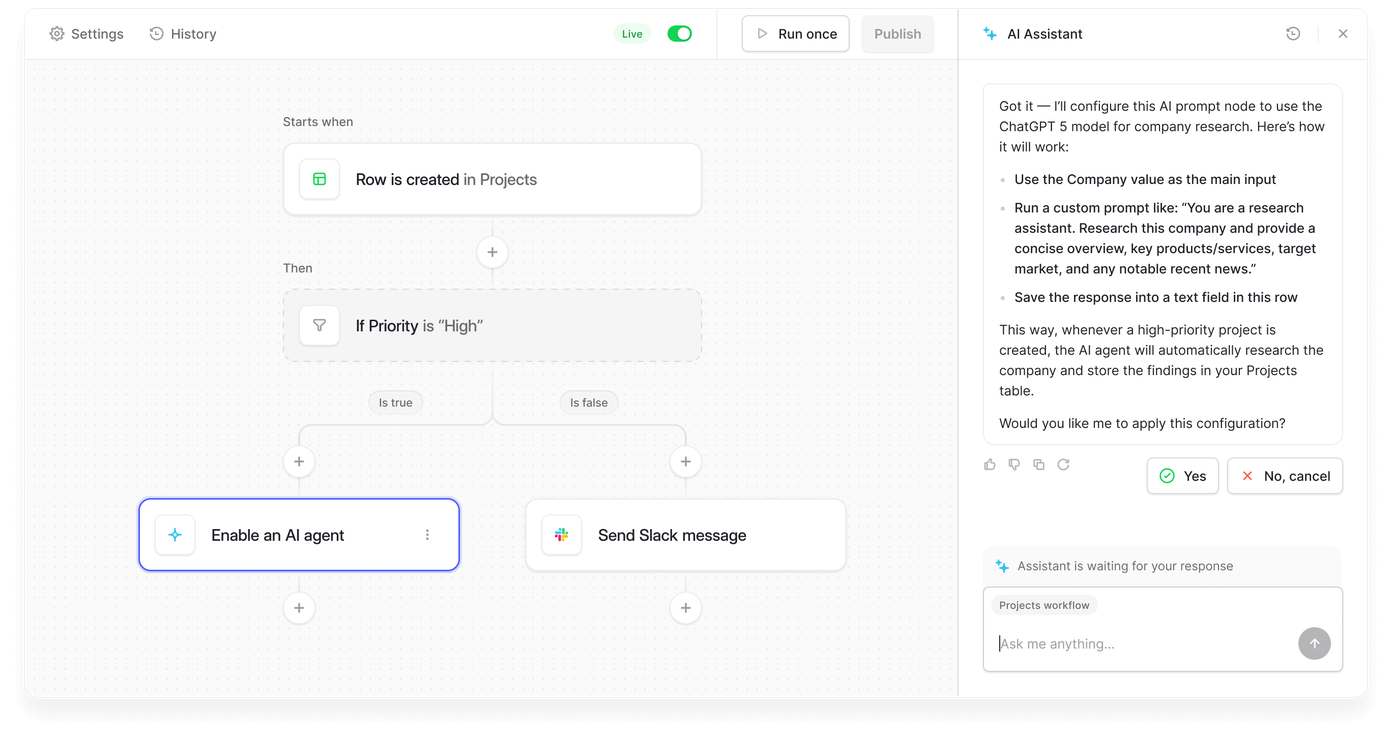
Baserow provides an open-source Airtable-style database and has added AI fields and an assistant (Kuma) to help with building databases, formulas, and automations, and is especially attractive if you want self-hosting and extensibility.
When to pick it
Teams that want control, open code, and the ability to self-host with AI assistant features.
Upside / downside
Open source with flexible deployments. But fewer polished templates or UI refinements.
4) Airtable AI
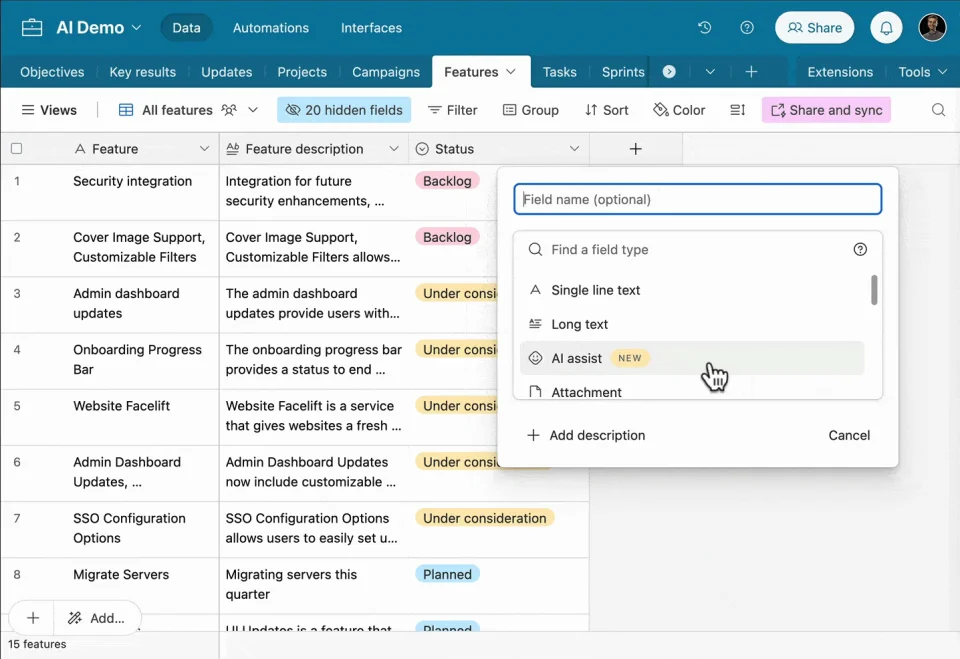
Airtable has leaned hard into AI (Omni / Airtable AI) to let users summarize, build automations and even prototype AI apps visually. It’s a polished product with a strong UX and a good template ecosystem.
When to pick it
Design-forward teams and organizations that want a refined low-code experience and are already embedded in the Airtable ecosystem.
Upside / downside
Works well for teams already on Airtable, though many workflows require third-party automation tools. Costs can rise quickly at scale for heavy AI inference.
5) Pinecone
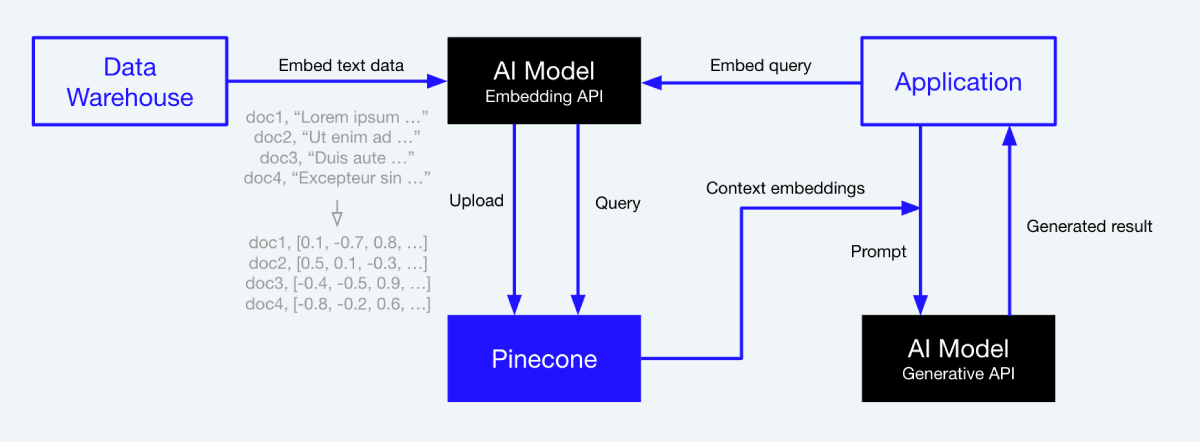
Pinecone is a managed vector database: designed for use with embedding vectors and semantic searches. Unlike traditional full relational databases such as Stackby, Pinecone serves as an efficient and low-latency tool for performing similarity searches and is therefore an ideal choice for companies looking for vectors to power their AI data pipelines.
When to pick it
When semantic search/nearest neighbor queries over embeddings are core to your app (retrieval-augmented generation, semantic matching).
Upside / downside
Scales and performs well for embeddings. But you still need an app layer for business logic/UI. It's more of a backend component rather than end-user tool
Future of AI databases
By late 2026, databases won’t just be “systems of record”. They will become systems of intelligence. The next 12–36 months will likely bring a few clear trends:
- Hybrid models to pick from
- Better governance & explainability
- Tighter multimodal support
- Autonomous agents acting on data
- Predictive workflows instead of reactive dashboards
- Document-to-action pipelines with zero manual setup
- Unified unstructured + structured storage
- Queryless decision engines
The most valuable tools won’t be the most powerful, instead they’ll be the most usable.
Conclusion
If you’re a small-to-mid team or a business unit inside a larger org and you want to move fast without building infra, Stackby is convincing: a spreadsheet-like front end, templates and videos to get started, embedded AI field agents for extraction and enrichment, and a Co-Builder to scaffold new apps from plain language. It’s practical and pragmatic and not an all-out engineering project.
For many teams that want an approachable AI database in 2026, templates, forms, AI fields, dashboards and workflows all in one place, Stackby is a solid place to start. Try one small workflow (resume parsing, invoice extraction, or a business card scanner) and measure the time saved. If it fits, expand.

![Best 14 HR Database Software for Recruitment Agency [Free+Paid] [2026]](/blog/content/images/size/w960/2024/04/stackby--hr-database-software-blog-post-5.3.jpg)
![10 Best Free Database Templates for Marketing Agencies in [2026]](/blog/content/images/size/w960/2024/03/stackby-Database-templates-for-marketing-agencies-1-blog-post-2.jpg)