Is Airtable Too Expensive? Cheaper Alternatives in 2026
Is Airtable too expensive? Explore cheaper alternatives in 2026 that offer better value and features for your budget and needs.

Is Airtable too expensive in 2026? It depends on how you use it, how large your team is, and how quickly your data and workflows are growing. Airtable can be a powerful way to combine spreadsheets, databases, automations, and workflows, but its per-user pricing can become harder to justify as more people need access.
For a freelancer or a small team, Airtable may be perfectly reasonable. For a growing business with 10, 20, or more collaborators, however, the monthly cost can add up quickly.
In this guide, we'll break down Airtable's cost, explain when Airtable becomes expensive, review Airtable competitors, and cover cheap Airtable alternatives that may provide better value for different team sizes and workflows.
Understanding Airtable's Pricing Structure
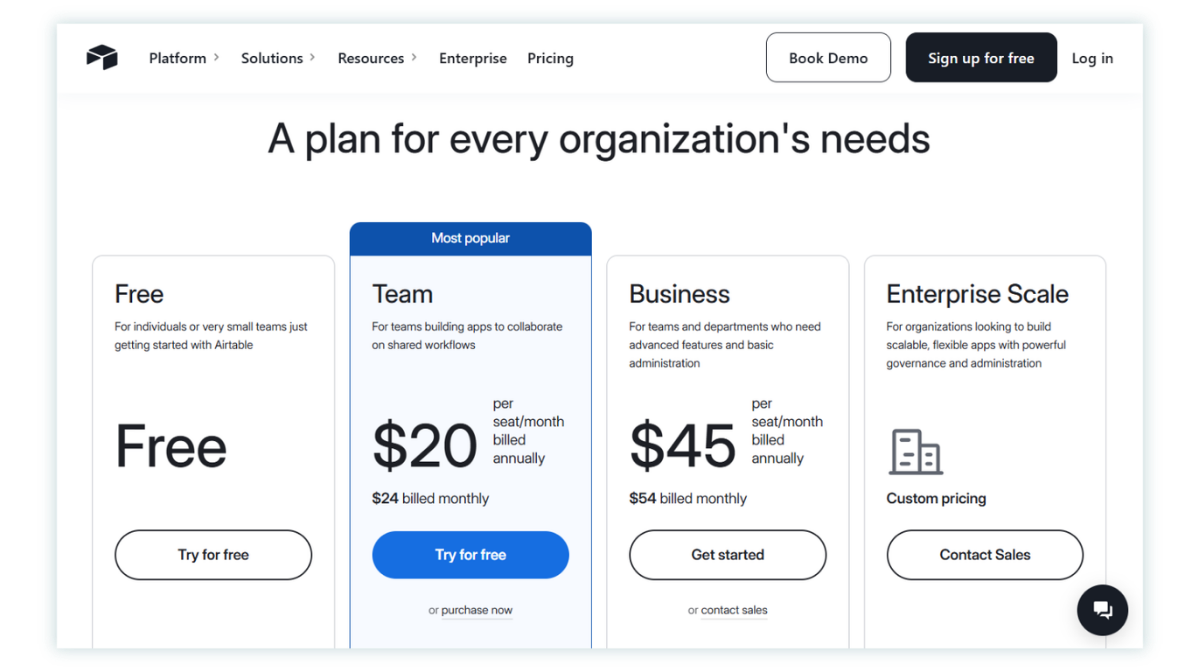
Airtable's pricing is based largely on the plan you choose and the number of users who need paid access. Its plans include Free, Team, Business, and Enterprise options.
The important thing to understand is that the price isn't just about the monthly subscription. As your team grows, you also need to consider record limits, automation limits, integrations, advanced features, and the number of people who need access.
For a small personal project, these limits may not matter much. For a growing business, they can become an important part of the total cost.
Free Plan Limitations
The free plan is useful for individuals and small teams that want to test Airtable or manage relatively simple projects.
It provides the basic Airtable experience, but there are limits on records, attachments, automations, and other features. Once your database becomes an important part of your business operations, you may eventually need a paid plan.
This is often the point where people begin searching for a cheap Airtable alternative rather than immediately moving to a more expensive Airtable plan.
Team and Business Plan Costs
The Team plan costs $20 per collaborator per month when billed annually, while the Business plan costs $45 per user per month when billed annually.
For a single user, that may not sound particularly expensive. The calculation changes when an entire team needs access.
For example, a 10-person team on a $20-per-user plan would spend:
10 × $20 × 12 = $2,400 per year
A larger team of 25 users would spend:
25 × $20 × 12 = $6,000 per year
And that's before considering whether your team eventually needs a higher plan.
The issue isn't necessarily that Airtable is expensive for every user. It's that per-seat pricing becomes increasingly important as the number of collaborators grows.
This is where alternatives like Stackby offer more value.
For teams looking for an Airtable alternative, Stackby combines databases, integrations, automation, and AI-powered workflows in one flexible workspace: Airtable alternative.
Enterprise Solutions and Custom Pricing
Larger organizations may need Airtable's enterprise-level capabilities, including more advanced administration, security, controls, and support.
Enterprise pricing is custom, so businesses need to contact Airtable for a quote.
For organizations that already depend heavily on Airtable, this may be appropriate. But businesses comparing software costs often look at Airtable competitors that offer different pricing structures, self-hosting options, or more features at lower entry prices.
Many users expressed that Airtable's per-seat pricing and record limits can hinder functionality as data size grows. It's easy to get caught paying for a premium product when your actual usage might be better served by a more cost-effective solution.
What Is Airtable's Cost Relative to Other Project Management Tools?
One important point is that Airtable doesn't fit neatly into just one software category.
It combines spreadsheet-like tables with database functionality, automation, integrations, and workflow capabilities. Teams managing structured business data can also use a client database template to organize contacts, records, and related information in one workspace. Because of that, comparing it only with traditional project management software isn't always an apples-to-apples comparison.
So, what is Airtable’s cost relative to other project management tools?
It depends on what you're actually using Airtable for.
If you're primarily managing tasks, deadlines, and team projects, platforms such as ClickUp, monday.com, or Smartsheet may offer more structured project management features, while database-focused teams may prefer an Airtable alternative with flexible workflows.
If you're primarily managing structured relational data, CRM records, content databases, or operational information, Airtable is closer to database and no-code workflow platforms.
This distinction matters because the cheapest tool isn't necessarily the cheapest solution. A lower-priced project management platform may require additional software if you still need a relational database, advanced integrations, or custom workflows.
When Does Airtable Become 'Too Expensive'?
So, you're looking at Airtable's price tag and wondering if it's really worth it. It's a common question, especially when you start scaling up.
Plan | Price/User/Month (Annual) | Row Limit (Pro) |
|---|---|---|
Free | $0 | 1,200 |
Team | $20 | 50,000 |
Business | $45 | 125,000 |
For Small Teams and Solopreneurs
Airtable can make sense for a freelancer, founder, or small team that doesn't need many paid collaborators.
The problem usually appears when a project grows from one or two users into a larger team.
If only a few people actively build and manage the database, paying for a large number of seats may not be necessary. But if everyone needs to edit and work inside Airtable, the monthly cost can increase quickly.
This is one reason small businesses often consider a cheap Airtable alternative before committing to a long-term subscription.
For Growing Businesses with Complex Needs
As a business grows, the number of people using its systems usually grows too.
A CRM that started with two users may eventually involve sales, marketing, operations, management, and customer support.
Teams managing client projects can also use project management templates to organize tasks, timelines, responsibilities, and project data.
A content calendar may start with one person and eventually require access for writers, designers, editors, and managers.
That's when per-seat pricing becomes more noticeable.
Airtable itself may continue to work perfectly well, but the question becomes:
Is the additional cost still providing enough value for every paid user?
When Your Data Keeps Growing
Team size isn't the only factor.
As your business adds customers, products, campaigns, projects, content, or other records, your database becomes more important.
Record limits, automation limits, storage, and integrations can become part of the decision.
A business may therefore face two types of growth at the same time:
- More people need access.
- More data and workflows need to be supported.
That's when the total cost of staying with Airtable deserves a closer look.
When You Need More Structure
Airtable is flexible, which is one of its biggest strengths. But flexibility isn't always the same thing as structure.
Some teams eventually need more defined project workflows, task management, reporting, permissions, dashboards, or operational processes.
A flexible database app can be useful when teams need structured data, custom workflows, integrations, and reporting without relying on multiple disconnected tools.
If your team has reached that point, the right question isn't simply:
"What is cheaper than Airtable?"
It is: "What gives our team the structure we need without paying for features we don't use?"
That's where the best Airtable alternatives for teams that need more structure can become particularly interesting.
Airtable Alternatives: Price & Feature Comparison
Here's a practical way to look at several common alternatives:
| Tool | Best suited for | Main advantage over Airtable |
|---|---|---|
| Stackby | Database and API-driven workflows | Airtable-like experience with integrations and flexible workflows |
| Baserow | Open-source databases | Self-hosting and data control |
| NocoDB | SQL-backed workflows | Turns existing databases into no-code interfaces |
| Notion | Docs and lightweight databases | Combines documentation and databases |
| Coda | Interactive documents | Documents, tables, formulas, and workflows together |
| Google Sheets | Simple data management | Familiar and inexpensive |
| Smartsheet | Structured project management | More project-management-focused workflows |
| ClickUp | Project and task management | Stronger task and project-management structure |
There is no single winner for every team. Each platform solves a slightly different problem.
Stackby: Most Value Driven Airtable Alternative
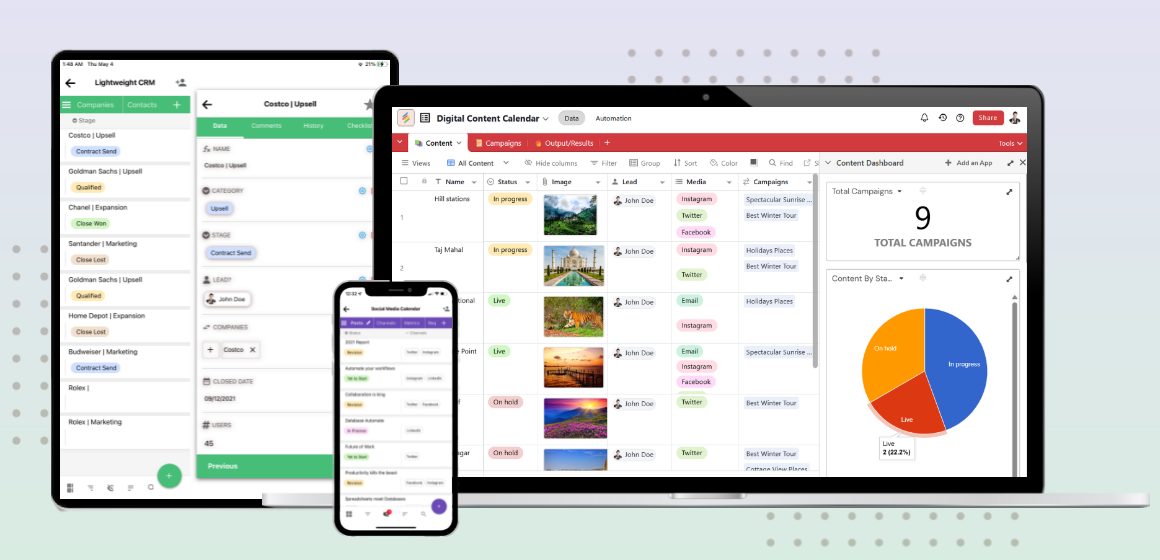
Stackby is a flexible Airtable alternative for businesses that need database functionality, API integrations, automation, AI capabilities, and customizable workflows. It is particularly useful for teams that want a database builder that can adapt to different operational and project requirements:
Relational Database + Spreadsheet Interface
Both Stackby and Airtable are spreadsheet style platforms that function as relational databases. Where Stackby differs is in its capabilities, especially when it comes to linking and managing related data as well as its developer friendly stack.
CRM Features
Though Airtable can be used as a CRM tool, Stackby is designed with robust, built-in CRM capabilities and templates specifically tailored for sales and customer management. This set of features helps with lead tracking, deal pipelines, and customer communication logs, progress of sales, and more.
Native API Connectors
Its integrations help teams connect external tools and bring operational data into a centralized workspace, while also offering compatibility with external tools for more advanced or cross-platform workflows.
AI Assistance
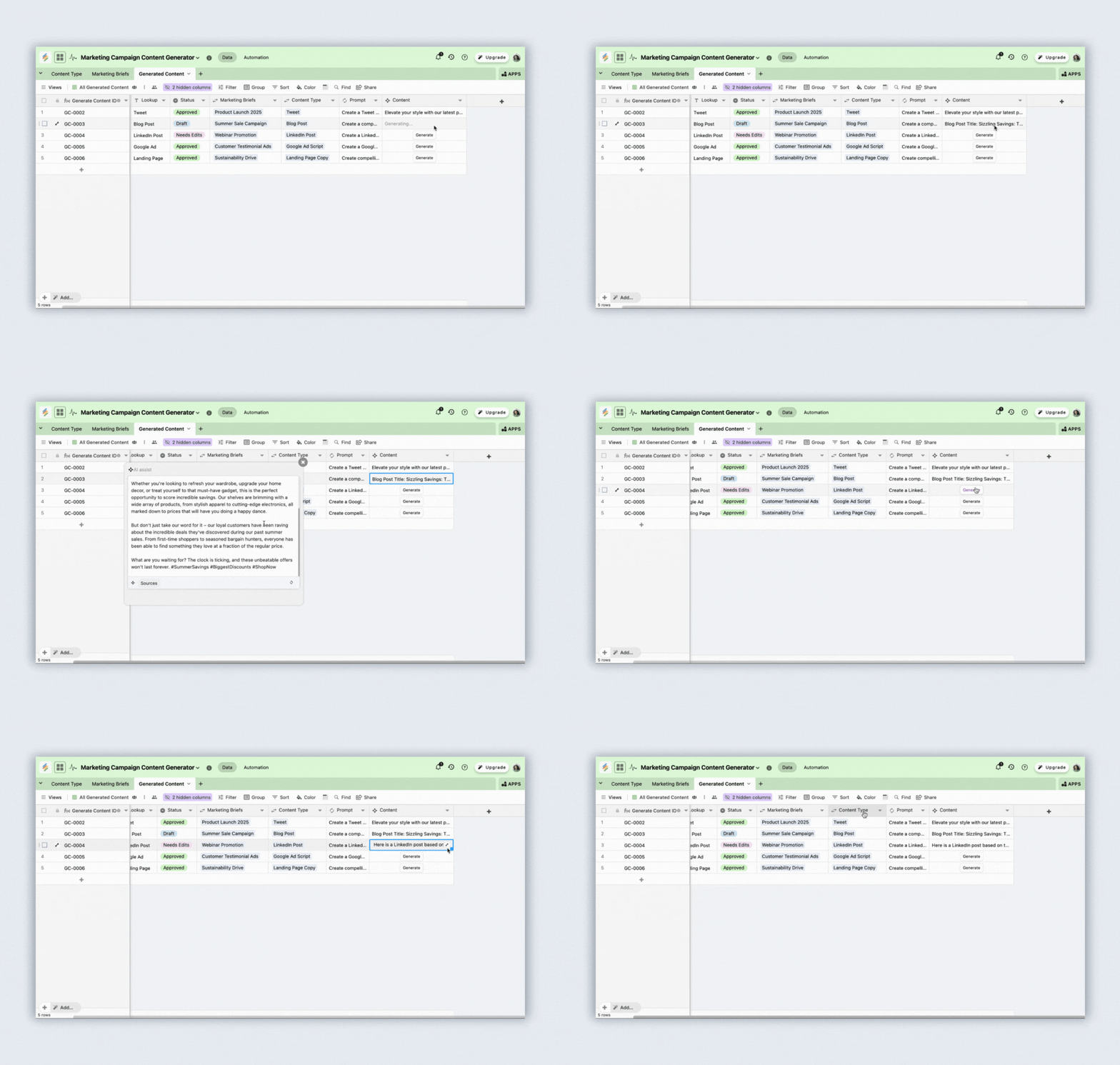
Stackby incorporates powerful AI capabilities directly into its platform. This means users get AI field agents to automate a variety of tasks such as content generation, data summarization, sentiment analysis, and a lot more. These AI powered tasks and features are natively integrated within your workflows.
Performance and Robustness
Stackby is optimized for performance and is scalable to handle way bigger datasets and complex operations compared to Airtable. Its architecture is designed to remain reliable even as usage grows.
Security
Both platforms maintain high security standards. Where Stackby stands out is in the level of control it offers over data permissions, along with a robust set of enterprise-grade security features that are particularly suitable for more structured and regulated needs.
Pricing and Value
This is where Stackby really stands out. Airtable’s pricing tends to climb pretty quickly, especially with its per-seat model and record limits. Stackby, on the other hand, offers unlimited records on most paid plans at a much lower cost. For growing teams, that makes a noticeable difference, especially when you need something powerful without constantly worrying about limits or pricing jumping up.
“Stackby is a more powerful data management and project management tool that offers tons of value for your money, especially as it is way more affordable than Airtable’s higher price points. A great alternative for teams and organizations looking for a smart spreadsheet upgrade without the higher cost! Check out Stackby as the affordable Airtable solution for you and your team.”
Best Airtable Alternative for CRM
Stackby is a flexible Airtable alternative for CRM workflows, allowing teams to manage leads, contacts, companies, deals, and follow-ups in customizable databases. Teams can create CRM workflows around their specific sales process instead of being limited to a fixed structure.
With API connectors, automation, and AI-powered fields, Stackby can also help teams centralize customer information, reduce repetitive updates, and keep sales data connected across workflows. This makes it useful for sales teams, agencies, and growing businesses that need a customizable CRM without adding another complex system.
Airtable Alternative with Built-in Marketing Automation
Stackby can also support marketing teams that want to manage campaign data and automate repetitive marketing workflows from one workspace. Teams can organize campaigns, leads, content, customer data, and performance metrics while connecting information from other marketing tools through API connectors.
Its automation and AI capabilities can help reduce manual data updates, streamline campaign workflows, and create dashboards for tracking marketing performance. For agencies and in-house marketing teams, this makes Stackby a practical Airtable alternative for combining CRM, marketing data, automation, and reporting in one customizable workspace.
Airtable Alternatives: Pricing and Feature Overview
Features | Stackby | Airtable |
|---|---|---|
Ease of Use | User-friendly interface, intuitive design | Intuitive interface, visually appealing |
Customization | Highly customizable, flexible views, extensive integrations, growing apps marketplace | Flexible views, good customization options, app marketplace |
Pricing | More affordable, tiered pricing, generous free plan | Can be expensive at higher tiers, free plan limitations |
Scalability | Scales well for growing teams, robust features | Scales well, suitable for complex projects |
Integrations | Wide range of integrations, Zapier support + native API connectors and in-house Dataflow.to connector product | Good integration options, Zapier support |
Collaboration | Real-time collaboration, commenting, task assignment | Real-time collaboration, commenting, team features |
Automation | Built-in automation rules, workflows | Automations, workflows, limited by plan |
Reporting | Advanced reporting, custom dashboards | Basic reporting, customizable dashboards |
Support | Responsive customer support, knowledge base | Good customer support, extensive documentation |
Airtable vs Stackby: Which Is the Better Airtable Alternative?
| Feature | Airtable | Stackby |
|---|---|---|
| Pricing | Free plan; paid plans increase with users | Free plan; paid plans with flexible options |
| Storage & records | Limits vary by plan | Higher limits on paid plans |
| Automations | Built-in automations with plan-based limits | Built-in automation and workflows |
| Templates | Extensive template library | 350+ customizable templates |
| API & integrations | Integrations and API support | Native API connectors and integrations |
| AI | AI features available on supported plans | AI-powered fields and workflows |
Best Airtable Alternatives for CRM
Stackby is a flexible Airtable alternative for CRM workflows, helping teams manage leads, contacts, companies, deals, and follow-ups in customizable databases. Its CRM templates, API connectors, automation, and AI-powered fields help teams centralize customer data and streamline sales workflows.
Airtable Alternative with Marketing Automation Built In
Stackby also supports marketing workflows for campaign tracking, lead management, content planning, and performance reporting. Its native automation and API connectors help reduce repetitive updates and connect marketing data, making it useful for agencies and marketing teams managing campaigns and customer information in one workspace.
How Much Can You Save by Switching From Airtable?
The answer depends entirely on your team size and the alternative you choose.
Consider a simple example : A 10-person team paying $20 per user each month would spend:
$200 per month or
$2,400 per year
If the team can use a different platform that provides the required features at a lower total cost, the annual difference can become meaningful.
But don't compare only subscription prices.
Before switching, calculate:
- Number of paid users
- Number of records
- Automation requirements
- Integration requirements
- Storage
- API usage
- AI usage
- Project management requirements
- Migration costs
- Training time
- Additional tools required
The right simple database software should balance pricing with records, integrations, automation, storage, and the workflows your team actually needs.
A platform that looks cheaper at first may not actually be cheaper if you need three additional services to reproduce your existing workflow.
Making the Right Choice for Your Budget and Needs
By now, it’s clear that pricing plays a big role, but it’s not the only thing that should drive your decision. The real question is how well the tool fits into your workflow.
Airtable works well for structured setups, but as teams grow, costs and limits tend to add up. What most teams really need is something that can handle both simple and complex workflows without forcing trade-offs.
That’s where Stackby feels more balanced. It keeps the familiarity of a spreadsheet while supporting relational data, automations, and deeper workflows when needed. You can start simple, but the system doesn’t break or get restrictive as things scale or become more complex.
In a more practical sense:
- Handles both simple and complex workflows without needing to switch tools
- Combines integrations, internal automations, and data management in one place
- Supports AI co-builder and AI fields to speed up setup and ongoing workflows
- Enables data visualization through Apps Marketplace with charts and dashboards
- Teams that need visual reporting can also use Stackby reporting to turn database information into more useful business reports.
- Offers a more predictable setup as teams and data grow, without constant limits
The goal isn’t to pick the most powerful tool on paper, it’s to pick one that actually works as your needs evolve.
If Airtable starts to feel restrictive or harder to justify over time, exploring alternatives like Stackby becomes a practical next step.
Is Airtable Still Worth It in 2026?
It depends on your team and your workflow.
Airtable can be a good fit when you need a flexible relational database with integrations, automations, and customizable workflows.
But as the number of users and the complexity of your data increase, the cost deserves closer attention.
For some teams, staying with Airtable makes sense because its features and existing workflows justify the expense.
For others, moving to a cheap Airtable alternative can reduce software costs while still providing the database and workflow capabilities they need.
The best approach is to compare the actual cost of your current Airtable setup with the features you use, then evaluate alternatives based on your team's specific requirements.
Airtable may make sense if:
- Your existing workflows already depend on Airtable
- Your team needs flexible relational data
- You use its integrations and automations extensively
- The productivity benefits outweigh the subscription cost
- Your team is comfortable with the platform
An alternative may be worth considering if:
- Your number of paid users is growing quickly
- Your team is hitting plan limits
- You don't use many of Airtable's advanced features
- You need stronger project-management structure
- You want self-hosting or greater data control
- You mainly need a simple spreadsheet
- You're paying for more seats than your workflow really requires
The important thing isn't simply finding the lowest price.
For teams prioritizing flexibility, custom database software can provide a more adaptable foundation for managing business data, workflows, and integrations.
Best Airtable Alternatives for Teams That Need More Structure
Teams that have outgrown flexible databases often don't necessarily need another Airtable clone.
They may need more structure.
For example:
- Project-focused teams may prefer ClickUp or Smartsheet.
- Documentation-heavy teams may prefer Notion or Coda.
- Open-source and self-hosting teams may prefer Baserow or NocoDB.
- API and database-focused teams may consider Stackby.
- Simple spreadsheet users may be perfectly comfortable with Google Sheets.
This is why choosing among Airtable competitors should start with the problem you're trying to solve rather than the number of features a platform advertises.
Frequently Asked Questions
Is Airtable too expensive?
Airtable can become expensive for larger teams because paid plans use per-user pricing. Whether it is too expensive depends on your team size, workflow requirements, and how much value you get from the platform.
What is Airtable's cost relative to other project management tools?
Airtable's pricing is difficult to compare directly with project management tools because Airtable is primarily a flexible database and workflow platform. Tools such as ClickUp and Smartsheet are more focused on structured project and work management.
What is the difference between Airtable and Stackby?
Both platforms combine spreadsheet-style interfaces with database functionality. Stackby places a strong focus on API connectors, integrations, automation, CRM workflows, and AI-powered fields, while Airtable has its own extensive ecosystem of integrations, database features, and workflow capabilities.
What are the best Airtable alternatives for teams that need more structure?
The answer depends on the type of structure your team needs. ClickUp and Smartsheet are worth considering for project management, while Notion and Coda work well for documentation and workflow-heavy teams. Baserow and NocoDB are useful options for teams interested in open-source or self-hosted databases.
What is the cheapest Airtable alternative with built-in CRM and marketing automation in 2026?
Stackby is a cost-effective Airtable alternative for teams that need database management, CRM workflows, integrations, and automation in one platform. Its customizable databases, API connectors, and automation capabilities make it suitable for managing leads, campaigns, customer data, and marketing workflows without relying on multiple tools.
Is there a free Airtable alternative?
Yes. Several Airtable alternatives offer free plans, including Stackby, Baserow, NocoDB, Notion, and Google Sheets. The right option depends on the required database capabilities, integrations, automation, and team size.
What is the cheapest Airtable alternative?
The cheapest Airtable alternative depends on the features and number of users required. Free options can work for basic workflows, while Stackby provides a free plan along with database, API, automation, CRM, and AI capabilities for more advanced use cases.
What can replace Airtable?
Airtable can be replaced by platforms such as Stackby, Baserow, NocoDB, Notion, Coda, Google Sheets, Smartsheet, and ClickUp. The best replacement depends on whether your priority is databases, CRM, project management, automation, integrations, or self-hosting.
Conclusion
Airtable can be a strong choice for teams that need flexible databases, integrations, automations, and customizable workflows. However, as team size, data volume, and workflow complexity increase, per-user pricing and plan limitations can become important considerations.
For teams looking for a flexible and cost-effective alternative, Stackby combines database management, integrations, automation, AI-powered workflows, and customizable solutions in one platform. The right choice ultimately depends on your budget, team size, data requirements, and the workflows you need to manage.
You can start a free trial with Stackby and evaluate whether it fits your team's workflow.
Key Takeaways
1. Airtable works well for structured workflows but can become restrictive as usage scales.
2. Pricing increases with team size, while record limits still apply on lower tiers.
3. The free plan is useful to get started but not built for long-term or growing use cases.
4. As workflows become more complex, flexibility and scalability matter more than just features and you might have to jump to business from pro plan.
5. Tools like Stackby offer a more balanced approach with data, automation, integrations, and AI in one place.