Softr Review 2026: Features, Pricing, Pros & Cons
Thinking about building an app without code? Softr is one of the tools out there that promises just that. In this softr review for 2026, we're going to break down what it is, what it can do, how much it costs, and if it's actually a good fit for what you need. We've looked at what real users are saying and tested it out to give you the lowdown.
Key Takeaways
- Softr makes it simple to turn data from places like Airtable and Google Sheets into working web apps, especially for non-technical folks.
- It's great for building internal tools, client portals, and simple dashboards quickly.
- For more advanced data manipulation or deeper workflow automation, Stackby might be a more suitable choice.
- While easy to start, some advanced features or scaling up might push you to pricier plans.
- Users generally find the interface user-friendly, but support can sometimes be slow with complex issues.
- For very complex apps or when you need full code control, alternatives like Bubble or Vitara.ai might be a better choice.
What is Softr?
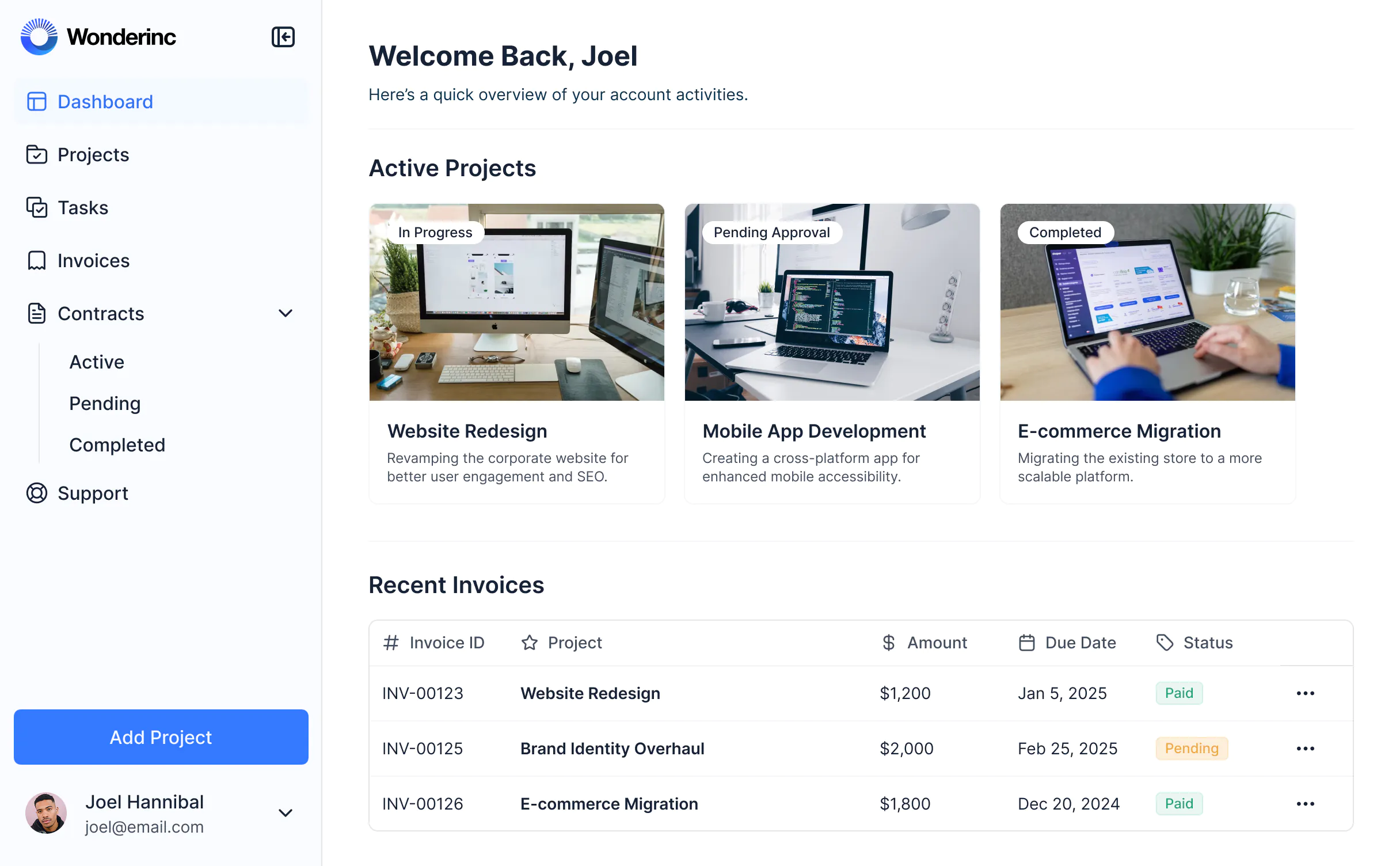
So, what exactly is Softr? Think of it as a way to build web applications without needing to know how to code. It's designed for people who have data, like in Airtable or Google Sheets, and want to turn that data into a functional app. You describe what you want, and Softr helps put it together. It handles the front-end, the database connection, and even user logins. This means you can create things like client portals, internal dashboards, or membership sites pretty quickly. It's a neat tool if you're not a developer but need a custom web app. Many find it a good starting point for their projects, asking, "is Softr good?" for their specific needs. It aims to make app creation accessible, letting you focus on your data and what you want the app to do, rather than the technical bits.
Key Features of Softr
Softr really shines when it comes to making app building accessible, even if you're not a tech wizard. It's built around the idea that your data should be the star, and the platform helps you wrap a user-friendly interface around it.
No-Code Interface & Ease of Use
This is Softr's bread and butter. You don't need to know how to code. The platform uses a visual builder, and now with AI assistance, you can describe what you want your app to do, and Softr helps set up the structure, logic, and front-end. It's designed to get you from an idea to a working app pretty quickly, especially for internal tools or client portals. The AI helps speed up the initial setup significantly.
Template Library
If starting from scratch feels daunting, Softr offers a decent library of templates. These can give you a head start on common app types, like client portals, internal directories, or project management tools. You can then customize these templates to fit your specific needs.
Integrations (Airtable, Google Sheets, etc.)
Softr plays nicely with popular data sources like Airtable and Google Sheets. This means you can use your existing spreadsheets or databases as the backend for your app. It's a big plus because you don't have to migrate all your data. You can connect to your data and start building right away, turning your spreadsheets into functional applications. This direct connection makes it easy to manage your data and app in tandem. For more advanced data management and workflow needs, tools like Stackby offer a wider array of unique field types and deeper integrations.
Customization Options
While it's a no-code tool, Softr gives you room to tweak things. You can adjust layouts, colors, and content using pre-built blocks. It's not as flexible as writing code, of course, but for many standard applications, it provides enough control to make the app look and feel like your own.
User Management & Permissions
Building an app often means controlling who sees what. Softr includes features for user authentication, allowing you to set up login systems and define different user roles. This means you can create apps with specific permissions, ensuring that users only access the information and features relevant to them. This is super handy for client portals or internal company tools where data privacy is important.
Softr vs. Stackby Features
When looking at no-code app builders, it's helpful to compare what they offer. Softr is great for quickly turning data into user-facing applications. However, if you need more advanced data handling, custom fields, or deeper automation within the data layer itself, other tools like Stackby might be a better fit.
Feature | Softr | Stackby |
|---|---|---|
Primary Focus | App building from data, user interfaces | Unified data platform, advanced databases, workflow automation |
No-Code Interface | Yes, with AI assistance | Yes, intuitive interface |
Data Sources | Airtable, Google Sheets, Softr DB | Airtable, Google Sheets, SQL, APIs, etc. (wider range) |
Custom Fields | Limited | Extensive, unique field types |
AI Capabilities | For app setup and layout | For workflow automation, data analysis, content generation |
User Management | Yes | Yes, robust role and permission controls |
Integrations | Good (Airtable, Google Sheets) | Very extensive, including deeper API connections |
Customization | Block-based, good for UI | Highly flexible, custom views, and workflows |
Pricing | Tiered, can increase with features/users | Value-focused, often more cost-effective for advanced features Stackby |
While Softr excels at creating front-end applications from your data, it's important to consider tools like Stackby if your needs go beyond simple app interfaces. Stackby provides a more robust data management system with advanced features that can streamline complex workflows and offer greater control over your data.
If you're looking for a platform that offers more than just an app builder, especially one that can handle complex data relationships and automations, it's worth checking out Stackby. They offer a powerful combination of database, automation, and AI tools that can really boost productivity across different teams.
Softr Pricing Plans
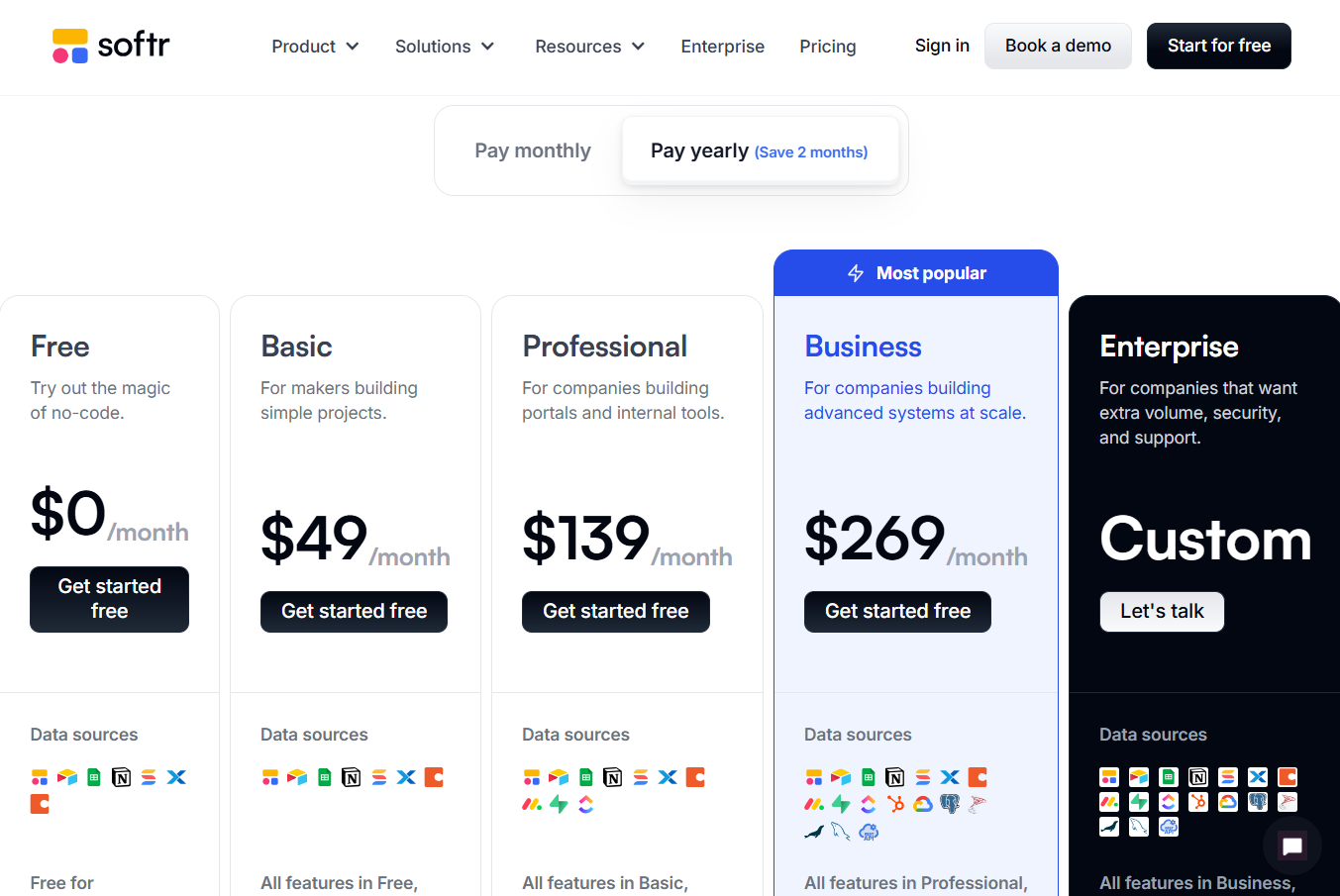
When it comes to softr pricing and plans, the platform offers a few different tiers to fit various needs, starting with a free option. This makes it pretty accessible if you're just dipping your toes into building apps or have a very small project.
As you grow, you'll likely look at their paid plans. The Basic plan kicks off around $49 per month, which is where you can start removing Softr branding and using your own domain. Then there's the Professional plan, usually around $139 monthly, offering more power for growing apps and better user management. For teams needing more robust features and priority support, the Business plan sits around $269 per month. They also have custom Enterprise options for those with really specific, large-scale requirements.
It's worth noting that while Softr's pricing scales predictably, some users find that as their apps get more complex or their user base expands significantly, the costs can add up. This is pretty common with app builders, though. You're trading off development time and cost for subscription fees.
It's important to look at the user limits and feature sets at each tier. What seems affordable initially might need an upgrade sooner than you think if your app takes off.
For comparison, if you're looking at tools that offer a bit more flexibility, especially on the data management and automation side, platforms like Stackby might be worth a look. They also have a range of plans, including free and paid options, designed to handle more complex workflows. You can find more details on Stackby's pricing.
Here’s a quick peek at how some features stack up:
Feature | Softr (Typical Paid Plans) | Stackby (Typical Paid Plans) |
|---|---|---|
No-Code Interface | Yes | Yes |
Template Library | Yes | Yes |
Integrations | Good (Airtable, G Sheets) | Extensive (Zapier, APIs) |
User Management | Yes | Advanced Permissions |
AI Features | Emerging | Integrated AI Workflows |
Pricing Starts | ~$49/month | ~$25/month |
If you're building internal tools or client portals and your data structure is fairly straightforward, Softr is a solid choice. But if you anticipate needing more advanced automation, deeper integrations, or more granular control over your data workflows, Stackby could be a better fit. You can explore Stackby's flexible plans to see if they align with your project's future.
Pros of Using Softr
Softr really shines when you want to build web apps fast—without any code.
If you're looking for something that gets you from idea to launch in under an hour, Softr nails it. For businesses, startups, and solo founders who just want clean client portals, internal tools, or dashboards up and running, this is a big win. In my own softr honest review, a few things kept standing out:
- The interface is super friendly, with guided steps and visual building that doesn't make you feel like you need a tech background.
- You can start from scratch or grab a template and tweak it to your needs, from booking apps to membership directories.
- Direct integrations with Airtable and Google Sheets mean less manual data work – just connect and go.
- AI features speed up the setup, especially if you hate fiddling with blocks and settings.
- Scaling up users or records is easier compared to some no-code platforms (generous app limits).
- The Softr platform benefits include reliable hosting and security features, so you don't panic about updates or server issues.
Here's a quick table comparing features side-by-side with Stackby, a solid alternative to Softr for startups needing heavier workflows or flexible API access:
Feature | Softr | Stackby |
|---|---|---|
No-Code App Builder | Yes | Yes |
Airtable/Google Sheets Sync | Yes | Yes |
AI-Driven Setup | Yes | Yes |
Templates & Blocks | Good Variety | Extensive Variety |
Priority Support | Higher Tiers | Yes |
Max Users per App | Lower | High |
Mobile Native App | No | Yes |
API & Advanced Automations | Limited | Strong |
Enterprise Admin/SSO | No | Yes |
Flexible Permissions | Yes | Advanced |
In my experience, Softr is ideal when you want to show data, build a portal, or quickly impress clients—but if you need to handle huge datasets, detailed permission controls, or want options like SSO, Stackby pulls ahead. Stackby's enterprise-grade features and robust security are hard to match if your team grows larger or handles sensitive workflows.
That said, no app is perfect. You might hit walls with certain plan limitations or find yourself wishing for faster support or more custom logic (see the Cons of Using Softr section). If you ever need more power or want to push deeper into automations, definitely consider giving Stackby a try. It’s a proven alternative to softr for startups needing more than what basic no-code tools deliver.
Cons of Using Softr
While Softr is a fantastic tool for quickly building web apps and client portals, it's not without its drawbacks. For starters, the block-based approach, while easy to learn, can sometimes feel restrictive when you need really specific design elements or complex layouts. You're working within pre-defined structures, which means you might hit a wall if your vision is highly unique.
Another point to consider is its scalability for very complex applications. If you're dreaming up something with intricate logic, custom workflows, or deep branching requirements, Softr might not be the best fit. It's built for speed and ease, not necessarily for handling the most demanding technical challenges. Think of it like this: you wouldn't use a screwdriver to hammer a nail, right? Softr is a great screwdriver, but for heavy-duty tasks, you might need a different tool.
Here's a quick look at how Softr stacks up against a more robust alternative for certain use cases:
Feature | Softr | Stackby |
|---|---|---|
Ease of Use | Very High | High (more database-centric) |
Customization | Moderate (block-based) | High (flexible database and workflow customization) |
Complex Logic | Limited | Advanced (custom workflows, automations) |
Integrations | Good (Airtable, Google Sheets, etc.) | Extensive (API integrations, Zapier, Make, etc.) |
Scalability | Best for small to medium apps | Suitable for complex workflows and larger datasets |
Learning Curve | High | Moderate (steeper for advanced features) |
Some users have also noted that as your needs grow, the pricing can start to add up. While there's a free plan, unlocking more advanced features and higher usage limits requires stepping up to paid tiers, which might become a consideration for budget-conscious startups or growing businesses.
If you find yourself needing more power and flexibility than Softr can offer, especially for managing complex data and workflows, you might want to check out platforms like Stackby. They offer a different approach that can handle more intricate needs. You can explore Stackby's capabilities to see if it aligns better with your project's demands.
Who is Softr Best For?
So, who really gets the most out of Softr? If you're a small business owner, a freelancer, or part of a team that needs to get a client portal or an internal tool up and running fast, Softr is a solid choice. Think agencies, consultants, or anyone who needs to give clients access to specific data or features without a whole lot of fuss. It's great for building things like membership sites, resource hubs, or simple marketplaces. If you're not a coder and want to build something functional without learning a new language, Softr shines.
It's particularly good if your data already lives in Airtable or Google Sheets. Softr makes it pretty easy to turn those spreadsheets into a working app. You can get a basic app out the door quickly, which is a big win when you're trying to test an idea or serve clients better. For those looking to build client-facing websites or apps, Softr is a good option to consider.
However, if you're looking to build something super complex, highly customized, or that needs to scale massively with very specific logic, you might hit some walls. That's where alternatives start to look more appealing. For instance, if you need more advanced database features and a more flexible form builder, Stackby could be a better fit. They offer a robust database and form builder that's quite customizable, and it often comes at a better price point for what you get.
Here’s a quick look at how they stack up:
Feature | Softr | Stackby |
|---|---|---|
Ease of Use | Very High (drag-and-drop blocks) | High (spreadsheet-like interface, intuitive) |
Data Sources | Airtable, Google Sheets, Softr DB | Airtable, Google Sheets, Dropbox, OneDrive, etc. (wider range) |
Form Builder | Basic, integrates with data sources | Advanced, updatable forms, signatures, custom fields, email notifications |
Customization | Good for templates, limited deep changes | High, extensive options for forms and database structure |
User Management | Yes | Yes |
Pricing | Starts free, scales up | Starts affordable, good value for features |
Best For | Client portals, simple apps, dashboards | Complex data management, advanced forms, sales teams, project tracking |
If your main goal is to quickly create a good-looking front-end for your existing data, especially for client portals or internal dashboards, Softr is a strong contender. But keep an eye on those plan limitations as you grow.
If you find yourself needing more power under the hood, especially with forms and database structure, it might be worth checking out Stackby's advanced features. They really focus on making data management and form creation more flexible and affordable, which could be exactly what you need to move beyond the basics.
Softr vs. Stackby
When weighing up Softr against Stackby for your next no-code website builder evaluation, it really boils down to what kind of projects you want to build, and how much control or flexibility you need.
Feature | Softr | Stackby |
|---|---|---|
Target Use Case | Build web apps/sites from data | Build flexible databases, automate tasks |
Data Source Integration | Airtable, Google Sheets, CSV, built-in DB | Google Sheets, APIs, native spreadsheet UI |
Customization | Drag-and-drop blocks, templates | Custom fields, formulas, automation |
Backend Access | Managed (no raw code export) | More database access, workflows |
User Roles & Permissions | Yes | Yes |
Export/Portability | No | Export options available |
Native App Support | Web only | Not for native, but powerful web apps |
Price Flexibility | Increases with usage/advanced needs | Annual deals, affordable for teams |
Softr is very easy to pick up if you want something live quickly. But if you need to get under the hood, customize logic, or manage larger, more complex data, Stackby stands out.
- Softr speeds things up for building web portals, workflows, and public-facing pages by connecting your spreadsheets or databases with a slick interface.
- Stackby fits when you want to manage data-heavy projects, finer access control, or tap into automation. The platform has a spreadsheet feel but layers on API integrations and more control than most competitors, according to this Stackby user story.
- Stackby also offers ongoing releases, high flexibility, and even a 14-day trial, with special annual pricing right now (huge Stackby discounts).
If you’re bumping into Softr’s limits—like no code exports, web-only deploys, or handling super large datasets—Stackby is a solid choice for teams wanting more control without losing the no-code experience.
In short: use Softr for fast, pretty web apps based on data. But if deeper logic, automation, or ownership matter, Stackby could win your no-code website builder evaluation.
Conclusion: Is Softr Worth It in 2026?
So, after all that, is Softr the no-code tool you should be using in 2026? For many, the answer is a solid yes, especially if you're looking to build internal tools, client portals, or simple web apps quickly. Its drag-and-drop interface is genuinely easy to get the hang of, and connecting data from places like Airtable or Google Sheets is pretty straightforward. It really shines when you need to present data in a more user-friendly way than a spreadsheet allows.
However, it's not a magic bullet for every situation. As your app grows or if you need really complex custom logic, you might start to feel the limitations. Some users find that pricing jumps up significantly when you need more advanced features or to support a larger user base. Plus, while support is generally good, there can be delays with more complicated issues.
If you're hitting those walls, or if you need something with a bit more power and flexibility from the get-go, it's worth looking at alternatives. Tools like Stackby, for instance, offer a different approach. They're often praised for being highly flexible and cost-effective, especially for teams that need robust data management alongside app-building capabilities. Stackby has helped companies like Chemtron see huge productivity gains by sorting out complex data issues.
Here’s a quick look at how they stack up:
Feature | Softr | Stackby |
|---|---|---|
Ease of Use | Moderate (drag-and-drop) | High (spreadsheet-like interface) |
Flexibility | Moderate (best for simpler apps) | High (customizable workflows, apps) |
Integrations | Good (Airtable, Google Sheets, etc.) | Extensive (APIs, Zapier, etc.) |
Pricing | Starts free, scales up | Cost-effective, transparent, lower for teams |
Advanced Features | Limited on lower tiers | Robust (automations, CRM, AI enhancements) |
Scalability | Can become costly | Scales affordably |
Ultimately, Softr is a fantastic tool for getting things done fast, especially for less technical users. But if you anticipate needing deep customization or are managing very large, complex projects, you might want to explore options like Stackby to ensure you have the room to grow without hitting unexpected roadblocks. It really comes down to what you're building and how big you plan for it to get.
So, is Softr the right choice for you in 2026? It really depends on what you need. If you're looking for a simple way to build websites without a lot of coding, Softr could be a great fit. It's user-friendly and can help you get your ideas online fast. Want to see if it's a good match for your projects?
Final Thoughts on Softr AI
So, after looking at Softr, it seems like a pretty good tool if you're trying to build simple apps or internal dashboards without getting bogged down in code. It's definitely easy to get started, especially if you're already using something like Airtable or Google Sheets. People seem to like how fast they can get something up and running. However, it's not perfect. As your app gets bigger or you need more advanced features, you might hit some walls. The pricing can also start to add up, and sometimes support can be a bit slow. For basic projects and getting non-technical folks building, Softr is a solid option. But if you're planning something really complex or need a lot of custom control, you might want to check out Stackby for free.
Frequently Asked Questions
Q1. What exactly is Softr?
Softr is a tool that lets you build websites and apps without needing to know how to code. You can use your existing data, like from Google Sheets or Airtable, and turn it into a working app. It's like building with digital blocks, and now it even has AI to help make things faster.
Q2. Do I need to know how to code to use Softr?
Nope! Softr is designed for people who don't code. You use a visual editor, picking and choosing parts, and the AI helps put it all together based on what you describe. It's all about making apps easily.
Q3. What kind of apps can I build with Softr?
You can build all sorts of things, like tools for your team to use inside your company, websites for your clients, or places to show off data. Think of things like customer lists, project trackers, or simple online stores.
Q4. Does Softr work with other tools I already use?
Yes, it does! Softr connects really well with popular tools like Airtable and Google Sheets. This means you can use the information you already have in those places to build your app without moving everything around.
Q5. Is Softr free to use?
Softr has a free plan that's great for trying it out or building small projects. However, if you want to use your own website address, remove Softr's branding, or need more advanced features, you'll have to upgrade to one of their paid plans.
Q6. When might Softr not be the best choice?
Softr is awesome for many apps, but if you need something super complicated with very unique features, or if you want to be able to take your app's code and host it somewhere else, Softr might feel a bit limited. Also, if you have a huge amount of data, it might get a bit slow.