
How Stackby AI is Transforming Project Management in 2026
Stackby AI transforms project management by automating repetitive tasks, generating smart insights, and streamlining workflows. With AI-powered data generation, reporting, and no-code automation, teams can plan faster, collaborate better, and make smarter decisions.

What is AI for project management?
AI project management is a process that uses artificial intelligence, or "AI," to create and deliver projects more quickly and accurately by assisting teams in their planning, tracking, analyzing, and executing of their projects. AI provides the ability to automate many of the routine functions performed by project managers and department heads (e.g., planning, monitoring and measuring, etc.), enabling project managers to understand and manage risks associated with their projects earlier in the development lifecycle, and to obtain data or insights on a wide range of issues that would normally be difficult or impossible to see manually. Many modern project management software platforms now include AI features that enable the writing of project briefs, forecasts of possible project delays, and their evaluation.
AI has changed the way in which project managers spend their time. Project Managers can now focus their efforts on developing strategies and improving quality of the output and maintaining alignment of the team goals rather than spending hours updating spreadsheets or sending reminders/notifications for the completion of individual project deliverables.
In addition, by the year 2026, AI will have matured to a point where it will provide project managers with practical support throughout all phases of the project lifecycle.
How AI is Powering Project Management in 2026
There are a few core technologies doing the real work behind every AI feature in project management tools. These technologies help teams understand data better, minimize the manual effort to manage data, and make project systems smarter over time.
- Large Language Models (LLMs) help project teams work in plain language by converting the disorganized and incoherent information contained in updates, notes, and data into easy-to-understand, meaningful summaries, reports and project documents.
- Machine learning harnesses the historical project data from the previous projects to detect patterns, provide an accurate estimate of when a project might experience an unexpected delay, and encourage the planning of future projects based on a more accurate prediction of when the project will be completed.
- Natural language processing (NLP), used in conjunction with machine learning technology, enables AI to read comments, documents and conversations and understand where useful project information exists within unstructured or unformatted text.
- AI-powered chatbots and assistants simplify the access of project information for the project team members by giving them answers to their questions, showing them the updates about the project, and guiding them through the process without forcing them to go through a variety of tools and systems.
- Automation-driven AI actions link insights drawn from the data to execute tasks by automatically triggering updates, alerts, and workflow changes when certain conditions are met.
How AI Improves Project Management Workflows in Practice
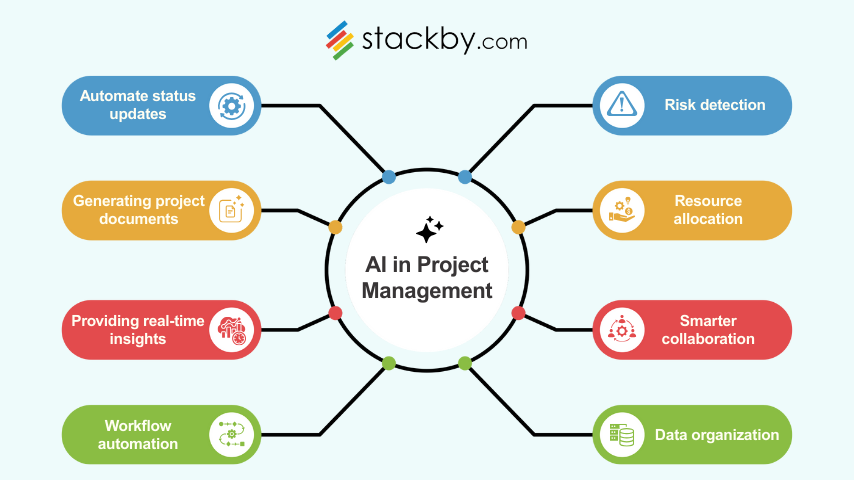
Project management is one of the many areas where AI is acting as a catalyst for speeding up the processes and reducing the workload resulting from manual tasks. Below are some of the significant ways that AI is transforming the working practices of the project teams:
Automate status updates
Instead of manually chasing updates, AI can retrieve the latest task details, read activity logs, and compile a short summary for the team. This is especially useful in large projects with multiple owners. Teams stay informed without spending time rewriting the same progress notes.
Identify risks early
AI can predict potential risks to the project by analyzing the work required to complete it, historical project timeline, dependencies and the current team workload. It gives project managers time to take action sooner. This kind of predictive insight is one of the biggest advantages of using AI for project management.
Generating project documents
AI can draft project briefs, sprint summaries, status reports, and stakeholder updates. Teams use these drafts as a starting point, which cuts writing time significantly. It is helpful when dealing with repetitive documentation that has a fixed structure.
Project briefs, sprint summaries, status reports, and stakeholder updates can all be written by AI. These drafts serve as a starting point for teams, which greatly reduces writing time. When handling repetitive documentation with a set structure, it is beneficial.
Resource allocation
AI reviews workload patterns, deadlines, and skill requirements to recommend optimal resource distribution. It becomes easier to avoid overworked team members or underutilized capacity. When projects run parallelly, these recommendations make scheduling so much smoother.
Providing real-time insights
AI provides managers a clearer picture of their entire portfolio. It helps teams to view changes as they occur without having to wait for weekly reports. These insights point out what’s working, what is falling behind, and where the team should be investing more time.
Enabling smarter collaboration
AI helps streamline discussions by summarizing conversations or meeting notes. It offers suggested action items, and keeps documentation consistent. It eventually reduces miscommunication by keeping everyone aligned, especially in case of remote or hybrid teams.
1. Workflow automation
AI enables smooth communication among the team members by triggering actions as and when conditions change. This includes updating a database record, notifying stakeholders about the changed condition, or simply moving the task forward to another team member.
2. Categorization, labeling, and segmentation of project data
AI can tag documents, group tasks, apply labels, and segment data based on patterns. This saves time and maintains clean, organized project structures without manual sorting.
3. No-code app builders like Stackby
provide teams with everything they require for their projects, including creation and management of their own project-related applications; creating project workflows and dashboards; and embedding AI directly to the process of creating, automating and managing data in their custom applications.
Benefits of AI in project management
When integration of AI in project workflows is done correctly, the benefits show up quickly and consistently.
First, teams work faster with less effort. AI handles repetitive tasks like documentation, tracking, and sorting data. This reduces context switching and keeps momentum high.
Second, the role of a project manager is to become more of a strategic partner to the organization. Using the capabilities offered by AI, the manager can devote time into planning, communicating with stakeholders, and solving problems, instead of spending time on updates and admin work. This gives the manager the ability to make well informed decisions.
Third, managers gain real-time visibility into multiple projects through AI insights. This makes it easy to predict challenges, determine resource allocation, and track project progress requirements.
Challenges of Using AI in Project Management
- AI model decision outputs rely heavily on the quality and overall consistency of project data sets.
- Over-utilizing automation removes valuable human context from decision-making processes.
- Teams may take time to trust in AI-generated insights and suggestions.
- Sensitive project data raises concerns around privacy and control.
- AI works best as a support layer and not a replacement for human judgment.
How to choose the best AI project management software
Key considerations to evaluate the right AI tool for your organization mostly depends on your team’s needs, scale, and daily workflow. These principles help narrow down the best option:
Choose tools that are simple and fast to set up
A good AI tool should be easy to adopt. Teams should start using features without long training or complex onboarding. Simple setup ensures you see results quickly.
Ensure they scale across your portfolio
Your tool should handle multiple projects, growing data, and large teams. Scalable solutions prevent you from switching tools when your organization expands.
Pick AI that integrates with your data and workflows
The best tools connect with your existing systems. They should pull data from your sources, automate actions in your current apps, and support your daily project needs.
Utilize customizable solutions
A flexible tool helps teams in creating custom workflows, fields, dashboards, and automations. This ensures the AI adapts to your processes rather than forcing you to change your style of work.
How Stackby AI is transforming project management
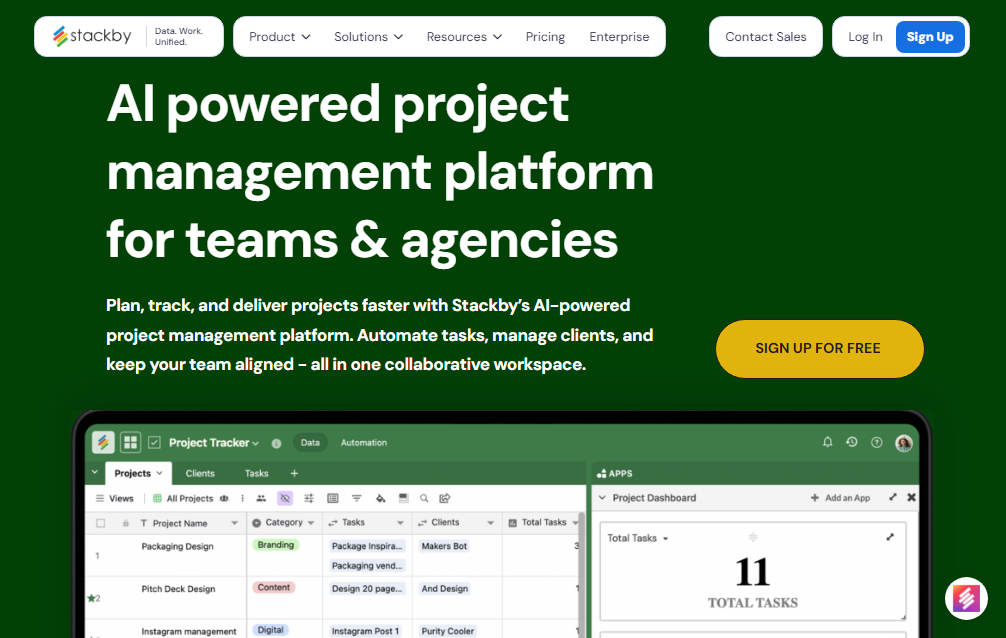
Stackby brings AI into every part of a project workflow while keeping everything simple and flexible for teams. The platform blends databases, automations, and AI into an easy structure that fits both small teams and large organizations.
With AI Column Fields, teams can generate summaries, extract priorities, analyze risks, and classify information inside their tables using simple prompts. This removes the need to copy data into external tools.
The AI Co Builder in Stackby allows teams to build tables, formulas, and automations from scratch, by simply describing what they need and the Co-Builder instantly constructs an intelligent workspace tailored for that use case. This dramatically reduces setup time and lets teams go from idea to execution in minutes
Stackby’s internal automations link AI insights with real actions. When a condition changes, the workflow continues without human intervention, the record is automatically updated, and notifications are sent.
Stackby supports robust forms and real-time collaborative features, such as updatable forms, conditional logic, and advanced field types that feed information directly into the project workflows. These features assist teams in gathering, updating, and acting upon data from external contributors or stakeholders in an organized manner.
Additionally, the platform offers multiple views, including Grid, Kanban, Calendar, Gallery, Timeline, and List, which facilitates the easy adaptation of AI-driven data to various working styles. Teams stay in sync in real time when they use collaboration tools like the activity bar, comments, and checklist reminders.
AI Project Management Template by Stackby
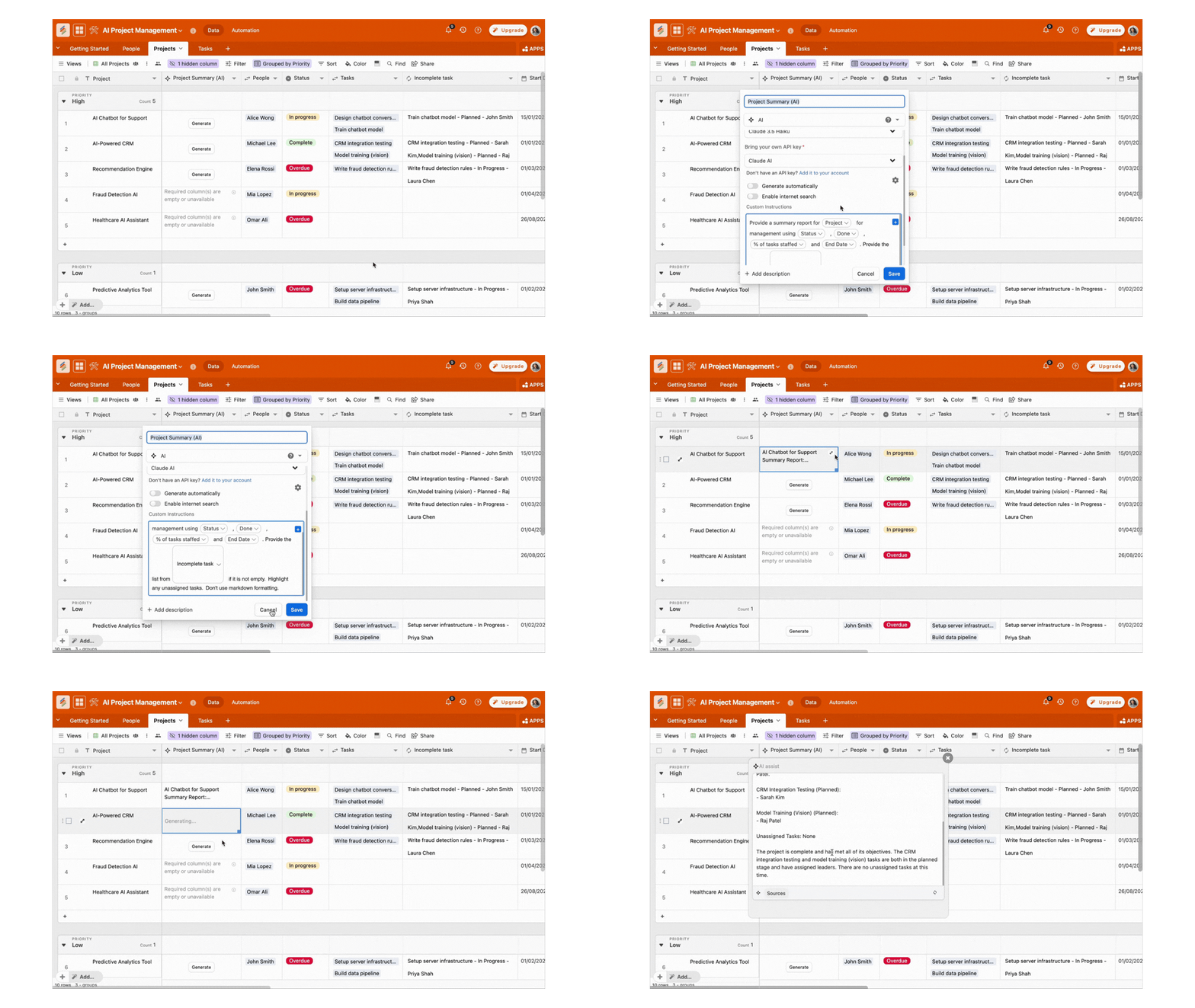
If you’re just stepping into AI-powered project workflows, Stackby’s AI Project Management Template gives you a ready-made foundation. This pre-built template comes with key structure and AI insights that can be customized by teams:
- Project Name, Tasks, Owner, Priority, Status, and Dates
- AI-Generated Summary to capture progress in natural language
- Risk Assessment to highlight tasks that might slip
- Next Steps suggestions based on workflow context
- Notes and collaborative annotations tied to project items
To begin, just add the template to your workspace, divide your project into tasks, designate owners and deadlines, and let the AI assist you in summarising tasks, identifying risks early, and recommending next steps. Additionally, you can link this template with other workflows or tools you already use and add automations to do away with manual follow-ups.
Whether you are a team lead organising work or a project manager managing several deadlines, this template offers a smart, organised foundation that is ready to use and easy to customize.
Conclusion
In 2026, experimenting with new tools is no longer the focus of AI project management. It involves building workflows that enhance clarity, lessen noise, and support teams in moving confidently. When AI is integrated into everyday project data, updates, and decision points, it stops acting like an extra feature and starts feeling like a real support.
Platforms like Stackby show how this can work in practice by fusing structured data, no-code flexibility, and AI that genuinely integrates with team operations. The result is not just faster project completion, but also a calmer, more focused project management system where teams spend less time managing work and more time doing it well.
FAQs
Q1. How is AI project management used in daily workflows?
AI project management tools assist with creating documents, tracking ris
ks, automating status updates, and summarising meetings. Throughout the workday, teams stay more organised and save time.
Q2. Can a project manager be replaced by AI?
AI supports project managers but does not replace them. While AI minimises manual labour and enhances analysis, managers are in charge of leadership, decision-making, and alignment.
Q3. What are the risks of using AI in project management?
Some common concerns include data privacy, an excessive dependence on automation, and inaccurate predictions if data is incomplete. AI should be used by teams as a support tool rather than as a complete decision-maker.
Q4. How soon can teams see results from AI project management tools?
Most teams see improvements within a few weeks. Mostly the impact depends on the volume of data, workflows, and how often the team uses AI features.
Is AI project management suitable for small teams?
Yes, of course. Small teams can greatly benefit from automation and faster documentation. AI helps them work efficiently and reduces the need of adding more people.

![13 Best Business Management Software for your Work [2026]](/blog/content/images/size/w960/2024/03/stackby-business-blog-image-1.jpg)