
Vendor Portal: Let Suppliers Update Their Own Records
A vendor portal helps businesses manage supplier records, collect documents, update pricing, and streamline onboarding. This guide explains how to build a no-code vendor portal, configure access permissions, automate supplier updates, and use Stackby to organize vendor management workflows securely.
If you're still emailing suppliers for updated W-9s, new bank details, or revised pricing sheets, you already know the mess this creates. Someone forwards the wrong version. A vendor updates their phone number but forgets the invoice address. Your procurement team loses Friday afternoons chasing PDFs that should've taken thirty seconds to fix.
A vendor portal solves this problem by giving suppliers a direct, limited-access way to manage their own records. No more routing everything through your team's inbox. It's a small workflow shift that saves a surprising amount of time once you're dealing with more than a handful of vendors.
This article covers what a vendor portal should do, how to build one without hiring a developer, and where tools like Stackby fit compared with spreadsheets or dedicated procurement software. You'll get practical setup steps to help suppliers update their own data instead of relying on your team.
What a Vendor Portal Actually Does
A vendor portal is a self-service layer that sits on top of your supplier database. Instead of your team manually entering every update a vendor emails over, the vendor accesses a form or portal and submits their own information.
That's the core concept. No complex software stack is necessarily required.
Most teams need a portal for a handful of recurring tasks:
- Updating contact details, addresses, and banking information
- Submitting compliance documents, such as certificates of insurance or tax forms
- Updating pricing sheets or catalog listings
- Confirming order status or submitting shipment updates
- Uploading signed contracts or amendments
Much like building a client portal, a vendor portal lets external users access information relevant to them. The difference lies in who's on the other side of the screen. Clients check project status, while vendors update operational data that supports purchasing, accounting, or inventory systems.
Although supplier workflows differ from customer relationships, the principles of organized external collaboration also apply to client management tools, where connected records and clear workflows help teams manage business relationships.
That distinction matters more than people assume. A vendor portal isn't just a dashboard. It connects to real business processes, including pricing updates, document compliance, and approval chains. Get the workflow wrong, and you'll spend your week chasing errors instead of emails.
Why Manual Vendor Data Management Breaks Down
Spreadsheets and shared inboxes work fine until the volume of supplier information becomes difficult to manage.
With five vendors, email may be manageable. With 50, it can become difficult to track updates. At 200 or more vendors, which is common in manufacturing, retail, and logistics, manual tracking can become a significant operational burden.
Outdated banking details can cause failed payments. Expired insurance certificates can go unnoticed. Pricing discrepancies can trigger invoice disputes that drag on for weeks.
Common problems businesses face when relying on spreadsheets and email for supplier management include:
- Version control issues: Nobody knows which spreadsheet contains the latest information.
- No audit trail: It's difficult to determine who changed a record and when.
- Limited visibility: Teams cannot easily see which vendors have updated their records.
- Manual data entry errors: Incorrect information can flow into accounting or procurement systems.
- Slow supplier onboarding: Collecting documents and entering information manually can take days.
The bigger problem isn't just the errors. It's the time involved. Someone on your team retypes information a vendor has already provided in an email. That's duplicated work, repeated every time a supplier needs to update a record.
A vendor portal reduces this unnecessary work by giving suppliers a structured way to submit updates.
Automating repetitive supplier updates is one example of workflow automation, which can reduce manual data entry and help teams manage routine business processes more consistently.
How to Build a Vendor Portal Without a Developer
You don't necessarily need custom software engineering to create a vendor portal. A no-code database with form-building and view-sharing capabilities can provide many of the tools required for supplier self-service.
The guide to online form builders covers tools that can help businesses collect structured information without relying entirely on email submissions.
Here's a practical build process.
Step 1: Set Up Your Vendor Database
Create a table with fields for vendor name, contact information, category, status, documents, and pricing. You can link it to related tables, such as purchase orders or contracts, if needed.
A Vendor Management Portal template provides a starting point for organizing supplier records and building a more structured vendor self-service workflow.
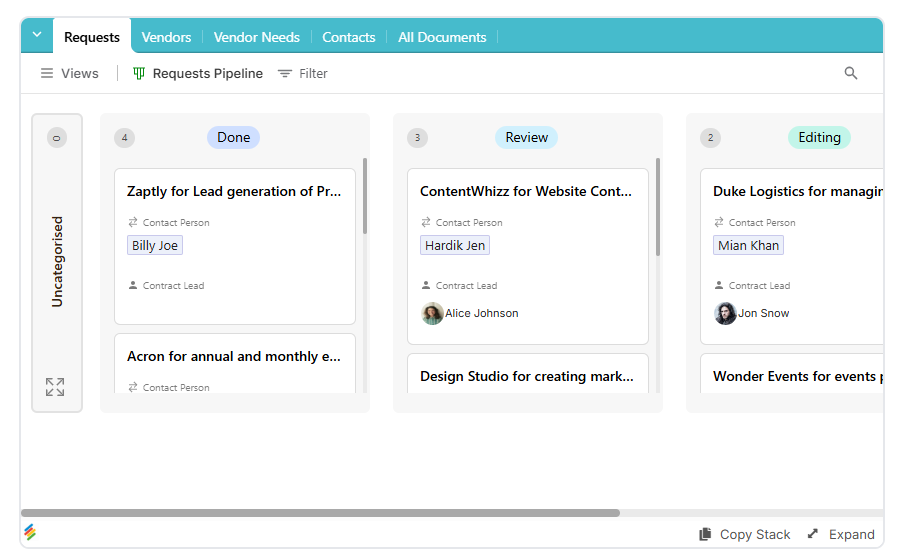
A structured database keeps supplier information organized and makes it easier to connect vendor records with other business processes.
Step 2: Build the Intake Form
Creating a custom form lets suppliers submit updated contact details, pricing, or inventory information directly into your database without accessing the backend.
Stackby's online form builder supports structured data collection, conditional logic, and database-connected submissions for workflows such as supplier onboarding and information updates.
You can control which fields appear on the form, helping suppliers provide the information your team needs without navigating the entire database.
For more details on connecting submissions to structured records, see this guide on how to build forms in a database.
Step 3: Pre-Fill Known Data
Speed up supplier updates by pre-filling a form with existing vendor details before sharing it externally.
Suppliers can confirm or correct information instead of starting from scratch. This reduces repetitive data entry and makes the update process easier to complete.
Step 4: Restrict Access With Filtered Views
Filtering records by vendor ID can help organize supplier-specific information and limit which records appear in a view.
Access control is essential when handling sensitive information. Simply hiding other vendors' records is not the same as enforcing secure, record-level permissions. Before sharing a portal externally, verify that the platform supports the required permissions and that each supplier cannot access another vendor's pricing, banking details, or contracts.
Step 5: Share or Embed the View
By sharing a view with team members, you can provide relevant information to authorized users. For an external supplier portal, confirm that the sharing method supports the access restrictions your workflow requires.
Want the portal to appear within a supplier-facing website? Embedding a view can make selected database information available through an embedded interface. Check the view's visibility and permissions before embedding it, especially if it contains confidential supplier data.
Step 6: Automate the Backend
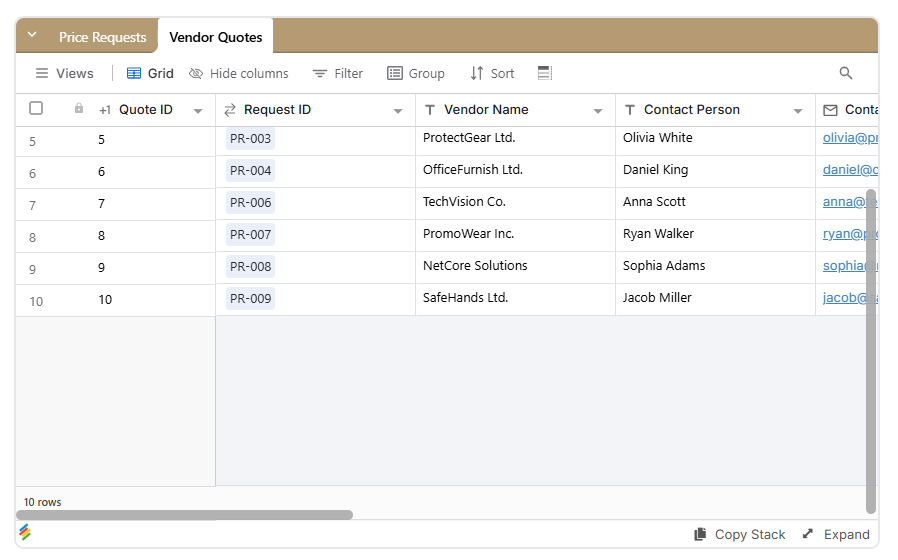
Use automation to update a row to synchronize vendor-submitted changes with related records where appropriate.
Your procurement, finance, and inventory workflows can stay current without someone manually copying data between tables. For sensitive changes, such as banking details or pricing adjustments, consider adding a review or approval step before the information becomes active.
A Purchase Approval Form template can complement supplier workflows by organizing purchase requests, estimated costs, vendor details, and approval decisions.
Step 7: Get Notified About Submissions
A form submission trigger can notify your team when a vendor submits an update.
With Stackby Automations, teams can configure triggers and actions for notifications, record updates, and other repetitive supplier-management tasks.
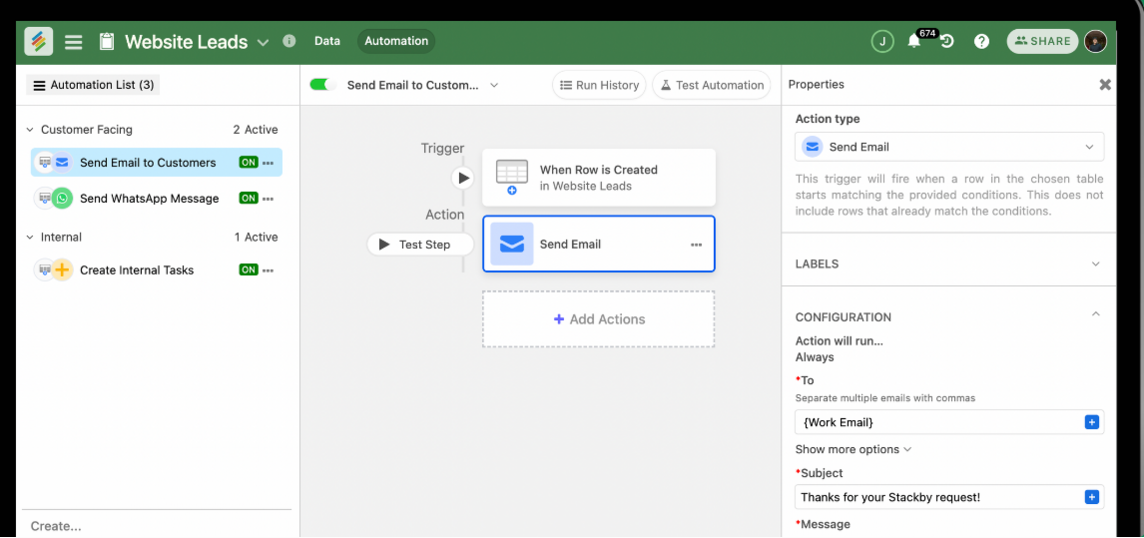
Notifications help prevent important changes from sitting unreviewed for weeks. You can also use them to route submissions to the relevant procurement or finance team member.
These steps provide a practical starting point for a no-code vendor portal. The time required depends on the number of vendors, the complexity of your approval workflows, and the access controls your business needs.
Vendor Portal vs. Spreadsheets vs. Dedicated Procurement Software
Businesses usually choose between three approaches to supplier management. Here's how they compare in everyday use.
The spreadsheet approach has a low starting cost, but the hours spent chasing updates can add up. Dedicated procurement platforms provide more structured processes, though implementation and customization can vary.
A flexible database can sit between these approaches, providing structured records and configurable workflows without requiring a fully customized procurement system. The right choice depends on supplier volume, security requirements, integrations, and approval complexity.
How Stackby Helps With Vendor Self-Service
Stackby is a no-code database platform that can support vendor self-service workflows. Its tables, forms, and automations can help teams organize supplier information and reduce manual data entry.
Here's how its capabilities can fit into a vendor portal:
- Forms with conditional logic: Collect information relevant to each vendor category. A logistics supplier may need different fields from a marketing contractor.
- Linked tables: Connect vendor records with purchase orders, contracts, or pricing sheets to keep related information organized.
- Attachment columns: Collect insurance certificates, tax forms, signed agreements, and other supplier documents.
- Automation triggers: Notify the procurement team when a vendor submits a change.
- Views and sharing controls: Present relevant records to authorized users. Confirm that the chosen sharing setup provides adequate record-level restrictions before exposing supplier data externally.
- AI Field Agents: Help categorize incoming vendor documents or identify missing information as part of a review workflow.
Stackby can also support supplier onboarding and approval workflows through its database and automation capabilities. Instead of maintaining separate spreadsheets for each process, teams can connect related information and configure workflows around their needs.
Compared with a spreadsheet-based process, this approach can provide more structure for collecting information, managing documents, and tracking updates. However, the exact security controls, integrations, and workflow requirements should be evaluated before using any platform for sensitive supplier information.
Common Mistakes When Setting Up Supplier Self-Service
A few issues consistently arise when businesses move from manual tracking to a vendor portal.
Giving Vendors Too Much Access
Sharing an entire table may expose other suppliers' pricing, contact details, or payment terms. Configure permissions before sharing anything externally, and test the setup using an external account to confirm that suppliers can access only the information intended for them.
Skipping Supplier Onboarding Procedures
Inviting a user via link can simplify access for new suppliers when the chosen setup supports the required permissions.
However, teams should document the onboarding process internally. Record which access method to use, who approves new suppliers, and which information vendors are expected to submit. Without a consistent process, onboarding can gradually return to ad hoc email invitations.
Forgetting to Remove Access
When a supplier relationship ends, deleting a user from the workspace may be part of the offboarding process, depending on how access was granted.
Review all access routes, including shared views and public links. Removing a workspace user alone may not revoke access granted through a separate sharing method. Former suppliers should no longer be able to access confidential pricing, contracts, or other restricted information.
Requiring Vendors to Re-Enter Existing Data
Forms without pre-filled information can create unnecessary work for suppliers. If you already have their company address, contact details, or vendor ID, consider a process that allows them to confirm or correct those details instead of entering everything again.
Automating Every Change Without Review
Not every supplier update should become active immediately. Changes to banking details, pricing, tax information, or compliance documents may require verification or approval.
Build review steps into the workflow wherever incorrect information could affect payments, purchasing decisions, or regulatory compliance.
Vendor Portals for Small Businesses vs. Larger Operations
A vendor management portal for a small business may look very different from one designed for an enterprise managing hundreds of suppliers. The workflow should match the scale and complexity of the operation.
Small Businesses: Under 20 Vendors
Small teams often need only a basic supplier intake form, organized vendor records, and submission notifications.
Focus on collecting contact information, documents, and pricing in a consistent format. Avoid adding complicated approval chains until there's a clear business need for them.
Mid-Sized Businesses: 50–200 Vendors
Growing operations can benefit from automated notifications, pricing update workflows, and document expiration tracking. Insurance certificates and other compliance documents may need periodic review, so a process for tracking expiry dates can help prevent missed renewals.
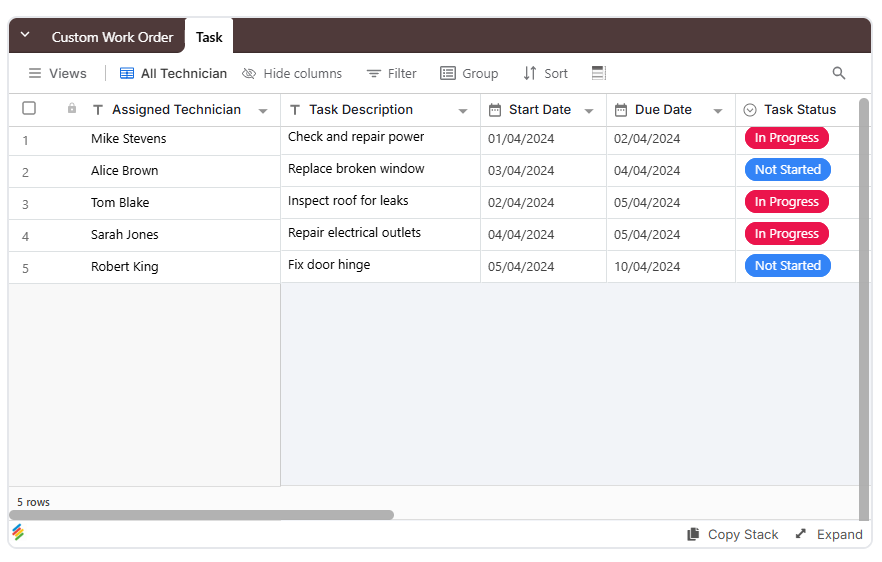
A template can provide a starting structure. For example, custom work order forms can be adapted for supplier submissions by changing the fields to match your procurement categories.
Larger Operations: Hundreds of Vendors
Businesses managing ongoing vendor relationships may need more extensive controls, including approval workflows, access reviews, document histories, and links between suppliers, purchase orders, and contracts.
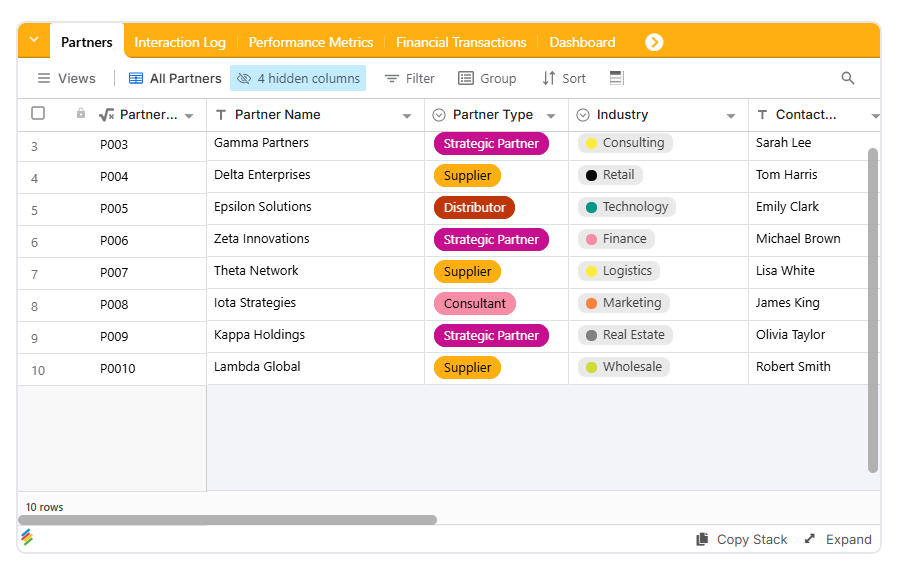
The partnership CRM template may offer a starting point for organizing supplier relationships and communication alongside renewal dates and contract details. It would need to be adapted to the organization's vendor management and security requirements.
At this scale, evaluate whether a no-code portal meets your requirements for integrations, permissions, audit trails, compliance, and procurement system connectivity.
Frequently Asked Questions
What is a vendor portal exactly?
A vendor portal is a self-service tool that lets suppliers submit or update information such as contact details, documents, pricing, and order information. It reduces the need for an internal team to manually enter every change.
Do I need a developer to build a vendor portal?
Not always. No-code tools with database and form-building capabilities can support basic vendor portals without custom coding. More complex integrations, security requirements, or procurement workflows may still require technical assistance.
How is a vendor portal different from a shared Google Sheet?
A vendor portal can provide structured forms, supplier-specific access, and automated notifications. A shared spreadsheet often relies on manual tracking and may expose more information than each supplier needs. Security depends on the permissions and sharing controls configured in either system.
Can vendors upload documents through a portal?
Yes. A supplier document management portal can include file-upload fields for insurance certificates, tax forms, signed contracts, and other compliance documents. The portal should also provide a clear process for reviewing and updating those files.
Is a vendor portal secure for sensitive pricing data?
It can be, provided the platform and configuration support appropriate access controls. Suppliers should only be able to access their own authorized records, and sensitive changes may need additional verification. Test permissions and review shared links before launch.
How much does it cost to set up a vendor portal?
Costs vary based on the platform, number of users, integrations, and workflow complexity. Spreadsheets may have a low initial cost, dedicated procurement platforms may require larger budgets, and no-code platforms may offer free and paid plans. Compare the full cost, including implementation, subscriptions, maintenance, and staff time.
Conclusion
Chasing suppliers for updated records through email isn't a reliable long-term process. It may work initially, but manual updates can create duplicated work, inconsistent records, and delays as the vendor list grows.
A vendor portal gives suppliers a structured way to submit their own information, helping reduce manual data entry and keeping supplier records organized. A no-code database with forms, views, and automations can provide a practical starting point without requiring a fully custom procurement system.
With Stackby, teams can organize vendor information, collect documents, connect related records, and configure submission notifications. Start with a simple intake form, confirm that suppliers can access only the records they're authorized to see, and add approval steps for sensitive changes.
The goal is a supplier management process that is easier to maintain, more consistent, and less dependent on chasing updates through email.
Key Takeaways
- A vendor portal lets suppliers update their own contact details, documents, and pricing, reducing manual data entry.
- A structured vendor database helps keep supplier records and related purchasing information organized.
- Forms and automations can simplify supplier submissions and notify teams when records change.
- Permissions must be tested carefully to prevent suppliers from accessing other vendors' confidential information.
- Sensitive changes, including banking details and pricing, may require verification or approval before taking effect.
- No-code tools like Stackby can support vendor self-service workflows without requiring a fully custom-built system.