AI Document Analysis: 5 AI Workflows for Document Analysis Using Stackby
Learn how AI is transforming document analysis. Explore five practical AI workflows you can build in Stackby to automate data extraction, summarize content, classify documents, and streamline your entire document management process.
Teams today handle documents everywhere - proposals, invoices, resumes, contracts, brand files, onboarding paperwork, compliance reports and what not. Each department has its own document mountain. The more a business grows, the more time gets used up in reviewing, validating, extracting information, and passing it forward for approvals. That’s why many companies end up with an entire department just to manage document operations.
AI changed that.
Modern teams now are relying on AI-powered document processing to handle routine document review. Instead of manually reading documents, copying data into sheets, forwarding information, and checking for compliance, teams are letting AI to handle the heavy lifting.
The shift is simple: manual and reactive document operations → automated and real-time document workflows.
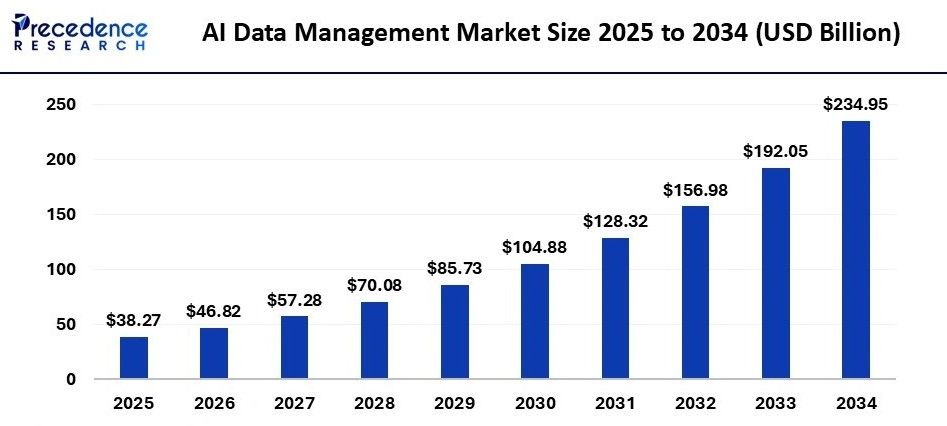
According to recent estimates from Precedence Research, the global AI data management market is projected to grow from USD 38.27 billion in 2025 to nearly USD 235 billion by 2034, reflecting the rapid adoption of AI-driven data solutions across industries.
In this blog, we’ll break down what AI document analysis really means and how teams are using Stackby to automate it through 5 powerful AI workflow templates.
What is AI Document Analysis?
AI document analysis can be defined as the ability for a software with built in AI, to read a document, understand it like a human, and convert the content contained within the document into structured information that an organization can use directly in workflows. It isn’t just OCR or text extraction, instead it interprets meaning, relationships, and context.
Many organizations utilize AI Document Analysis daily in various ways, including:
- Branding and marketing approvals
- Recruiting and screening candidates
- Procurement and vendor management
- Accounting and billing processes
- Legal and compliance reviews
- Customer onboarding and KYC
- Sales workflows and CRM updates
AI document analysis reduces decision-making time because the insights inside a document become instantly searchable, filterable, reportable, and automatable.
How AI Document Analysis Works
AI extracts a variety of output types from a document like names, clauses, amounts, timelines, messaging consistency, risks associated with terms etc., and makes them actionable.
It adapts based on what the business needs: scoring, summarizing, flagging mismatches, ranking or routing documents to the relevant team member.
Benefits of AI Document Analysis
Teams that have adopted AI document analysis are at an advantage because of:
- Increased speed of handling document
- Decreased errors and omissions
- Structures previously unstructured text
- Creation of dashboards and reports
- Triggering of automations without human follow-ups
- Increased productivity while reducing operational cost
AI Document Analysis will not replace humans, but rather, it will reduce the time previously spent by teams to read and review documents which will lead to better focused decisions.
Stackby for AI-Driven Document Workflows
Companies choose Stackby because it offers the benefits of being a relational database with the simplicity of a spreadsheet and AI built directly inside the workflows.
Stackby allows the user to upload and process multiple formats of documents including PDFs, scanned images, text documents directly inside columns or submissions via web forms. AI works inside columns, forms, and automation processes, to enable users to do more than simply store uploaded documents.
Here are other strengths that enhance document workflows:
- Customizable forms with conditional fields, signatures, and file uploads
- 30+ power-ups along with multiple column types and views
- Apps for dashboards which includes Charts, Pivot Table, Summary, Maps, Descriptions etc.
- Automated actions and triggers for many internal processes
- Integrations via Zapier, Webhooks, CRMs, messaging apps, WhatsApp and more
Now let’s break down the 5 most practical AI document workflows teams run inside Stackby today.
Workflow #1 : Brand Checker AI
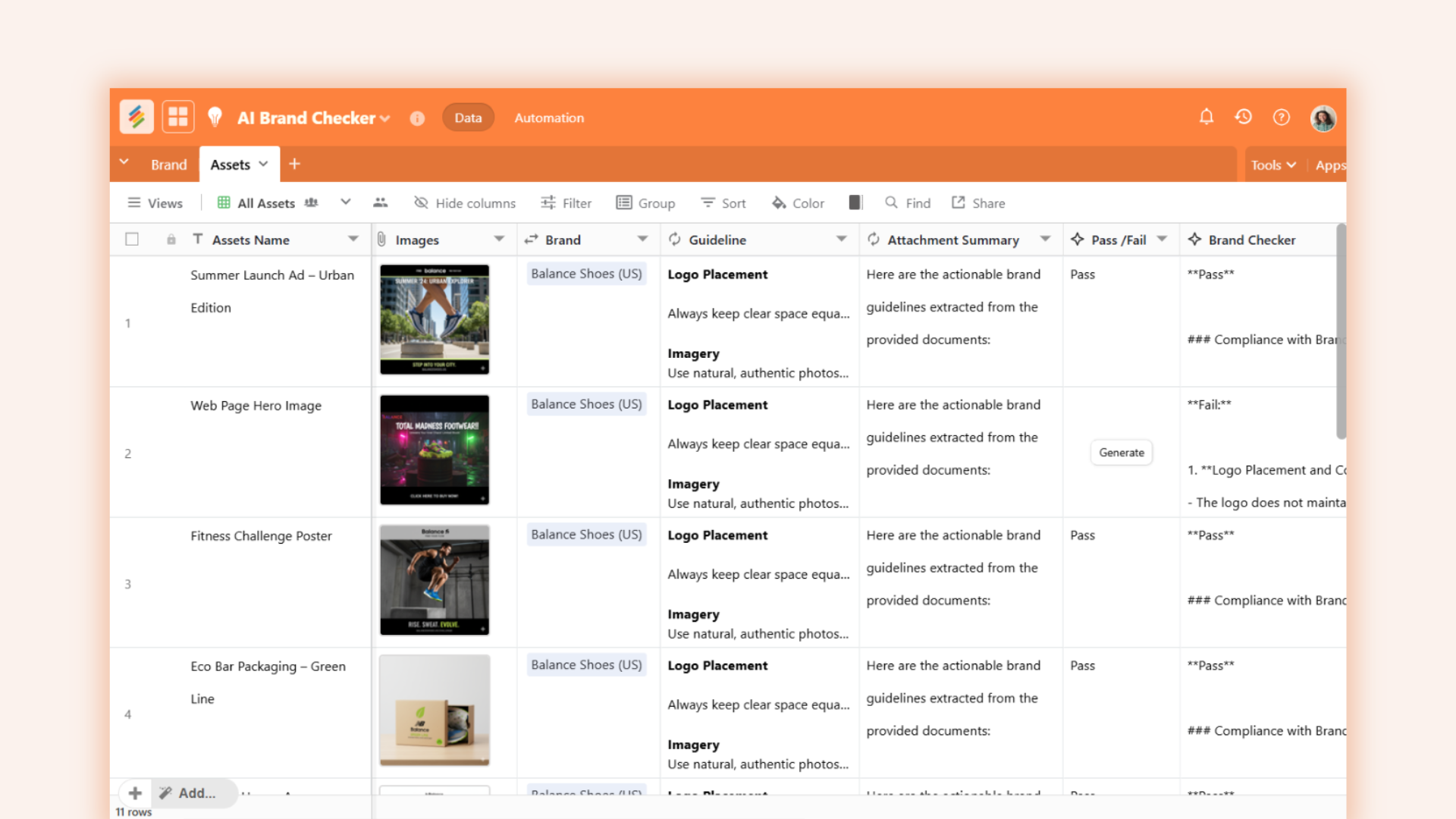
The AI-powered Brand Checker provides marketers with real-time insights into how consumers perceive their brands. By automatically scanning social media posts, online reviews, news articles and campaign reports for both their own brand and competitors' brands, the AI brand checker can easily identify the positive or negative emotions behind customer feedback and create an overview of relevant performance metrics, removing the need to do the time-consuming work of manually monitoring these sources.
How it works in Stackby: Marketers can use the AI-powered brand checker template to keep track of when their company name or competitors' company names are mentioned in social media or other media. The AI will analyze and interpret the text data (e.g., tweets and news articles) to generate either sentiment about a brand or the primary themes associated with a brand. This template provides marketers, brand managers, businesses, the ability to monitor and assess their brands across several different digital platforms and then compare their brands against other competitor brands using AI software.
For example, marketers could import social media posts or snippets of user comments into a table and then insert an AI summary column containing a single word that summarizes the sentiment of the post. The summary results can then be utilized for reporting and creating themed dashboards for the marketing team to review how their brands are currently performing.
Key Features of the AI-powered Brand Checker:
- AI-driven brand analysis and sentiment tracking
- Performance comparisons against competitors
- Performance Metrics (engagement, reach, growth)
- Auto-generated brand health report.
Key Benefits of the AI-powered Brand Checker:
- Instant Brand Insights without anymanual searching
- Making better marketing related decisions
- Notification to marketers of when negative sentiment occurs
- Creation of a centralized branded metric report for the marketing team to view.
Who benefits
Marketing teams, creative agencies, brand compliance units.
Optional automation idea
Trigger alerts or approvals when deviation crosses a defined score.
Workflow #2 : Resume Scanner AI
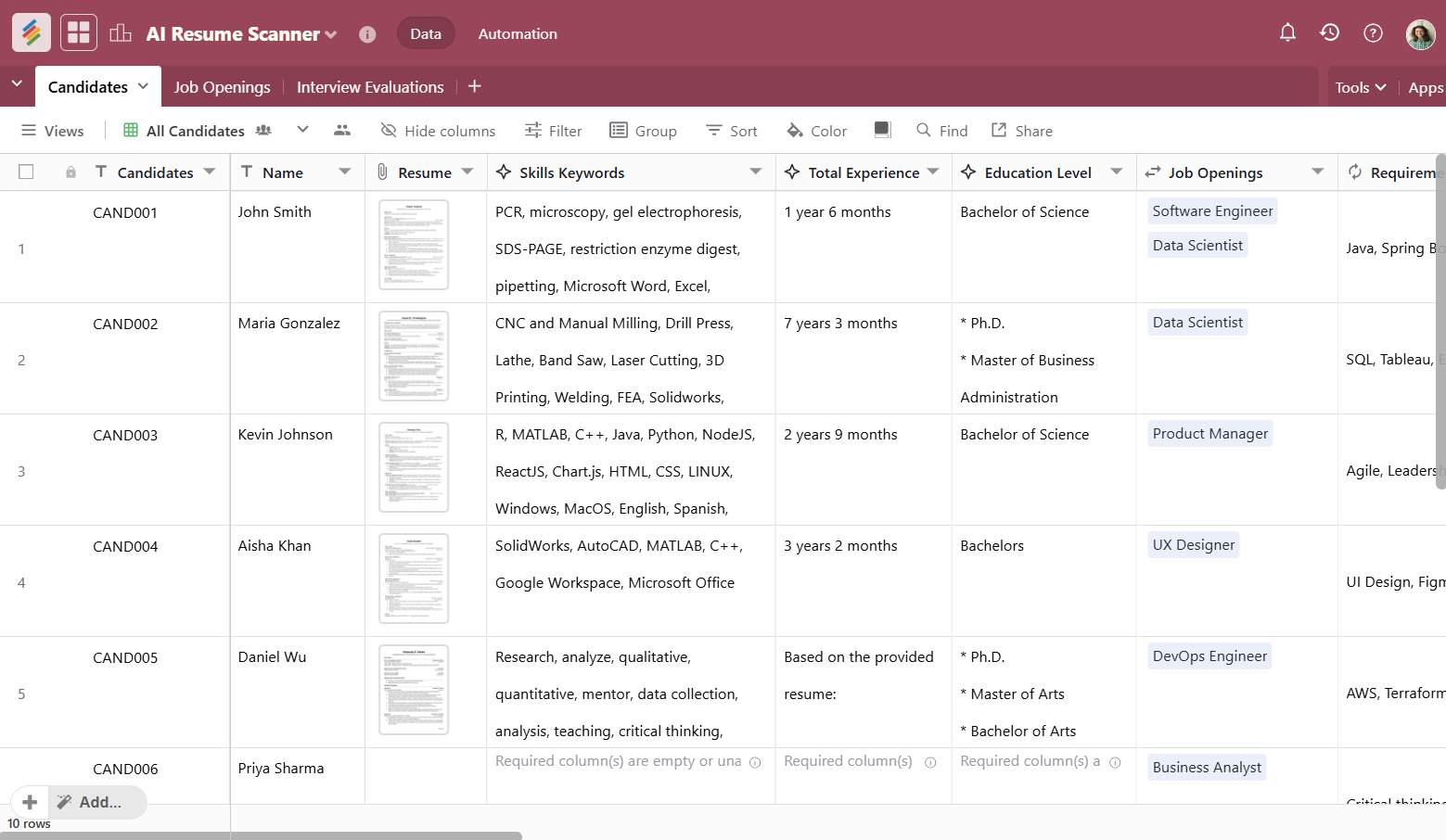
Finding candidates for jobs can be a painstaking process for human resources teams that typically go through many resumes each day. The AI Resume Scanner can help expedite this process dramatically by utilizing AI technology to scan through a job applicant's resume and find relevant keywords or phrases.
This is how Stackby's AI Resume Scanner works: You can create a template for an AI Resume Scanner and attach a resume in .pdf or text format into a "Table" using a "Form" or "Attachment" field to upload each resume directly into a table. The AI will scan each candidate's resume, parse it, and extract the candidate's education, work history, skill set, and certifications from each resume, and assign each candidate a rank and score for the job they applied for.
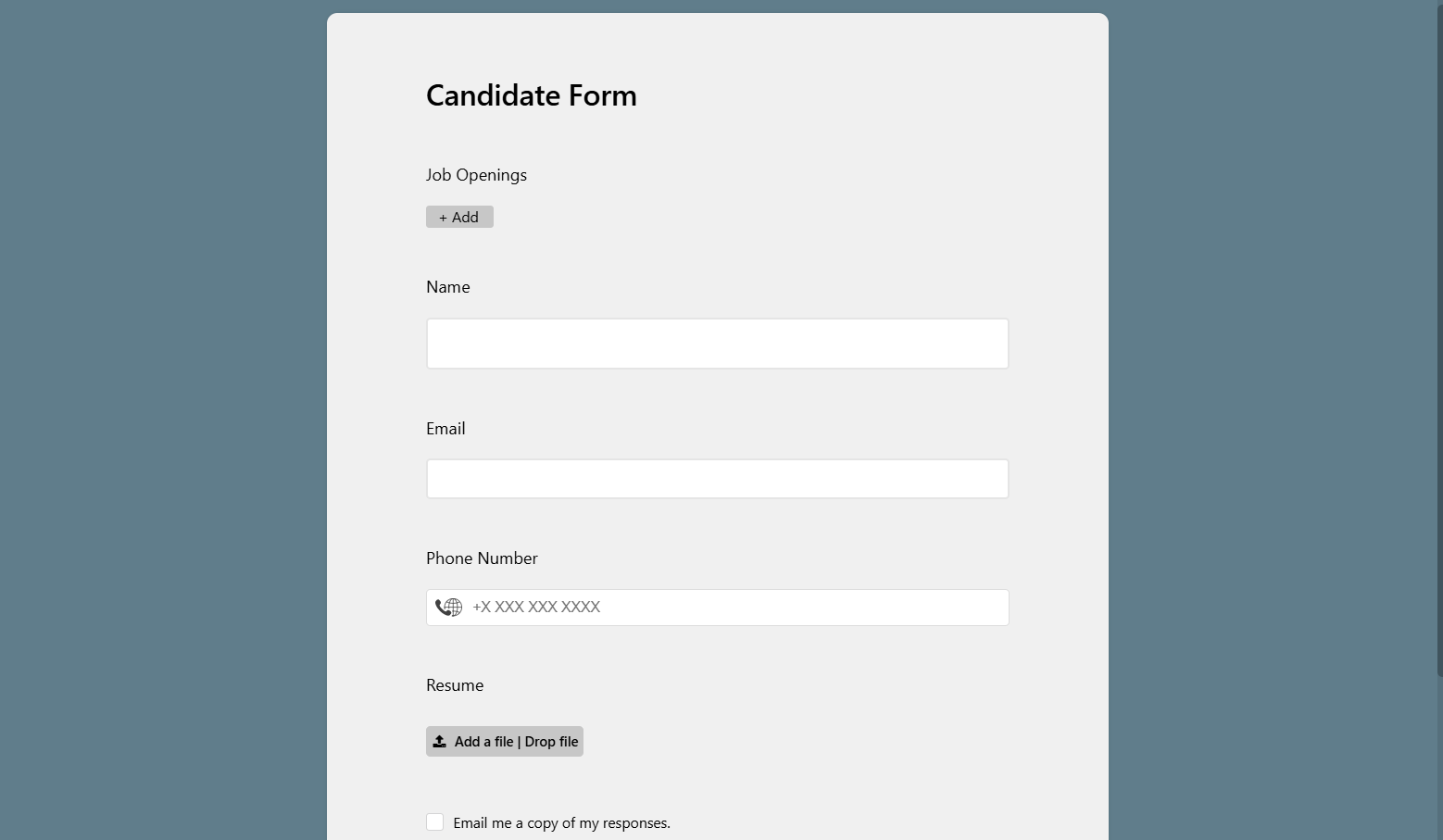
For instance, you could enter specific job criteria into the AI column prompt (for example, "Must have X years of experience in marketing", "Must hold Y certification", etc.), and each resume would be rated based on those criteria. By having all the information related to candidates stored in one place, recruiting teams no longer need to maintain spreadsheets that are often disorganized. Instead, they can utilize an organized shortlist of the most qualified candidates, as well as AI-generated summary reports of the strengths of each candidate.
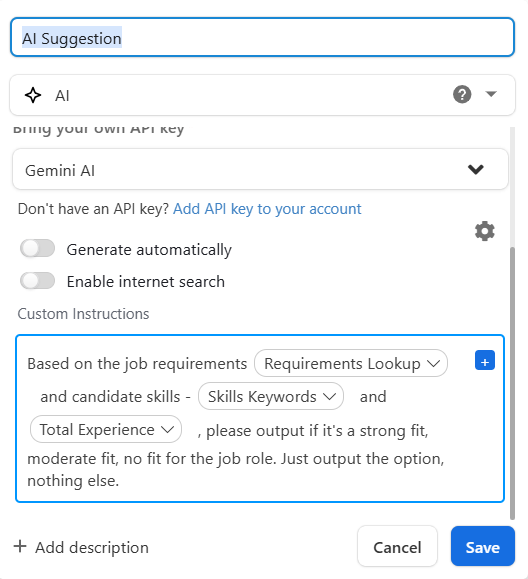
Key features Stackby’s AI Resume Scanner template include:
- The ability to parse resumes with AI technology, which allows you to automatically extract a candidate's skills, education, and so forth.
- The ability to provide a score and rank for each candidate.
- The ability to store all candidate's data in one place.
- The ability to customize the filters based on job criteria.
- The ability to track the progress of applying candidates.
Benefits of using the AI Resume Scanner are:
- Reducing the time and effort to recruit a candidate and ensuring that you do not miss out on great candidates.
- Reducing the bias that can result from subjective ranking and providing an objective and data-driven approach.
- Keeping all of your hiring-related information (CVs, cover letters, and notes) secured in one location.
Who benefits
Recruiters, HR teams, founders, hiring managers.
Optional automation idea
Auto-notify shortlisted candidates or schedule interviews.
Workflow #3 : AI Contract Operation Analysis
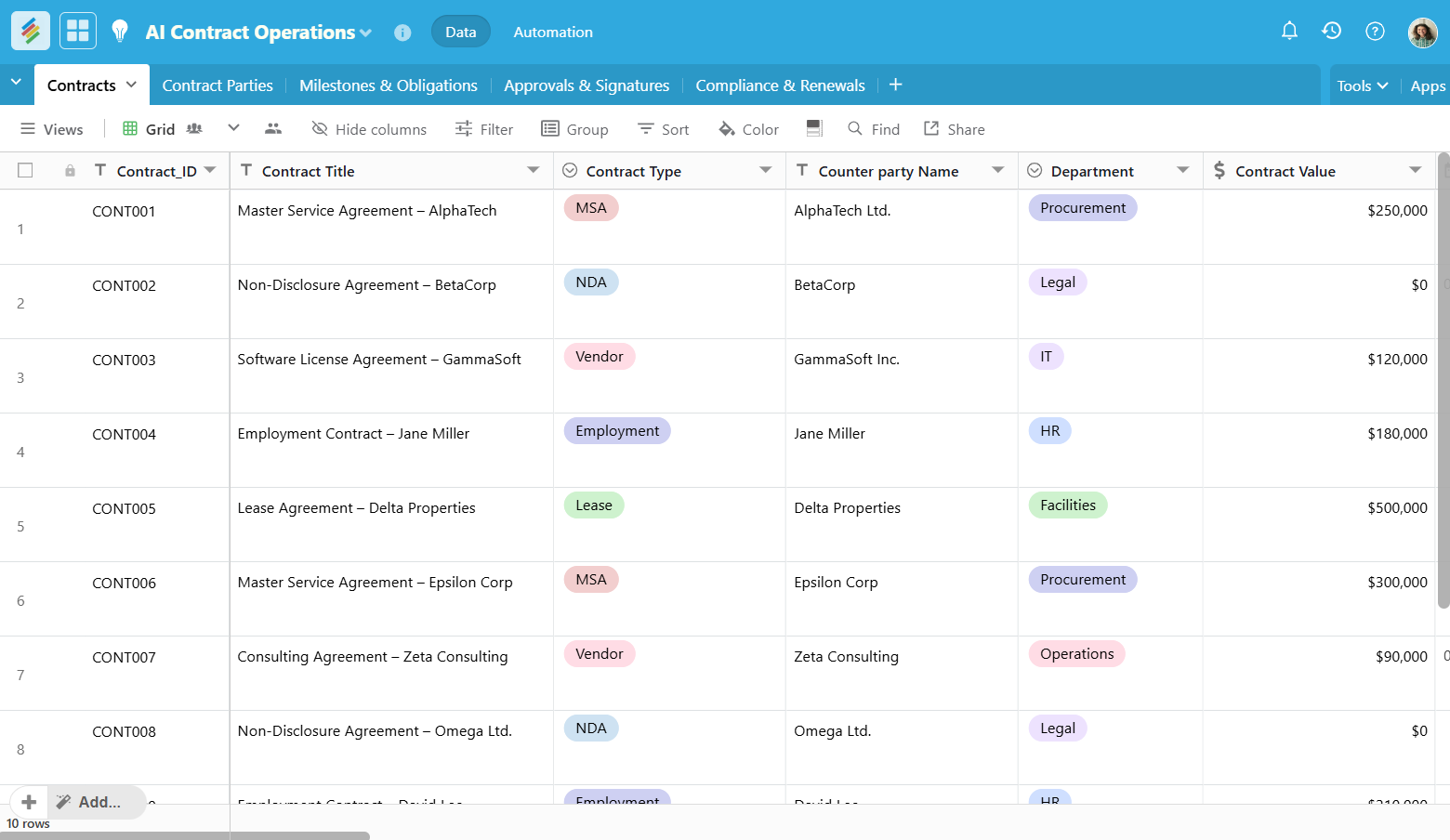
The legal and operations departments are responsible for a large number of contracts (including NDAs, vendor agreements, and partnership agreements) and they use AI to help find important contract's terms (such as payment terms, deadlines, etc.); identify areas of risk; and create standard language that allows legal and operations staff to complete contract review much more quickly.
Stackby’s AI Contract Operations template is built to accomplish this: an organization will need a single database that contains all contracts that they manage (such as all current contracts), so each contract has a type, company name, value, etc., as well as a copy of the contract document itself attached to this. An AI column will read the text of the contract and generate summaries of key obligations, alerts for areas of risk and so forth.
This way businesses can centralize, manage and automate their whole contract management process, including:
- Creating a Draft using AI Assist to Develop Draft Profitability
- Contract Reviews
- Approval Processes and Contract Compliance.
By using tools like Stackby, it is much easier for organizations to have all of their contract information in one central location and make it possible to create draft contracts by using specific prompts, like "summarize the key payment terms of this contract", or "list all of the deadlines associated with the renewal of this contract". This Stackby feature makes it very easy for companies to upload multiple pages of contract text or PDFs to have it all in a single location.
Key Feature highlights:
- The ability for AI to draft contracts and summarize them.
- Contract repository where contracts are kept securely.
- Automated workflows (including approval processes and electronic signatures).
- Tracking obligations (including renewal obligations and payment terms).
- Dashboard for tracking status.
- Collaboration and the ability to add comments/notes.
The benefits to your business include:
- Faster contract drafts created using AI.
- Automatically tracks the obligations and deadlines of all contracts to minimize potential legal risks
- Totally visible to the organization by enabling teams to view contract status and key terms.
Who benefits
Legal teams, founders, procurement, sales operations.
Optional automation idea
Renewal or lock-in alerts before the contract expires.
Workflow #4 : Business Card Scanner AI
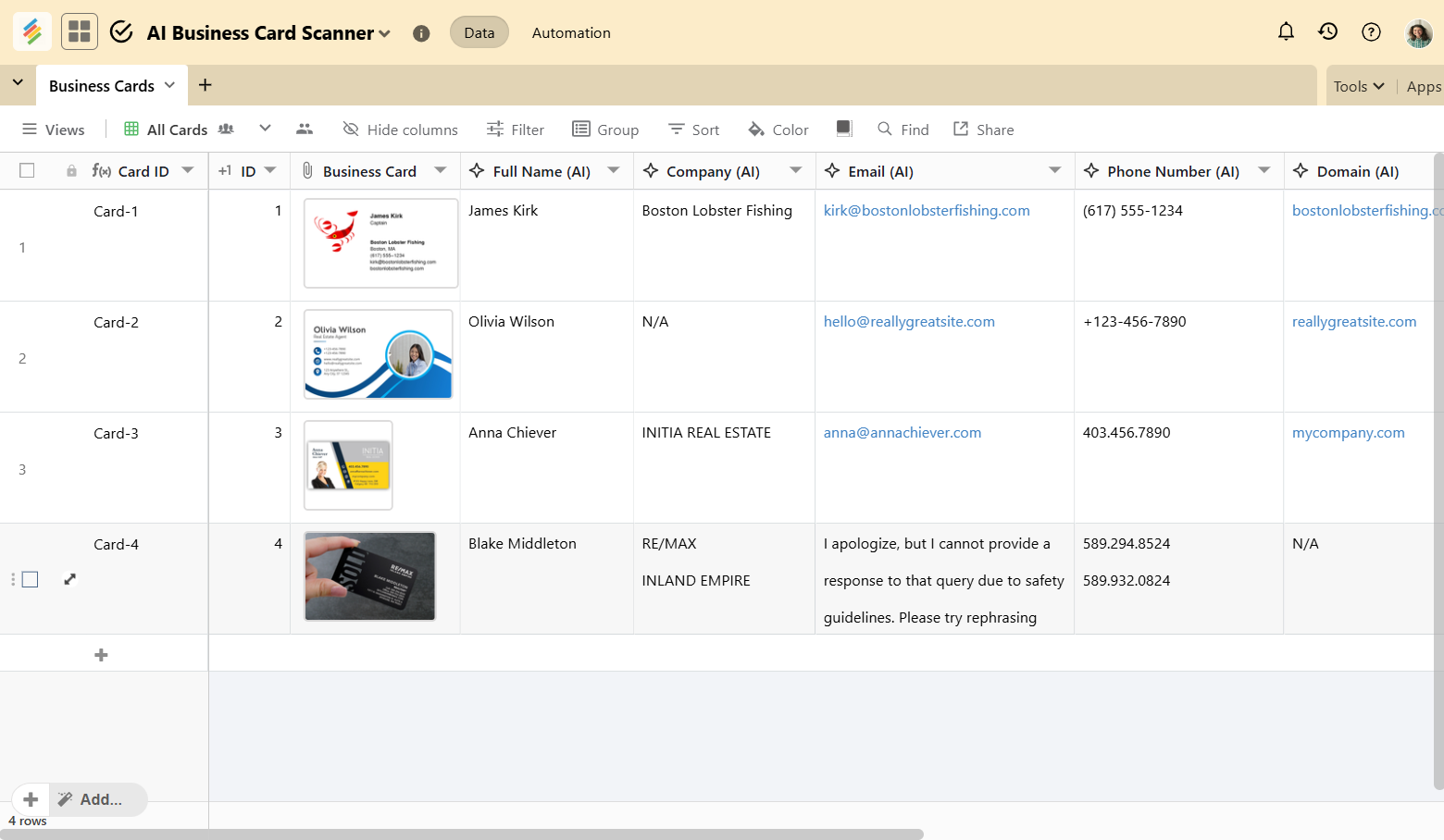
Networking events typically produce a large volume of business cards that people have acquired. An AI Business Card Scanner is an automated system that scans these business cards and extracts contact information from each scanned card to subsequently upload their contact information into a customer relationship management (CRM) or database.
How Stackby works: By using the Stackby’s AI Business Card Scanner template, team members can upload pictures of business cards directly inside Stackby via Stackby Forms or attachment column. Once these pictures of business cards get uploaded, Stackby's AI technology interprets the data in each picture of the scanned business card and reports back the details of the contact within the designated columns of the table.
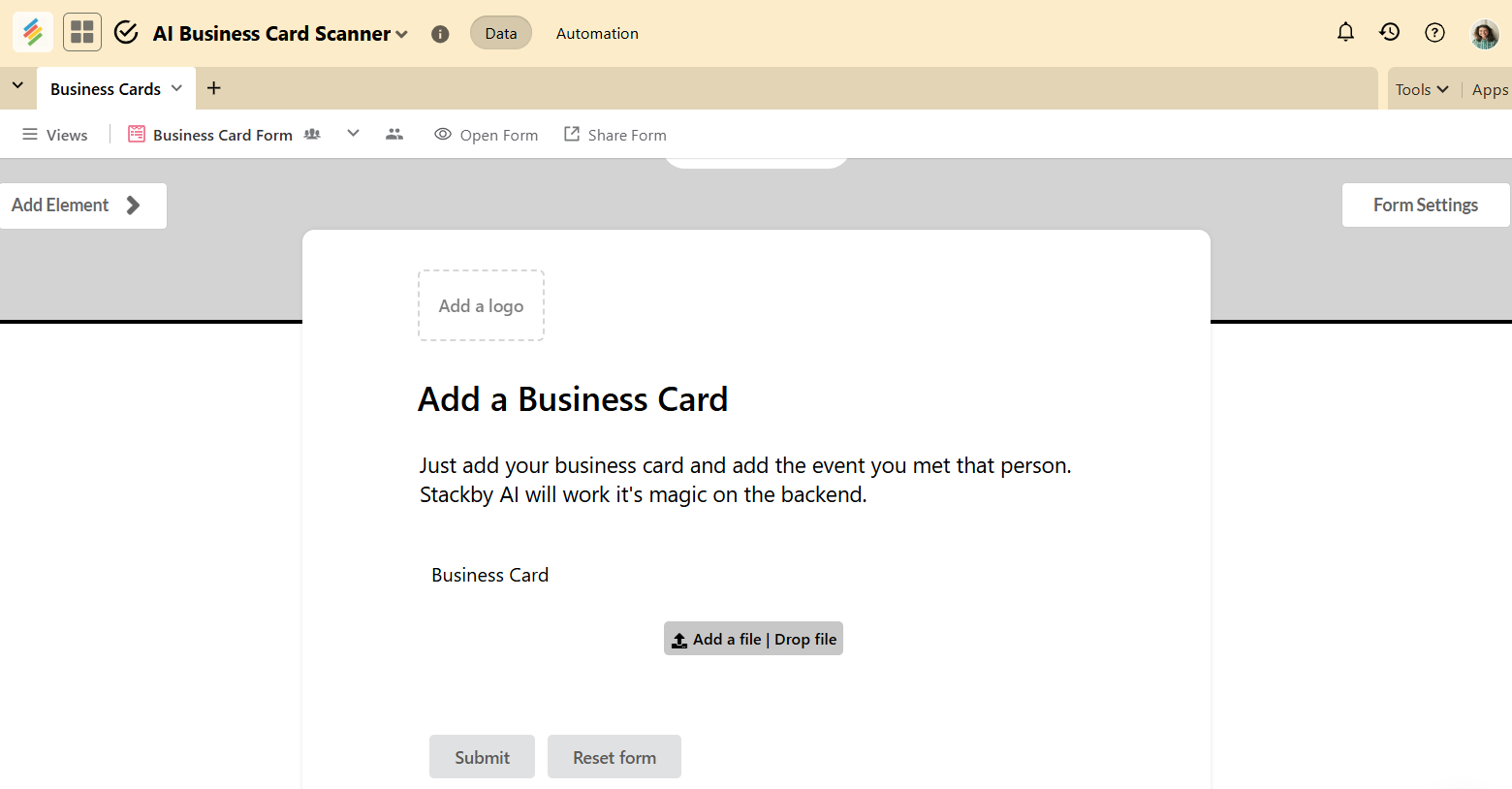
Each scanned business card uploaded will create a new row within the "Contacts" table in Stackby. One can add a prompt in the AI column like "Read this image of the business card and return the 'Name, Title, Company, Email, Phone." The output will generate a structured list of contacts based on the unstructured data collected from the images of your scanned business cards.
The Features of Business Card Scanning include:
- AI-based Optical Character Recognition (OCR) of JPG or PNG images of Business Cards.
- Batch-submit/uploading of Business Cards.
- Mapping of scanned image data to name, email, and etc.
- Ability to use any AI model (OpenAI, Anthropic and Gemini) via API key.
Benefits of Business Card Scanning are:
- Eliminating manual data entry of contact information.
- Automatically adding newly scanned contact information directly into the workflow.
- Instantly updating the database with new leads.
- The ability to choose which AI model will be used.
Who benefits
Sales teams, partnership teams, event/networking professionals, startup founders.
Optional automation idea
Trigger outreach or add to a campaign automatically.
Workflow #5 : Invoice Scanner AI
Many invoices are processed by the Finance departments daily. The AI can read invoice documents (or emails) and extract several key pieces of information from the invoice document such as the invoice number, invoice date, invoice amount due and vendor, so that it is not necessary to manually enter that information into your accounting system. This greatly reduces approval time, and it eliminates many potential errors.
How it works in Stackby: By using the Stackby’s Invoice Scanner template. For example, you can create a Stackby form where your vendors can submit invoice PDF files or image files. When the invoice submission is received, the AI column (or as part of an automation step) can use OCR (Optical Character Recognition) to extract the fields from the invoice document and populate those fields into your Stackby table. The AI can validate the information (ex: match the amount with your purchase orders) and mark the invoice as Ready for Approval. Additionally, Stackby automations can automatically initiate the approval/request for payment process after the information has been validated.
Key Feature:
- Auto-extraction of invoice information with OCR.
- Validation of amounts and dates.
- Creation of invoice records
- Automated reminders for due dates
- Integration with approval processes/payment tools.
The advantages of AI Invoice Scanner include:
- Extracting email invoices or uploads
- Scanning and validating invoice information and sending for approval with the assistance of OCR. This significantly decreases the likelihood of data entry errors and makes the processing of invoices faster.
- Well-organized invoice database, and each invoice record will contain all of your extracted amounts and due dates for use in reporting.
Who benefits
Finance teams, accounting firms, procurement teams, small and mid-size businesses.
Optional automation idea
Auto-reminders for payments before the due date.
Visibility through Dashboards & Reporting
Once document insights are organized, teams build dashboards to monitor:
- Hiring pipeline reports
- Distribution of contract risks
- Invoice aging and payable trends
- Brand approval cycle time
- Quality of leads from networking events
The use of Charts, Pivot Tables, Goals Tracker, Summaries, KPIs, Maps and more provides leaders with an opportunity to identify bottlenecks early and they can act before delays occur.
Common Mistakes Teams Make & How to Avoid Them
Making a small change can help prevent large operational inefficiencies over time.
Final Thoughts
AI document analysis isn’t about replacing people in fact it increases team efficiency. It allows every department to skip repetitive reading of documents and jump directly to decision-making.
With Stackby, teams get AI capabilities built inside databases, structured data, dashboards, and automations - all in one workflow. That is, no matter if you have resumes, invoices, brand assets, business cards, legal contracts, or any other documents, AI does most of the heavy lifting, so teams can focus on growth.
Try out one of these 5 AI workflows in Stackby and experience document operations that run on autopilot.
![A Simple Guide on Workflow Management Software [Updated 2026]](/blog/content/images/size/w960/2021/12/work-management-blog.png)
![Mastering Workflow Management: A Comprehensive Guide with Templates [2026]](/blog/content/images/size/w960/2023/09/Workflow-Management-A-Guide.png)