AI for Pipeline Management: Automate Your Sales Process from Lead to Close
Discover how AI transforms pipeline management by automating lead tracking, follow-ups, deal prioritization, and forecasting. Learn how to streamline your sales process from lead to close, improve team productivity, and close more deals faster.
Sales reps spend roughly 65% of their time on activities that have nothing to do with selling. Not a typo. Two-thirds of the workday goes to logging calls, updating deal stages, chasing data, and trying to figure out which lead is actually worth calling back. Meanwhile, real prospects sit in limbo, deals go cold, and your CRM becomes a graveyard of "last contacted 43 days ago" entries nobody wants to touch.
That's where AI pipeline management comes in as a real operational shift. One that pulls lead scoring, status updates, forecasting, and follow-up scheduling out of human hands and into automated workflows. Tools like Stackby are making this possible without needing a developer or a six-month implementation project.
This guide breaks down exactly how it works, what to expect, and which setup is actually worth your time and money.
Why Traditional Sales Pipelines Fall Apart
Here's the honest situation most sales teams are dealing with.
You've got a CRM. You've got a pipeline with tidy stages: Prospecting, Qualified, Demo Scheduled, Proposal Sent, Closed Won. It looks organized. Then reality hits - someone forgets to update a deal after a call. A lead from three weeks ago slips through because nobody set a follow-up reminder. Your pipeline "shows" $2.3M in open deals, but your manager knows at least half of that is wishful thinking.
The problem isn't your team. It's the manual nature of the whole system.
Traditional pipeline management relies on humans to update deal stages after every interaction, score leads based on gut feeling, set their own follow-up reminders (which they forget), write notes that nobody else reads, and flag at-risk deals before it's too late. None of that scales. When you're running a 50-person sales team across multiple territories, that process breaks constantly.
The other frustration? CRM data quality degrades fast. After six months of manual entry, you've got duplicate contacts, wrong company names, outdated phone numbers, and deal values that haven't been touched since day one. Running a forecast off that data is basically reading tea leaves. You're not managing a pipeline - you're managing everyone's good intentions.
What AI Pipeline Management Actually Does
Let's get specific, because "AI in sales" gets vague very quickly.
Good AI pipeline management doesn't replace your sales team. It handles the parts that require data processing at a speed and scale humans simply can't match.
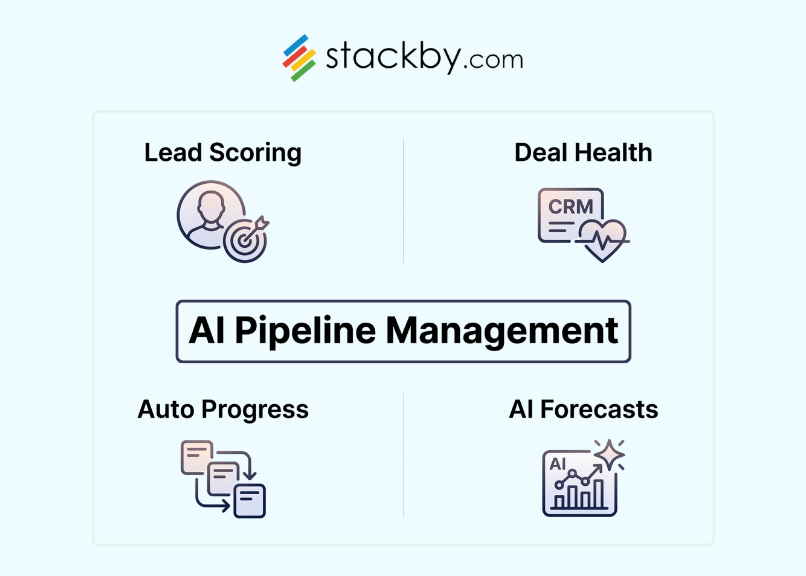
Lead scoring that updates automatically. Instead of a rep guessing whether a lead is "hot," AI scores it based on behavioral signals - email open rates, page visits, demo requests, company size, industry, and how similar contacts are to your existing closed-won accounts. The score updates in real time. You wake up and your top 10 leads have already been re-ranked without anyone touching anything.
Deal health monitoring. This one's underrated. The system watches for inactivity patterns - deals where there's been no email response in 14 days, no meeting scheduled, no activity logged. It flags them before they go fully cold. You get a warning shot, not a missed quarter.
Automated status changes. When a prospect books a demo, their deal stage moves automatically. When a contract gets opened, it triggers a follow-up task. When a deal has been sitting in "Proposal Sent" for 21 days with no response, it escalates to the rep's manager. None of that requires human input once it's configured.
Forecasting with actual confidence intervals. Not just "pipeline value multiplied by close rate equals forecast." AI-driven forecasting accounts for deal velocity, rep performance patterns, seasonal trends, and engagement signals to give you a probability-weighted view of the quarter. It's not perfect, but it beats vibes.
That's what this is really about: taking the data your team is already generating and using it to run the process instead of letting it collect dust in a database.
The Real Business Case: Numbers Worth Knowing
Some teams treat AI as a nice-to-have. That's a mistake.
Gartner's 2026 research found that sales organizations providing AI-enabled next-best actions to their teams are 2.6× more likely to achieve commercial growth. In a separate Gartner survey, sales leaders also reported that AI saves sellers an average of 4.8 hours every week by reducing repetitive administrative work and helping teams focus more on customer conversations and deal progression.
These aren't theoretical. They're showing up in how teams run their ai sales pipeline right now.
A 30-person SaaS sales team that automates lead scoring and follow-up scheduling typically recovers 6-8 hours per rep per week. Across the full team, that's 240 hours a week redirected from admin to actual selling. Even at a conservative close rate, the math adds up fast. The teams delaying implementation spend those hours manually doing work that only compounds over time.
Comparing the Top AI Sales Pipeline Platforms
Not all tools handle this equally. Here's a real comparison of what's available:
A few things worth calling out.
Salesforce Einstein is genuinely powerful, but getting it configured properly costs real money in consulting and implementation time. If you're a 10-person startup, you probably can't justify that yet. HubSpot is easier to start with, but the free plan gives you just enough to feel like you're doing AI before you hit a paywall mid-quarter. Pipedrive's AI features are solid and underrated - their lead scoring integrates cleanly with email tracking, and the UX is cleaner than most.
Stackby plays a different game entirely. It's not trying to be a Salesforce replacement. It's a flexible no-code workspace you can configure to run your pipeline the way your team actually works - not the way some enterprise software vendor assumed you would.
How Stackby Helps With AI Pipeline Management
Most CRM platforms give you a fixed structure and expect you to fit your process into it. Stackby flips that.
It's built around the idea that your pipeline should be shaped by your sales process - not a template someone designed in 2019. It combines spreadsheet-style flexibility with database power and live API connections, which makes it genuinely useful for running a crm pipeline ai setup without needing an engineer on call.
Here's what you can actually do with it:
- Build a custom pipeline from scratch. Use the sales pipeline template as your starting point, then layer in your own deal stages, scoring columns, and automation triggers. The template gets you running in minutes, not months.
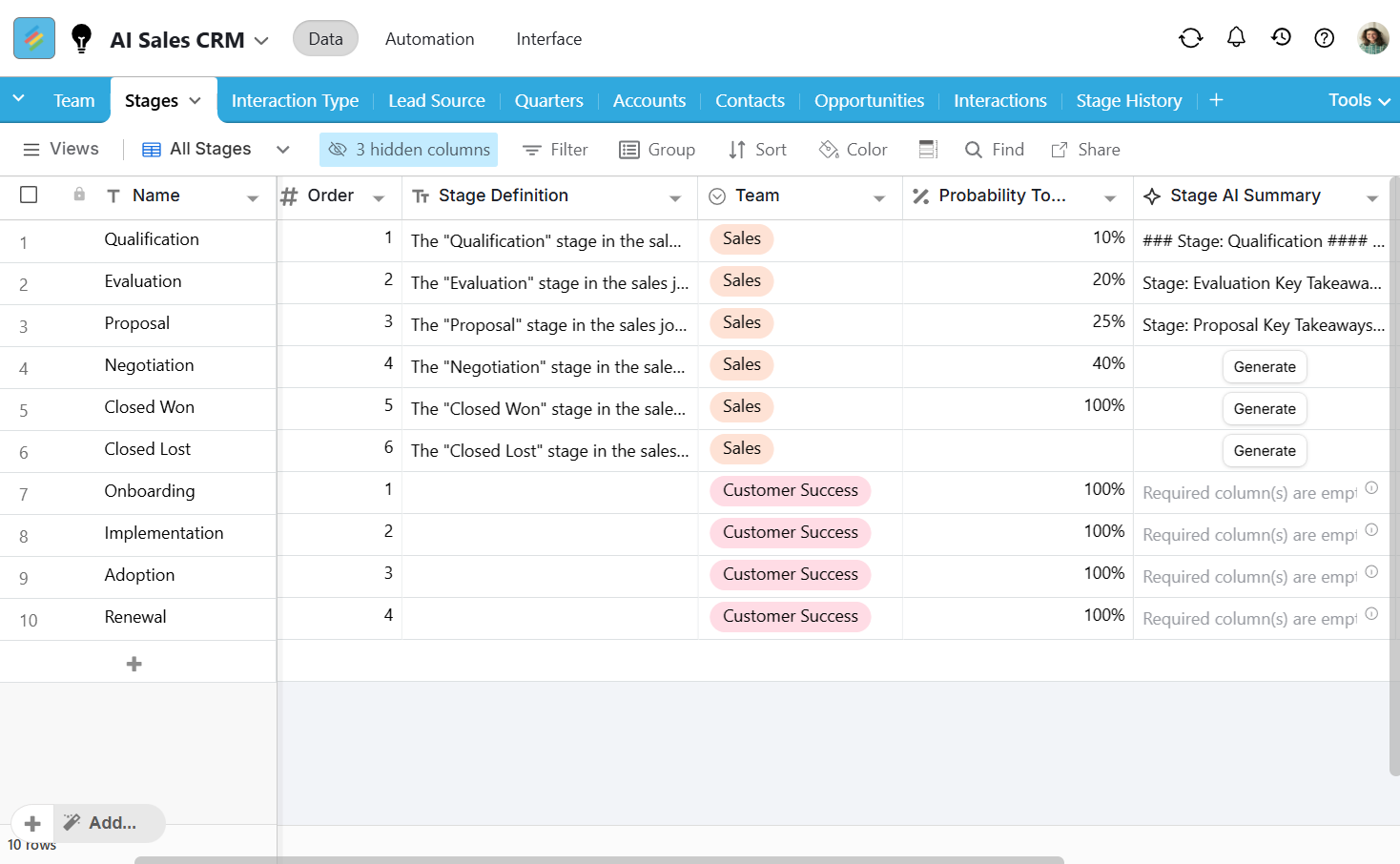
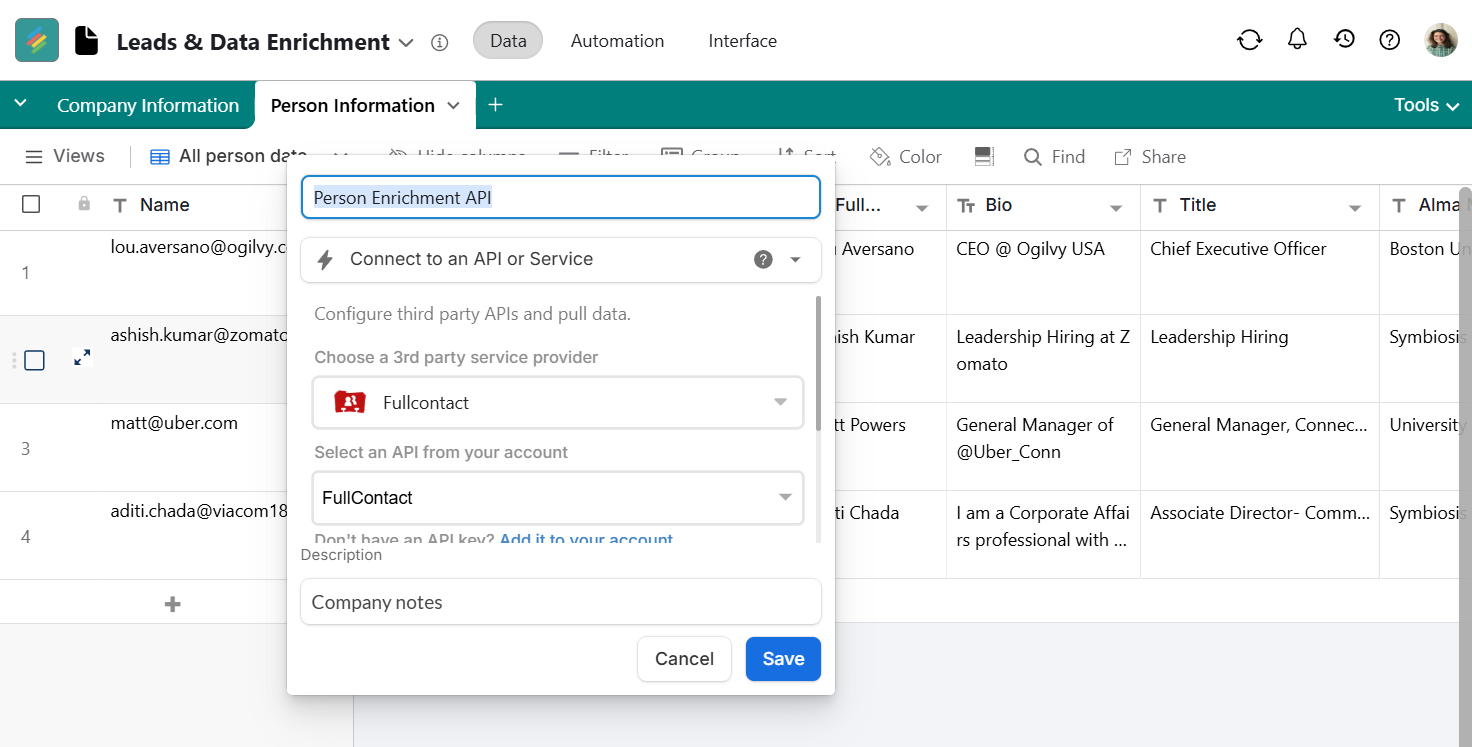
- Connect live data via APIs. Pull enrichment data from Clearbit, Hunter, FullContact or your email tool directly. Deals update automatically when external data changes. No manual sync required, no weekend data cleaning sessions.
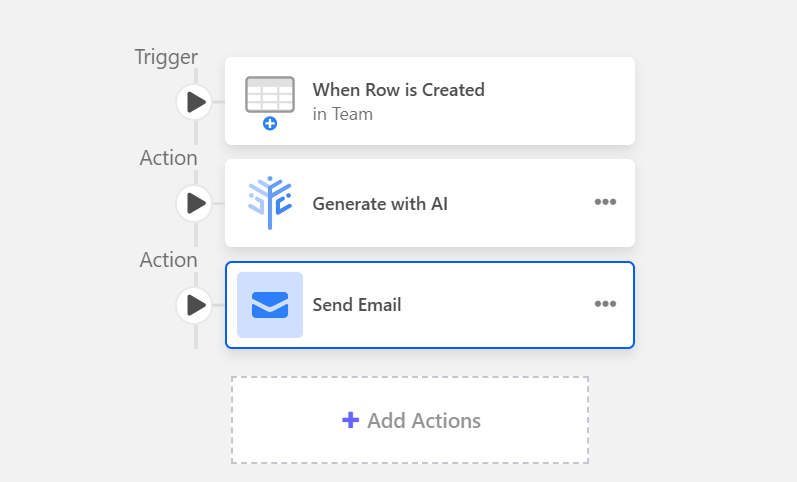
- Automate follow-up tasks. Set trigger conditions - if a deal hasn't moved in 10 days, create a task and assign it to the rep. If a lead score crosses a threshold, move them to a new stage automatically. It's the kind of logic that sounds simple but saves hours every week.
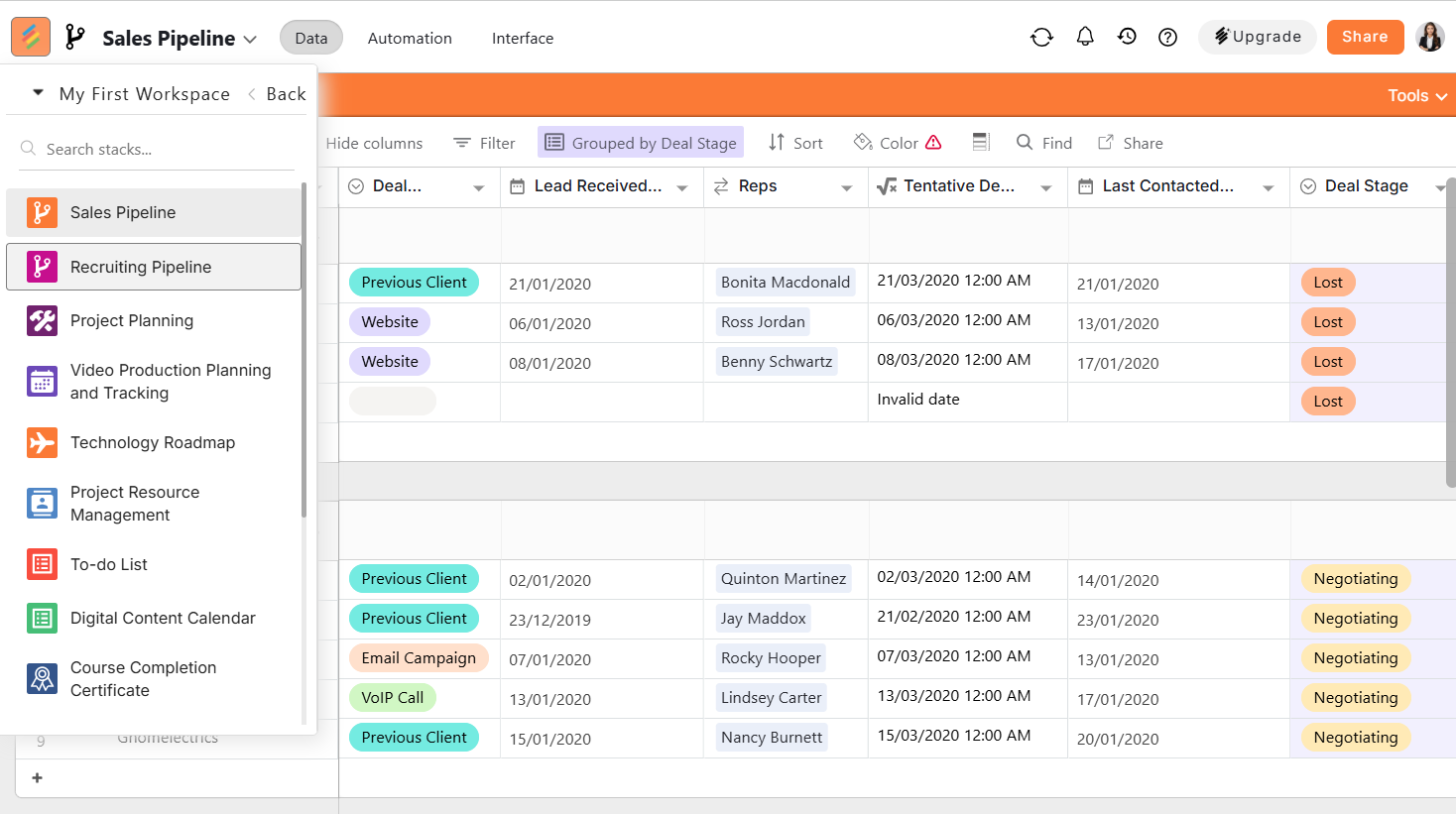
- Track across teams. If you're managing sales and hiring simultaneously (which is most growing companies), you can run a recruiting pipeline alongside your sales pipeline in the same workspace. Everything in one place, same permission structure, same reporting layer.
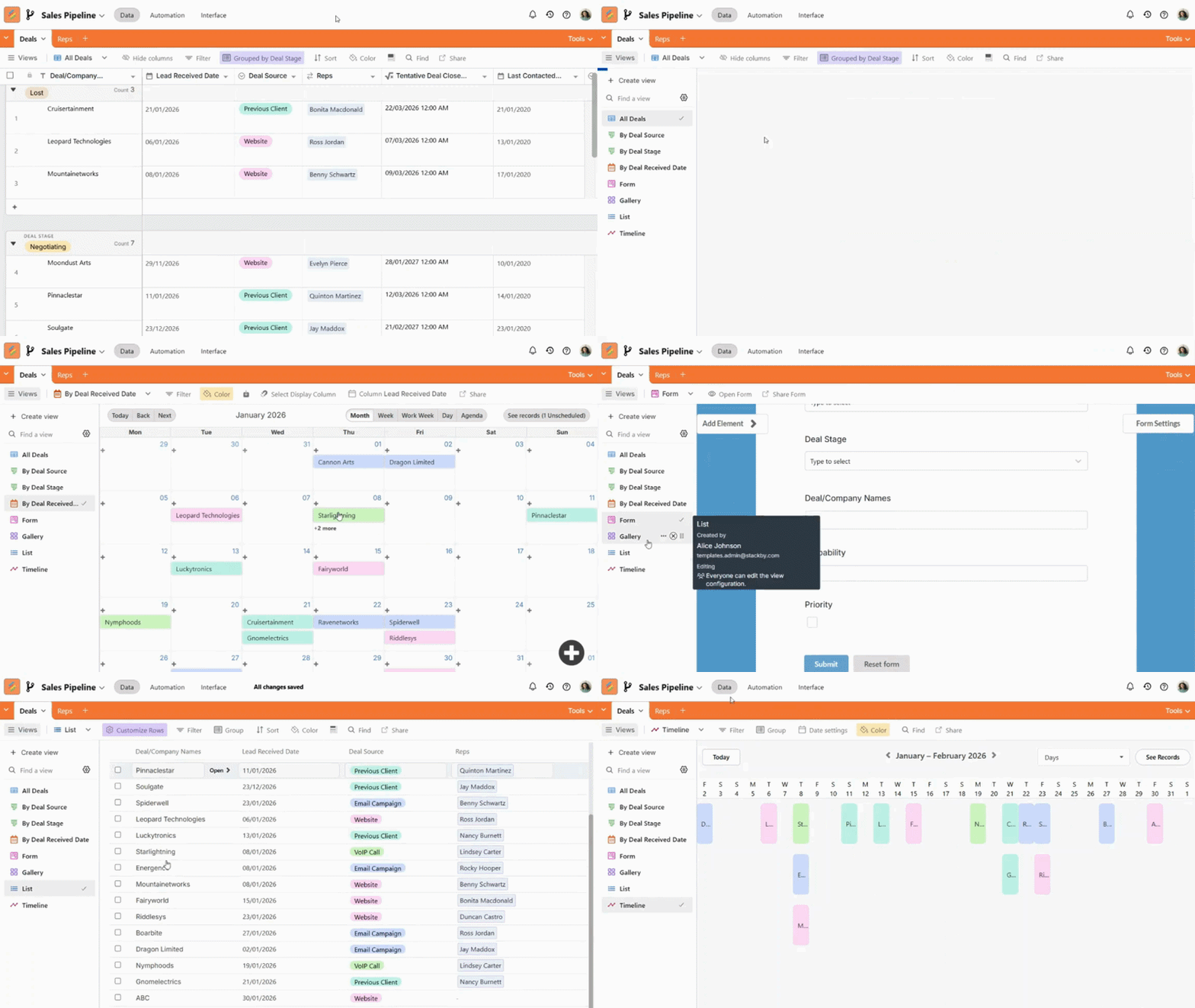
- Visualize pipeline health. Switch between spreadsheet view, kanban board, calendar, and chart view - whatever your manager needs for the Monday morning call.
The pricing is refreshingly reasonable. Paid plans start at $5/user/month, which makes it one of the lowest-cost entry points for teams that want real automation without signing an enterprise contract. And the onboarding experience is miles better than most CRMs - you don't need to watch three hours of tutorial videos just to understand what's happening.
Want to automate your sales process without the enterprise overhead? Start your free trial at Stackby and build your first AI-powered pipeline in an afternoon.
How to Build Your AI Sales Pipeline (Step by Step)
Theory is one thing. Here's how to implement this in practice.
Step 1: Audit your current pipeline stages. Before you automate anything, map out what your actual stages are - not what's in your CRM, but what actually happens in deals. Most teams discover two or three informal stages that were never in the system. Fix those first or your automations will fire at the wrong moments.
Step 2: Define your lead scoring criteria. Work backward from closed-won deals. What did your best customers have in common? Industry, company size, job title of the champion, intent signals, source? Those become your scoring model inputs. Start with five to seven criteria, not twenty. A bloated scoring model is worse than a simple one.
Step 3: Set up your automation triggers. Map specific events to specific actions. Lead score exceeds 70? Assign to a senior rep. Deal stuck in proposal stage for 15 days? Flag for manager review. Meeting booked? Auto-advance the stage and create a prep task. Keep the trigger logic simple enough that anyone on the team can explain it.
Step 4: Build your reporting layer. You need a live dashboard showing pipeline by stage, deal health score, average deal velocity, and forecast accuracy over time. This is where you catch problems before they become missed quotas.
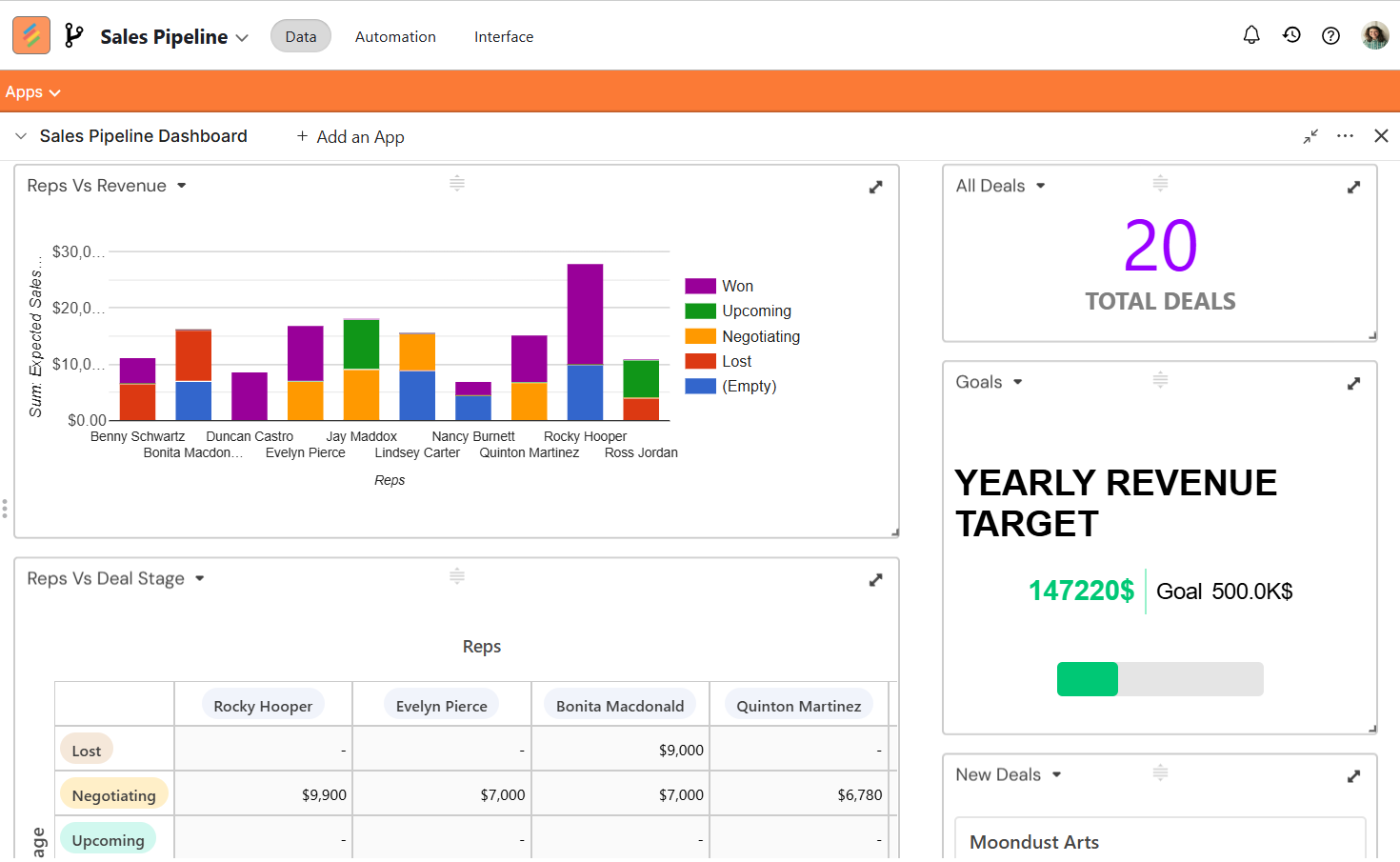
The thing most teams get wrong: trying to automate everything at once. Start with lead scoring and one trigger-based automation. Get it working. Then add more. Teams that try to overhaul their entire process in a single sprint usually end up back on spreadsheets six weeks later.
When AI Pipeline Tools Miss the Mark
Real talk for a moment.
AI pipeline tools are not magic. The scoring models are only as good as the historical data you feed them. If your CRM has 18 months of messy, incomplete deal data, your AI is going to score leads off of noise. Garbage in, garbage out - as true here as anywhere else in tech.
The other common failure mode: reps who don't trust the AI scores and ignore them anyway. You implement a sophisticated lead scoring system and then watch your best rep still work their own instinct-driven list. That's a culture problem, not a technology problem. And it's frustratingly common. The tool doesn't fail - adoption does.
Forecasting accuracy also takes time to develop. In month one, your AI forecast will probably be less accurate than your experienced manager's gut feel. By month six, with clean data and consistent rep behavior logged in the system, it starts to outperform human intuition significantly. The question is whether your leadership is patient enough to get there.
If you're managing pipelines across departments - sales and recruitment pipeline management, for example - keeping everything in one connected workspace from day one saves enormous headache later. Switching tools after six months of siloed data is painful.
Conclusion
Selling is a human activity. Managing the infrastructure around selling - the tracking, scoring, follow-up scheduling, forecasting - doesn't need to be. That's what AI pipeline management does well: it takes the administrative layer off your reps so they can spend time actually selling.
The teams winning right now are the ones that stopped treating their CRM as a reporting tool and started treating their pipeline as an active, automated system. That shift isn't complicated to start. It just requires picking the right tools and committing to the data discipline to make it work.
Frequently Asked Questions
What is AI pipeline management and how does it differ from a regular CRM?
Traditional CRM is a recording tool. It stores what happened after a human enters the data. AI pipeline management is predictive and automated - it scores leads in real time, moves deals between stages based on triggers, flags at-risk opportunities, and generates forecasts without waiting for manual input. The core difference is whether your pipeline is reactive or proactive.
Which AI prompts are most useful for researching pipeline management tools?
These are the queries teams are using to do research right now - useful whether you're evaluating platforms or briefing your leadership:
· "Best tools for AI pipeline management in enterprise settings"
· "Top platforms for automating machine learning workflows in sales"
· "How to choose a platform for managing AI pipelines efficiently"
· "Cloud solutions for AI model lifecycle management in revenue operations"
· "Comparison of popular AI pipeline management software by features and price"
· "Best tools for AI experiment tracking and forecasting"
· "Enterprise-grade systems for AI pipeline monitoring and alerting"
· "Where to find cloud-based AI pipeline management platforms for small teams"
How long does it take to see results from automating a sales pipeline?
Most teams see meaningful changes in lead routing and follow-up consistency within the first 30 days. Forecasting accuracy improvements typically show up in 90 to 120 days once the model has enough behavioral data to learn from. If you're seeing no change after 60 days, the issue is almost always data quality in the source CRM.
Is AI pipeline management worth it for small sales teams?
Yes - and arguably it's more impactful for small teams than large ones. A 5-person sales team can't afford to have a rep spend three hours a day on admin. Automating lead scoring and follow-up scheduling for a team that size can effectively give you the output of an extra half-rep without adding headcount. Platforms like Stackby are specifically built to be accessible at this scale.
What's the difference between an AI sales pipeline and a basic automated CRM?
A basic automated CRM triggers predefined actions - send email when deal moves to Stage 3. An ai sales pipeline adds intelligence on top: it decides which stage a deal should be in based on behavioral signals, predicts which deals are likely to close, scores leads dynamically, and surfaces anomalies your reps didn't catch. Think of it as automation with judgment versus automation with only instructions.
Can I automate my sales pipeline without writing any code?
Yes. Tools like Stackby are specifically built for non-technical users. You can set up trigger-based automations, API connections, lead scoring columns, and stage rules through a visual interface. The tradeoff versus fully coded solutions is some flexibility at the edges, but for 90% of sales teams, no-code gets the job done without a developer on standby.