Client Portal for Accountants: Collect Documents Without Email Chasing
A client portal for accountants streamlines tax document collection, client onboarding, and financial record management. Learn how secure uploads, automated reminders, custom forms, and client-specific access help accounting firms reduce manual follow-ups and organize client workflows.
Tax season still runs on email for a surprising number of accounting firms. You send a request, wait three days, send a reminder, wait two more, call the client, and finally get a blurry photo of a W-2 at 11 PM. Multiply that by 40 or 50 clients, and you've got a bottleneck that has nothing to do with actual accounting work.
A client portal for accountants addresses this problem by giving clients one secure place to upload documents, submit forms, and check what's still pending. Instead of searching through inboxes for an attachment they sent three weeks ago, clients and accounting teams can access document requests and submission statuses in one place.
For firms juggling tax season, quarterly reviews, and year-round bookkeeping, that difference adds up quickly.
This article covers what a client portal should do, how it compares with email and shared drives, and how tools like Stackby can support firms looking for a flexible solution without hiring a developer.
What Does a Client Portal for Accountants Actually Do?
Strip away the marketing language, and a client portal is a secure, structured space where clients upload documents and accounting teams track what's missing without relying on scattered email threads.
But useful portals do more than store files. A well-organized client portal for accountants typically supports:
- Document requests and checklists: Clients know exactly what's needed, from 1099 forms and receipts to bank statements.
- Submission status tracking: Both the client and accounting team can see which documents have been submitted and which remain outstanding.
- Secure document uploads: Sensitive financial information can be shared through a controlled system rather than ordinary email attachments.
- Automated reminders: Clients receive reminders about outstanding documents without staff manually following up every time.
- Electronic signatures: Engagement letters, consent forms, and approval documents can be handled through supported signing workflows.
- Role-based access: Each client can access only the information they're authorized to see.
Here's what many firms miss: a portal isn't just a nicer Dropbox. It's a workflow layer. Depending on the platform and configuration, it can trigger actions automatically, such as notifying your team when a client uploads a missing 1099, rather than requiring someone to check a shared folder every morning.
If you're setting up a portal from scratch, pairing it with a client onboarding checklist can help ensure that important documents and information aren't overlooked during the first weeks of a new client relationship.
Why Email and Shared Drives Keep Failing Accounting Firms
Email wasn't built for document collection. It was built for messages. Somewhere along the way, accounting firms started treating it as a filing system, and that's where things begin to fall apart.
1. Attachments Get Lost in Long Email Threads
A client replies to an email from six months ago with a new PDF attached. Now, that document is buried under dozens of unrelated messages. Someone on your team has to search for it, verify which version is current, and move it into the correct folder.
That's time your team could spend on actual accounting work.
2. Shared Drives Can Create Permission Problems
Google Drive and Dropbox folders can work well for file sharing, but managing access across dozens of clients requires careful organization.
With 60 active clients, each needing separate folders and permissions, one configuration mistake could expose confidential financial information to the wrong person. A client document management system should make access rules easier to manage and verify.
The guide on building forms in a database explains how submitted information can be organized into structured records.
3. Manual Reminders Waste Staff Time
Someone on your team may be tracking document submissions in a spreadsheet that is already out of date. When a client misses a deadline, staff members have to check the records and follow up by phone or email.
Firms tracking office equipment or other physical assets alongside financial records may also find the Inventory Portal template relevant to their internal workflows.
This repetitive work is a strong candidate for automation.
4. Documents Lack a Clear Status
An email attachment doesn't automatically tell your team whether a document has been reviewed, whether more information is needed, or whether the client has submitted everything.
A structured portal can provide a central view of outstanding requests, received documents, and completed tasks.
The reality is that many firms recognize email's limitations but struggle to find the time to change their processes. A well-planned portal can reduce that burden by organizing collection and follow-ups in one place.
Key Features That Separate a Good Portal From a Mediocre One
Not every client portal is built the same way. Some accounting-specific platforms include features your firm may not need, while more flexible tools require you to configure the workflows yourself.
Before choosing a solution, focus on the following capabilities.
1. Security and Access Controls
A secure client portal for tax accountants needs appropriate safeguards for sensitive financial information.
Look for:
- Encryption in transit and at rest.
- Multi-factor authentication or other strong authentication options.
- Client-specific permissions and access restrictions.
- Clear controls for viewing, downloading, and sharing documents.
- Audit logs or activity records where available.
- Document retention and deletion controls that fit your firm's obligations.
Don't assume a platform is secure simply because it has a login page. Ask vendors about their security practices and verify that the available controls meet your firm's regulatory and professional requirements.
2. Flexible Forms and Document Collection
Accounting firms collect different types of information, including tax forms, financial statements, engagement letters, expense receipts, and supporting documents.
A client portal for tax forms and approvals should support structured intake rather than relying entirely on static PDFs and email attachments.
Tools that let you build forms in a database can help organize submitted information into structured fields, making it easier to sort, filter, and review records later.
3. Automated Reminders
A client portal for accountants with automated reminders can reduce the time spent chasing missing documents.
For example, a workflow might send a reminder three days after a request is issued and another when the deadline approaches. The exact schedule should reflect your firm's deadlines and client communication preferences.
Automation can handle routine follow-ups, while staff members focus on clients who need additional assistance.
4. Client-Specific Views
Each client should see their own document requests and submission status, not a shared list containing other clients' financial information.
Using an option to share a specific view from a table can help organize what each client sees. However, a filtered view alone is not necessarily a security boundary. Confirm that the platform's permission system actually prevents unauthorized access to other clients' records.
5. Integration With Your Existing Workflow
A portal that operates separately from your accounting software can become another disconnected system.
Look for ways to connect document collection with your existing processes, such as client management, deadline tracking, notifications, and bookkeeping. The goal is to reduce duplicate work rather than create another place your team must check manually.
Client Portal vs. Email vs. Shared Drive: A Comparison
The differences between these approaches become clearer when you compare how they handle everyday document collection.
Note: This is a qualitative comparison, not a measured benchmark. Actual costs, collection times, security controls, and automation capabilities depend on the providers and configurations involved.
A portal can make document collection more organized, but it won't automatically eliminate delays. Clients still need to submit their documents, and your team needs a clear process for reviewing and following up on outstanding requests.
The biggest benefit comes from combining structured requests, clear deadlines, appropriate access controls, and well-timed reminders.
How Stackby Helps With Client Document Collection
Stackby combines a database-style workspace with forms, views, and automations. Accounting firms can use these features to organize document requests and client records around their existing workflows.
The Stackby platform brings databases, forms, views, and workflow tools together to support customized document collection processes.
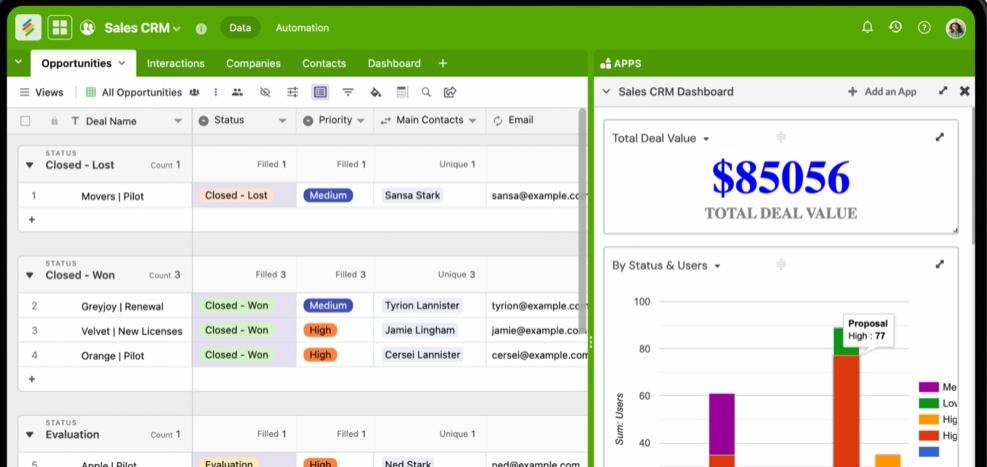
The Stackby Client Portal template provides a starting point for organizing client information and adapting shared workflows.
Here's how it can support the process.
1. Create Custom Intake Forms
Accounting firms may need separate forms for tax documents, expense receipts, financial statements, or engagement information.
Creating a custom form in Stackby lets you configure forms around the information you need to collect. Conditional logic can help display relevant fields for supported workflows.
2. Set Up Notifications When Clients Submit Documents
Staff shouldn't have to check a shared table repeatedly to see whether a client has uploaded something.
With Stackby's form-submission automation, you can configure notifications or other actions when a form is submitted, subject to the available automation options.
Stackby Automations supports trigger-based workflows, including notifications and record updates, that can reduce repetitive document follow-ups.
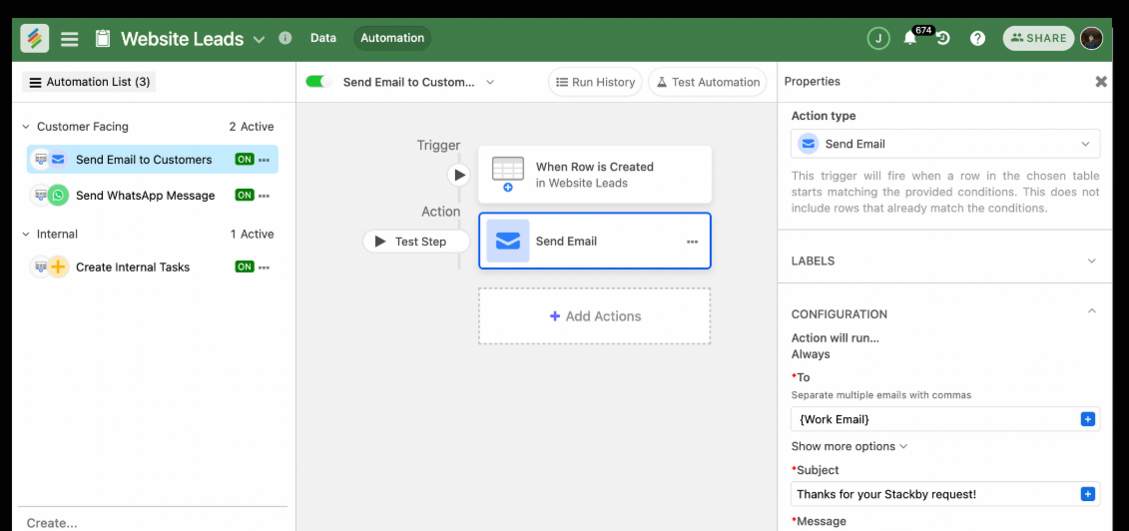
This can help your team respond to new submissions sooner and keep document reviews moving.
3. Organize Client-Specific Views
Create views that show document requests, deadlines, and submission statuses in a format that suits your workflow.
You can use the option to share a specific view from a table to make relevant information accessible to the right people. Verify the underlying permissions carefully before sharing any confidential client data.
4. Connect Clients With Their Documents and Financial Records
Linked records can connect each client to relevant document requests, financial statements, deadlines, and submission statuses.
This structure helps your team understand what has been received and what remains outstanding without maintaining separate lists for every step of the process.
5. Manage Document Attachments
Attachment fields can help organize supporting files, such as PDFs, scanned receipts, and other documents, alongside related records.
Because accounting documents may contain sensitive personal and financial information, confirm the platform's file-access controls, security protections, retention settings, and sharing behavior before using it for confidential records.
6. Use AI-Assisted Data Processing Where Appropriate
AI-assisted fields may help with tasks such as extracting or summarizing information from supported inputs. However, availability and capabilities depend on the specific tool and configuration.
For tax records and financial statements, any AI-generated extraction should be reviewed by a qualified team member before the information is used in accounting work.
7. Start With a Client Portal Template
Rather than creating every table and view from scratch, you can use Stackby's client portal template as a starting point and adapt it to your firm's document collection process.
For a step-by-step explanation of portal structure, forms, and permissions, read the guide on how to create a client portal.
Firms that want to build their own workflows without custom development can also refer to the guide on creating a no-code client portal.
Important: Before using any general-purpose platform for tax documents or other sensitive financial records, verify that its security, permissions, data handling, and compliance capabilities meet your firm's requirements.
Common Mistakes Firms Make When Collecting Client Documents
Even a well-designed portal can fall short if the surrounding process isn't clear. These common mistakes are worth avoiding.
1. Treating the Portal as a Replacement for a Process
A portal won't fix an unclear onboarding process.
If clients don't know which documents they need to submit, where to upload them, or when they're due, confusion will continue even after you change tools.
Pair your setup with a client onboarding checklist that explains document requirements and deadlines from the beginning.
2. Paying for Features You Don't Need
Some accounting platforms include payroll, invoicing, time tracking, and other modules that may not be relevant to your firm's immediate needs.
Identify your essential requirements first. Choose a platform that meets them without adding unnecessary complexity or cost.
3. Sending Too Many Automated Reminders
Automated reminders can save time, but poorly configured notifications can frustrate clients.
Instead of sending messages every day, establish a sensible schedule based on the request date and deadline. Adjust the frequency when a client has already responded or requested additional time.
4. Skipping the Security Review
A portal that looks professional isn't automatically appropriate for sensitive financial records.
Before rollout, review encryption, authentication, access controls, audit capabilities, data retention, and any applicable compliance requirements. Test permissions with separate client accounts to confirm that confidential information remains restricted.
5. Ignoring Document Review and Approval
Receiving a file isn't the same as completing the task.
Your process should distinguish between documents that have been requested, received, reviewed, approved, or flagged for correction. Clear status labels help staff and clients understand what happens next.
How to Set Up a Client Portal for Your Accounting Firm
Getting started doesn't need to be complicated. The key is to build around your actual document collection process instead of adding features before you need them.
Step 1: Map Your Document Requirements
Create separate checklists for different client types, such as:
- Individual tax clients.
- Small business clients.
- Bookkeeping clients.
- Audit or financial review clients.
Specify which documents are required, who needs to provide them, and when they are due.
Step 2: Build Forms Around Those Checklists
Create intake forms that reflect your document requirements.
Tools that let you build forms in a database can help organize submitted information in structured fields, making it easier to filter, sort, and review records than relying exclusively on email attachments.
Step 3: Configure Notifications and Reminders
Set up notifications for new submissions and reminders for outstanding requests where supported.
Define who receives each notification and what action they should take. Make sure reminders stop or change when a document is received, a deadline is updated, or a request is no longer relevant.
Step 4: Set Up Client-Specific Access
Configure access so each client can view only the records and documents they are authorized to see.
Test these permissions using separate accounts before inviting clients. Check not only the main portal view but also shared links, attachments, downloadable files, and any connected records.
Step 5: Compare Platforms Before Committing
Before choosing a system, compare the best client portal software options based on your requirements.
Consider pricing, security controls, document collection, integrations, support, and ease of use. A dedicated accounting portal may suit firms that need specialized accounting workflows, while a flexible no-code platform may suit firms that want to customize their own processes.
Step 6: Connect Document Collection With Client Management
Document requests shouldn't exist in isolation from client communication and deadline tracking.
Related client management tools can help your team coordinate follow-ups and maintain a consistent record of client interactions.
Start with a manageable workflow, test it with a small group of clients, and improve it based on actual usage before rolling it out to the entire firm.
Frequently Asked Questions
What is a client portal for accountants?
A client portal for accountants is a secure online workspace where clients can upload documents, submit forms, and check submission status. It replaces scattered email attachments and shared folders with a more organized, access-controlled document collection process. Firms planning a customized portal can also review this guide on creating a client portal without code for ideas on organizing files, updates, and client access.
Is a client portal worth it for a small accounting firm?
Yes. Even a small firm can benefit from structured document requests, clear submission statuses, and automated reminders. The value depends on how much time the firm currently spends tracking documents and following up with clients.
How secure is a client document collection portal for accountants?
Security depends on the platform and its configuration. A suitable portal should offer appropriate encryption, authentication, and access controls, along with security and data-handling practices that meet the firm's requirements. Verify these protections before uploading confidential financial information.
Firms that also coordinate supplier records can use the Vendor Management Portal template as a reference for organizing vendor information and related workflows.
Can I use a client portal to collect tax documents online without hiring a developer?
Yes. No-code platforms can support document collection through forms, structured tables, views, and automations without requiring custom software development. The setup time depends on the complexity of your workflow, permission requirements, and integrations.
Does a client portal replace my accounting software?
Usually, no. A client portal primarily supports document collection, communication, and workflow coordination. Accounting software handles tasks such as bookkeeping, tax preparation, and financial reporting. The two systems can complement each other when they integrate appropriately.
What features matter most for an accounting client portal for financial statements?
Look for secure document uploads, client-specific permissions, clear submission statuses, version management or other ways to identify the current document, and notifications when new files arrive. Approval and review statuses are also useful for tracking what remains to be completed.
Can a client portal send automated reminders for missing tax documents?
Some portals support automated reminders directly, while others require configured workflows or integrations. Check whether the platform can trigger reminders based on document status, deadlines, and submission activity.
Conclusion
Chasing documents by email isn't a minor inconvenience. It's a recurring drain on time that accounting firms have accepted as normal for too long.
Fixing the problem doesn't necessarily require expensive, complicated software. It requires a structured place for clients to submit documents, clear visibility into what's missing, and a reliable process for reminders and follow-ups.
A well-organized client portal for accountants can help firms:
- Reduce manual follow-ups by organizing document requests and submission statuses.
- Protect confidential financial information through carefully configured access controls.
- Keep tax forms, financial statements, and supporting documents connected to the right client records.
- Use reminders and notifications to reduce repetitive administrative work.
- Build a more consistent client experience during tax season and throughout the year.
For firms looking to move away from scattered inboxes and disconnected spreadsheets, Stackby offers forms, linked records, views, and automations that can be configured around a document collection workflow.
Start with a suitable portal structure, adapt it to your firm's checklists, verify security and permissions, and test the process with a small group of clients before expanding it across the firm.
Key Takeaways
- Centralize document collection: A client portal for accountants keeps tax forms, financial statements, receipts, and supporting documents organized in one place.
- Reduce manual follow-ups: Automated reminders and submission notifications help accounting firms track missing documents and reduce email chasing.
- Prioritize security and permissions: Encryption, authentication, and client-specific access controls help protect sensitive financial information.
- Simplify client onboarding: Clear document checklists, deadlines, and intake forms help clients understand what they need to submit.
- Track document status: Distinguishing between requested, received, reviewed, and approved documents helps teams manage accounting workflows efficiently.
- Connect tools and workflows: Integrating document collection with client management and accounting processes reduces duplicate work.
- Use no-code tools for flexibility: Platforms like Stackby provide forms, linked records, views, and automations to help firms build a client portal around their needs.