White-Label Client Portal: Your Logo, Domain and Colors
A white-label client portal helps agencies and freelancers provide a branded client experience with custom logos, domain options, organized project information, secure access controls, and streamlined workflows using tools like Stackby.
If you're running an agency or managing multiple clients, you've probably encountered a common problem: your client-facing tools don't match your brand. They have a different logo, a separate domain, and colors that don't align with your business identity. This inconsistency can affect how clients perceive your services before a project even begins.
A white-label client portal solves this problem by allowing you to use your own logo, domain, and brand colors across the workspace your clients access. Instead of seeing a third-party software brand, clients experience a professional workspace that reflects your business.
For agencies, consultants, freelancers, and service providers, white-labeling creates a more consistent client experience while keeping projects, deliverables, and communication organized in one place.
This guide covers what a white-label client portal involves, why custom branding matters, which features to consider, and how Stackby supports branded client workspaces with flexible sharing and access controls.
What Is a White-Label Client Portal?
A white-label client portal is a client-facing workspace that uses your business's branding instead of the software provider's identity. It allows clients to access project information, documents, reports, invoices, and other shared resources through a workspace that reflects your brand.
White-labeling goes beyond changing a logo. It typically includes three important components.
1. Visual Branding
Visual branding includes your company logo, brand colors, fonts, and other design elements. These details help maintain a consistent identity across your website, client portal, proposals, and project updates.
For example, a marketing agency can use its brand colors and logo on a client portal so the workspace feels consistent with the rest of its services.
2. Custom Domain
A custom domain allows clients to access your portal through a branded web address, such as portal.youragency.com, rather than a generic software URL.
This creates a more recognizable experience and makes the portal feel like a natural extension of your business.
However, custom-domain support varies by platform and subscription plan. Some providers reserve full domain customization for enterprise customers, while others support branded access through embedding or domain verification.
3. Access Control and Permissions
A branded portal also needs clear access rules. Clients should only see the information intended for them, including their own projects, files, invoices, and reports.
For example, a marketing agency managing 15 accounts needs a way to share each client's dashboard without exposing another client's campaign information.
Access control is not simply a branding feature. It is essential to maintaining client confidentiality and trust.
Before adding branding, it helps to establish the portal's underlying structure. The guide on how to create a client portal covers the foundational setup, including tables, views, and permissions.
Why Does White-Label Client Portal Software Matter?
A client portal is more than a place to share files. It is part of the experience clients have with your business, from onboarding and project updates to approvals and final deliverables.
A consistent, branded workspace can make your services feel more organized and professional.
Builds Client Trust
Clients interact with your tools throughout a project. When the portal uses your logo, domain, and brand colors, the experience feels connected to your business rather than a collection of unrelated applications.
A recognizable domain also helps clients identify the workspace they are accessing, although branding alone does not guarantee security.
Creates a Consistent Brand Experience
Every client-facing interaction contributes to your brand identity. A branded portal keeps the experience consistent across proposals, project dashboards, shared documents, and progress reports.
For agencies that manage several client accounts, this consistency can be especially valuable.
Improves Client Organization
A well-structured portal gives clients a central place to access relevant project information. Instead of searching through email threads and shared folders, they can access the information assigned to their account.
When combined with clear permissions, the portal also helps reduce accidental data exposure. Related client management tools can help agencies organize client information, communications, and ongoing work.
Supports Agency Growth
As an agency takes on more clients, managing separate folders, project updates, and reporting workflows can become difficult.
A centralized client portal helps standardize these processes, making it easier to reuse workflows while keeping each client's information separate.
Common Use Cases for a Branded Client Portal
White-label client portals can support different industries and service models.
Marketing agencies: Share campaign dashboards, content calendars, performance reports, and creative approvals.
Consultants: Provide project updates, research documents, recommendations, and milestone reports.
Accounting and bookkeeping firms: Share financial reports, invoices, and recurring documentation through organized client workspaces.
Software development companies: Manage requirements, project progress, testing feedback, and release documentation.
Design studios: Present creative assets, collect feedback, and manage approval workflows.
Professional service providers: Centralize client documents, onboarding forms, and ongoing project communication.
In each case, the portal serves as a client-facing layer that connects information and workflows while maintaining a consistent brand identity.
White-Label Client Portal vs. Generic Alternatives
Different tools provide different levels of branding, sharing, and access control. A shared folder may be sufficient for basic document delivery, but it may not offer the same level of customization as dedicated portal software.
The following comparison reflects the capabilities described for these options in this guide.
Capability | Shared Drive or Folder | Airtable Interfaces | Stackby |
|---|---|---|---|
Custom logo | Limited | Available on certain plans | Available on Economy and higher plans, as described |
Custom domain | Generally unavailable as a portal feature | Enterprise-level options | Embedding and enterprise domain verification options |
Per-client access | Folder permissions | Interface and sharing controls | Share specific views with clients |
Email-domain restrictions | Limited | Depends on configuration and plan | Email-domain restriction settings |
Linked client and project data | Limited | Supported | Supported through linked data and column types |
Workflow automation | Depends on connected tools | Native automation options | Triggers, actions, and AI fields |
Pricing for branded features | Varies by service | Varies by plan | Depends on plan and feature requirements |
Note: Features, plan eligibility, and pricing can change. Confirm the current details with each provider before making a purchasing decision.
Shared drives work well for basic file sharing, but they may not provide a complete branded portal experience. Other platforms offer more customization, although certain capabilities may require higher-tier plans.
The right option depends on your branding requirements, the sensitivity of your client data, and how much control you need over individual client views.
How Stackby Supports White-Label Client Portals
Stackby combines structured data, shared views, workflow capabilities, and branding options to help teams create organized client-facing workspaces.
Rather than treating a portal as a standalone collection of files, you can connect client records with projects, tasks, invoices, and other information.
Here are some of the capabilities that support this approach.
Custom Branding for Shared Views and Forms
Branding options help create a more consistent experience for clients accessing shared information and forms. According to the plan details described in this guide, custom branding is available starting with the Economy plan.
The exact branding options and limitations depend on the relevant feature and subscription.
Embed a Portal on Your Website
Embedding allows you to display a Stackby stack within a website, creating a way for clients to access relevant information within your existing online experience.
The Stackby embedding guide explains how to embed a stack on a website or web page.
Embedding and full custom-domain hosting are not necessarily the same thing, so confirm which option fits your requirements.
Share Specific Views With Each Client
A client portal should show each client the information relevant to their account.
Stackby supports sharing specific table views, allowing teams to organize and share selected information with clients.
The guide on how to share a specific view explains the sharing process.
When configuring client access, verify that the shared view exposes only the intended records and fields. Test the setup using an account with the same permissions as the intended client.
Restrict Access by Email Domain
For organizations that need additional control over who can access shared information, Stackby provides email-domain restriction settings for view sharing.
The email-domain restriction guide explains this option.
Domain restrictions can help limit access to approved email addresses, but they should be combined with appropriate sharing settings and permission checks.
Invite Clients Through a Link
Once the workspace and sharing permissions are configured, clients can be invited using a link-supported workflow.
Stackby's user invitation guide covers invitations to a workspace or stack.
The appropriate invitation method depends on the access level and experience you want to provide to each client.
Enterprise Domain Verification
Organizations with more advanced domain requirements may need enterprise-level controls.
Stackby provides documentation for enterprise admin domain verification, which covers the relevant verification process.
Check the current eligibility and configuration requirements before planning a portal around this feature.
Connect Client Data, Projects, and Deliverables
A client portal becomes more useful when its information is connected.
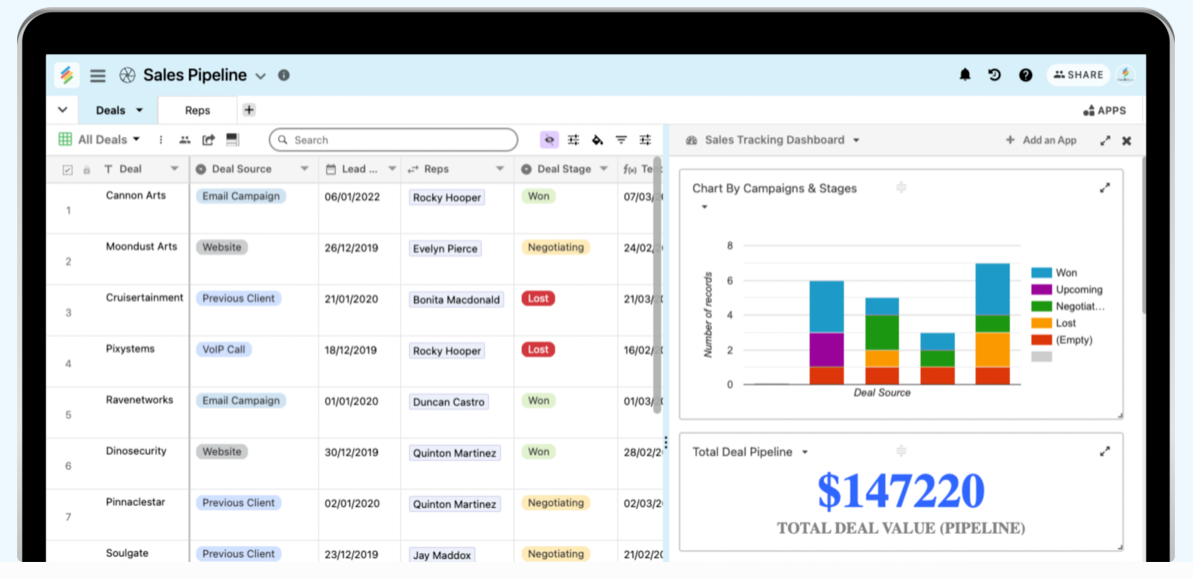
For example, a client record can be linked to projects, tasks, invoices, and deliverables. Different views can then present the relevant information for a particular workflow.
This structure helps teams maintain a consistent source of information rather than updating separate spreadsheets and documents for each client. Stackby's no-code database software can help organize related records and workflows in one place.
Automate Client Updates
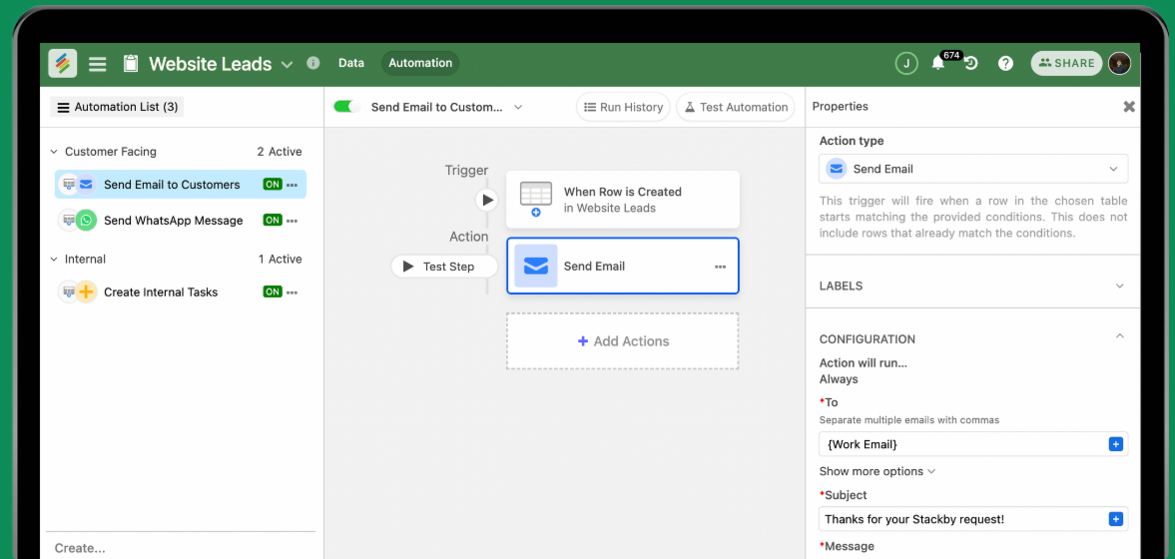
Automation can reduce repetitive work associated with onboarding, project tracking, and recurring updates.
AI fields can also help generate status summaries or project recaps, depending on the configuration and plan available.
Stackby automations can help connect changes in your data with repeatable workflows.
For more advanced branding or usage requirements, review the documentation on upgrading or changing a Stackby workspace plan.
You can also refer to this creative agency portal example to see an example of a client-facing workspace.
Common Mistakes to Avoid When Building a Branded Client Portal
A branded portal is most effective when its appearance, structure, and permissions work together.
Focusing Only on the Logo
Adding a logo and choosing brand colors can improve the portal's appearance, but it does not automatically create a complete white-label experience.
Consider the domain, shared links, login experience, and any visible references to the underlying software. Verify which of these elements your chosen platform allows you to customize.
Overlooking Client Onboarding
Clients need to understand where to find information, how to submit requests, and how to track progress.
A polished portal without a clear onboarding process can still create confusion. A structured client onboarding checklist helps standardize the first steps for every new client.
Configuring Permissions Incorrectly
Incorrect sharing settings can expose information to unintended users. A client-facing portal should be tested before it is shared widely.
Check the following:
Each client can access only the intended information.
Shared views do not expose unrelated client records.
Links and invitations have the intended access settings.
Email-domain restrictions are configured where required.
Permission changes are tested before being applied to live client workspaces.
Do not rely on branding or a hidden URL as a security measure. Access should be controlled by the platform's actual permission settings.
Building Too Much Before Testing
It can be tempting to perfect every color, page, and dashboard before involving a client. However, the underlying workflow matters just as much as the appearance.
Test the portal with a representative user before rolling it out. Confirm that clients can find their deliverables, understand project statuses, and complete the actions expected of them.
How to Integrate a White-Label Portal Into Your Existing Workflow
A client portal works best when it connects to the processes your team already follows.
Connect Client Management and Project Tracking
Client records, project details, tasks, and deliverables should be organized in a way that keeps related information connected.
Using suitable client management tools alongside structured project data can reduce the need to switch between disconnected applications.
Connect Your CRM to the Portal
A CRM typically manages client relationships, contact details, and sales opportunities, while a portal presents selected information to clients.
Connecting these two layers can help maintain consistency between internal records and the information clients see. The guide on how to build a custom CRM without code provides additional context on creating a connected client management system.
Standardize Repetitive Processes
Create reusable workflows for onboarding, approvals, reporting, and project updates. Standardization makes it easier to maintain consistent service quality as the number of clients grows.
Review Access Regularly
Client permissions should reflect current working relationships. When a project ends or a client's role changes, review their access and update sharing settings as needed.
Regular permission reviews help keep the portal organized and reduce the risk of outdated access.
Frequently Asked Questions
What is a white-label client portal?
A white-label client portal is a client-facing workspace that uses your company's branding, such as its logo and colors, instead of the software provider's identity. Depending on the platform, it may also support a custom domain and additional branding controls.
How do I create a white-label client portal?
Start by organizing your client records, projects, tasks, and deliverables. Next, configure the available branding options, set up the appropriate domain or embedding method, and establish permissions for each client. Test the portal before sharing it with your customers.
Does a client portal with a custom domain and branding cost more?
Pricing varies by provider. Some platforms reserve advanced domain controls for enterprise plans, while others include certain branding features in lower-tier subscriptions. Check the current plan details for each feature you require.
Can I restrict which clients see which data in a branded portal?
Yes, provided the platform supports suitable sharing and permission controls. Configure client-specific access, review which records and fields are visible, and test the experience with an account that has the intended permissions.
Is a white-label client portal the same as a CRM?
No. A CRM primarily manages customer information, sales opportunities, and relationship history. A client portal provides a client-facing space for accessing shared information and completing project-related activities. The two can work together.
What is the difference between white-labeling and custom branding?
Custom branding usually refers to visual elements such as logos and colors. White-labeling can go further by providing a branded domain and reducing visible references to the original software provider. The precise distinction depends on the platform's capabilities.
Conclusion
A white-label client portal helps agencies, consultants, and service providers create a consistent client experience through branded workspaces, organized information, and appropriate access controls.
The most effective solution goes beyond a logo change. It combines visual branding with suitable domain options, clear client permissions, connected data, and repeatable workflows.
The right platform depends on the level of customization you need, how sensitive your client information is, and your budget. Before choosing a plan, verify the availability of custom domains, branding features, access restrictions, and other requirements that matter to your business.
Stackby provides options for organizing client data, sharing specific views, embedding stacks, and managing access. These capabilities can help teams build a more structured client-facing experience without maintaining a separate set of disconnected files for every customer.
Key Takeaways
- White-labeling can include visual branding, custom domains, and access controls, not just a logo change.
- A branded client portal creates a more consistent experience across projects, reports, and deliverables.
- Client-specific views and carefully configured permissions help keep information separated between accounts.
- Custom-domain support, embedding, and branding options vary by platform and subscription plan.
- Connecting client records with projects, tasks, and deliverables makes the portal easier to maintain.
- Testing the workflow and reviewing access permissions are essential before sharing a portal with clients.