How to Automate HR Workflows with AI (Step-by-Step Guide)
Looking to manage your HR team on auto-pilot? Read this step by step guide to automate all your HR workflows with AI.
Introduction
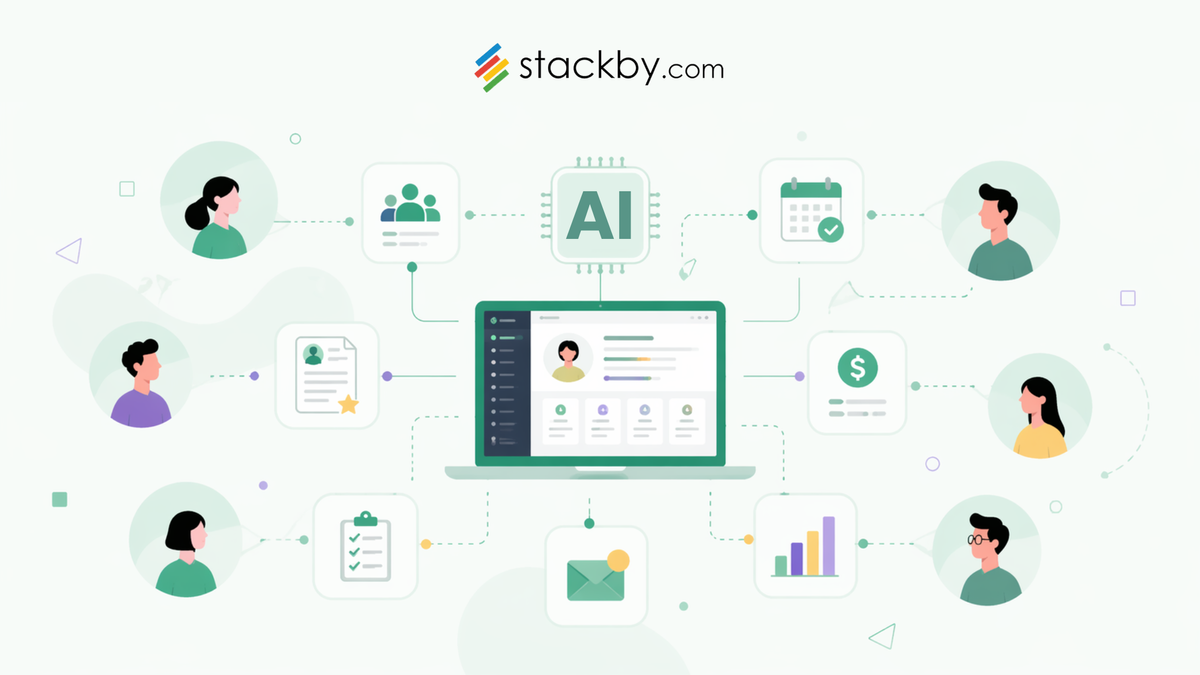
Most HR teams today aren’t struggling because they lack tools. If anything, it’s the opposite. There’s a tool for hiring, another tool for onboarding, something for managing employee information, something else for communication, and yet, the hiring process remains manual. Resumes are reviewed in one place, interview notes are scattered, onboarding checklists live in some Excel Sheets, and follow-ups depend on memory more than systems.
That’s where AI and automation actually start to matter, as a way to connect what’s already happening.
The goal isn’t to “automate HR completely.” That rarely works, and honestly, it shouldn’t. The goal is simpler:
- Reduce repetitive manual work
- Bring structure to scattered processes
- Make workflows predictable instead of reactive
In this guide, we’ll walk through how to do exactly that, step by step using Stackby, so you can build HR workflows that actually run without constant intervention.
What AI-Powered HR Automation Actually Looks Like
If you look at how AI is being used in HR in 2026, there’s still a clear gap between perception and reality. Most teams associate it with resume screening or chatbots, but that’s only scratching the surface. In practice, AI-powered HR automation is a combination of three layers working together:
- Structured data: your candidates, employees, roles, feedback
- Workflow automation: triggers and actions, status updates, task movement
- AI assistance: summarizing, tagging, scoring, generating insights
Individually, these aren’t new features as HR teams have been using spreadsheets, ATS tools, and workflows for years. But the shift happens when all of this exists in one system.
So instead of:
- Reviewing resumes manually → then updating a sheet → then sending emails
You get:
- Data captured → AI processes it → workflow moves automatically
That’s the difference between using tools and having a system. And this shift isn’t just about capability, it’s also about accessibility.
Earlier, implementing HR automation meant investing in heavy, specialized tools or stitching together multiple platforms. That’s not always realistic for smaller or growing teams. With no-code platforms like Stackby, the barrier is much lower. You can build structured HR systems, add automation, and layer AI on top without engineering support or multiple tool subscriptions.
For lean teams, this has a direct impact:
- Less dependency on multiple tools
- Lower operational costs
- Reduced manual workload without increasing headcount
So AI automation is not about replacing full HR systems overnight, but about building workflows that scale with you without adding unnecessary complexity early on.
Key HR Processes You Can Automate with AI
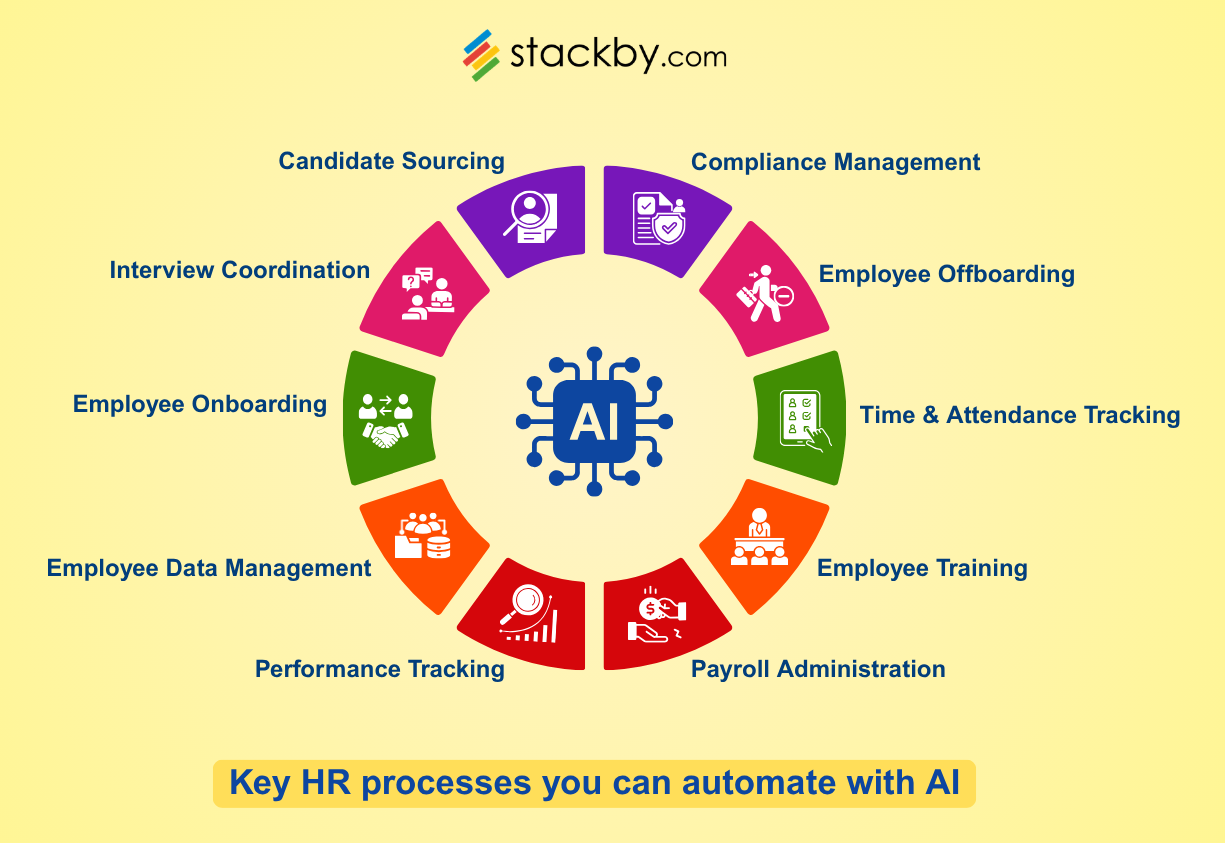
Let’s ground this in reality. What exactly can you automate? Not everything, but more than most teams realize:
Candidate Sourcing & Screening
This is where most HR teams spend unnecessary time.
- Going through resumes manually
- Trying to standardize evaluations
- Keeping track of who fits what role
With AI layered on structured data, you can:
- Summarize resumes instantly
- Extract key skills or experience
- Tag candidates based on relevance
- Maintain consistent evaluation criteria
Interview Coordination
A lot of HR work isn’t “HR work”—it’s coordination.
- Scheduling interviews
- Sending follow-ups
- Tracking who’s in which stage
This is where simple automation makes a big difference:
- Status updates triggering next steps
- Automated emails or notifications
- Clear visibility into pipeline stages
Employee Onboarding
Onboarding is one of the most repetitive workflows in HR.
Every new hire goes through the same steps:
- Document collection
- Task assignments
- Orientation tracking
Instead of recreating this every time, you can:
- Use forms to collect data
- Trigger onboarding checklists automatically
- Track completion without manual follow-ups
HR Operations & Employee Data Management
Most teams still rely on spreadsheets here—and that’s where things start breaking.
- Data gets outdated
- Versions get duplicated
- Context gets lost
A structured system helps you:
- Maintain a centralized employee database
- Link data across roles, departments, and timelines
- Keep everything updated in one place
Performance Tracking & Feedback
Performance reviews often become:
- Subjective
- Scattered
- Hard to analyze over time
With structured inputs + AI:
- Feedback can be stored consistently
- Patterns can be identified
- Summaries can be generated for quick insights
Payroll and Benefits Administration
This is one of those areas where errors are costly and manual tracking becomes risky over time.
While payroll processing itself may still happen through dedicated tools, a lot of the supporting work can be automated:
- Tracking compensation structures
- Managing benefits eligibility
- Keeping records updated across teams
With structured data and automation:
- Employee details stay consistent across records
- Changes in status (like promotions or role changes) can trigger updates
- Supporting documentation and approvals can be tracked in one place
It reduces dependency on scattered records and ensures HR always has a clear, updated view.
Employee Training and Development
Training often starts strong and then slowly becomes unstructured.
- Sessions aren’t tracked properly
- Progress isn’t documented
- Follow-ups are inconsistent
With automation:
- Training modules can be assigned based on role or onboarding stage
- Progress can be tracked centrally
- AI can help summarize feedback or learning outcomes
Over time, this creates a more consistent development process instead of ad-hoc training efforts.
Time and Attendance Tracking
This is a recurring operational task that can quickly become tedious.
- Logging attendance
- Tracking work hours
- Managing leave requests
With the right setup:
- Employees can submit entries via forms
- Records update automatically in a central system
- Leave or attendance data can be linked to employee records
Automation ensures that tracking doesn’t turn into a daily manual task, while still maintaining visibility.
Employee Offboarding
Offboarding is often overlooked—but it’s just as structured as onboarding.
Without a system:
- Tasks get missed
- Knowledge transfer isn’t tracked
- Documentation becomes inconsistent
With automation:
- Offboarding checklists can be triggered when an employee exits
- Tasks can be assigned automatically
- Final documentation and access updates can be tracked
This ensures a smoother transition without relying on memory or manual coordination.
Compliance Management & HR Support
Compliance is less about daily work and more about consistency over time.
- Maintaining employee records
- Tracking policy acknowledgments
- Ensuring documentation is up to date
Automation helps by:
- Keeping records structured and easily accessible
- Triggering reminders for updates or renewals
- Maintaining a consistent audit trail
Similarly, internal HR support (like handling employee queries) can be streamlined by organizing data centrally and using AI to assist with quick responses or information retrieval.
Where Most HR Automation Efforts Break Down
This part is important, because most automation attempts fail before they even begin. And that doesn't happen because the tools are bad, but because the setup is.
Here’s where things usually go wrong:
- No central system: Data lives across spreadsheets, emails, and tools. Automation on top of that only adds complexity.
- Jumping straight to AI: Without structured data, AI has nothing reliable to work with.
- Overcomplicating workflows: Too many steps, too many conditions—eventually, no one uses it.
- Manual work still exists in between: Even after “automation,” teams still update things manually.
The takeaway is simple: Automation works only when your data + workflows are structured first. That’s where Stackby enters the frame.
How Stackby Helps You Automate HR Processes
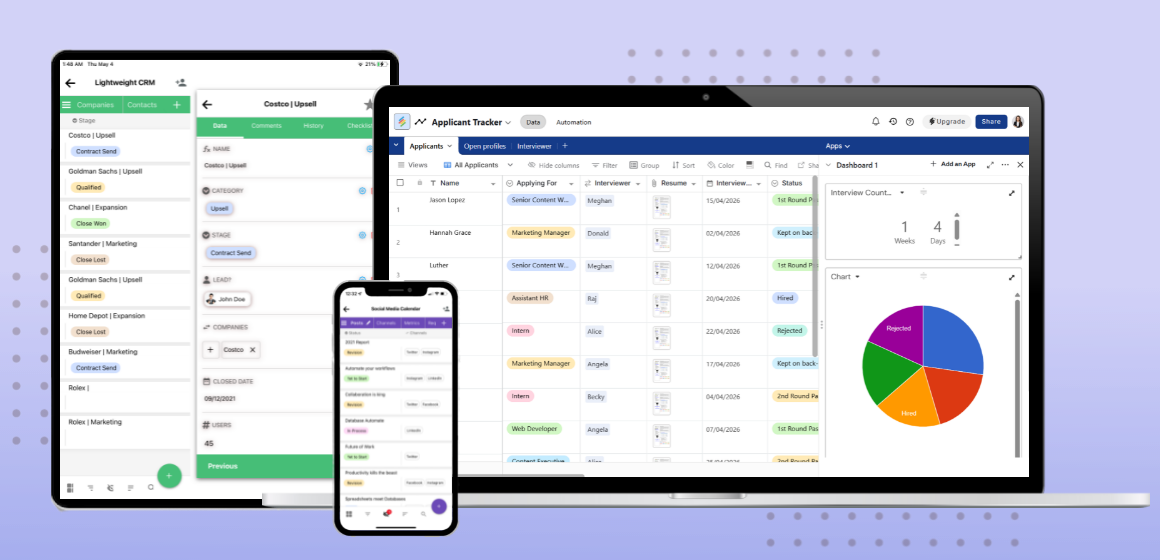
Before jumping into the steps, let’s quickly understand what Stackby brings to the table, specifically for HR workflows.
At its core, Stackby combines the flexibility of spreadsheets with the structure and functionalities of a relational database, which makes it ideal for managing workflows that evolve over time like hiring and onboarding.
Here’s how that translates into HR use cases:
- You can create structured tables for candidates, employees, roles, and workflows.
- Use different column types to store resumes, contact details, status, feedback, and more.
- Connect related data using linked records (for example: candidate → role → interview stage).
- Visualize workflows using: grid view for detailed data, kanban view for hiring pipelines, calendar view for interviews, timeline/list views for onboarding tracking.
On top of that, you get:
- Forms to collect candidate or employee information directly into your database
- Automation (triggers + actions) to reduce manual coordination
- AI fields to summarize, evaluate, or generate insights from data
- Custom workflows that adapt to your hiring or HR processes instead of forcing rigid structures
What makes this useful is not any single feature, it’s the fact that everything sits in one place.
Once that’s in place, automation becomes much easier to implement.
Steps to Automate HR Processes with AI in Stackby
Now let’s get into the actual setup that you need to follow to build a working HR system inside Stackby.
Step 1: Set Up Your HR Database
Start by creating your workspace (called a “stack” in Stackby), which will act as your central HR system. You have two ways to begin:
- Build your own base from scratch
This gives you full flexibility to structure tables exactly how your HR process works. - Use a pre-built template (recommended)
Stackby offers 1000+ templates, including a wide range of HR workflows, so you don’t have to start from zero.
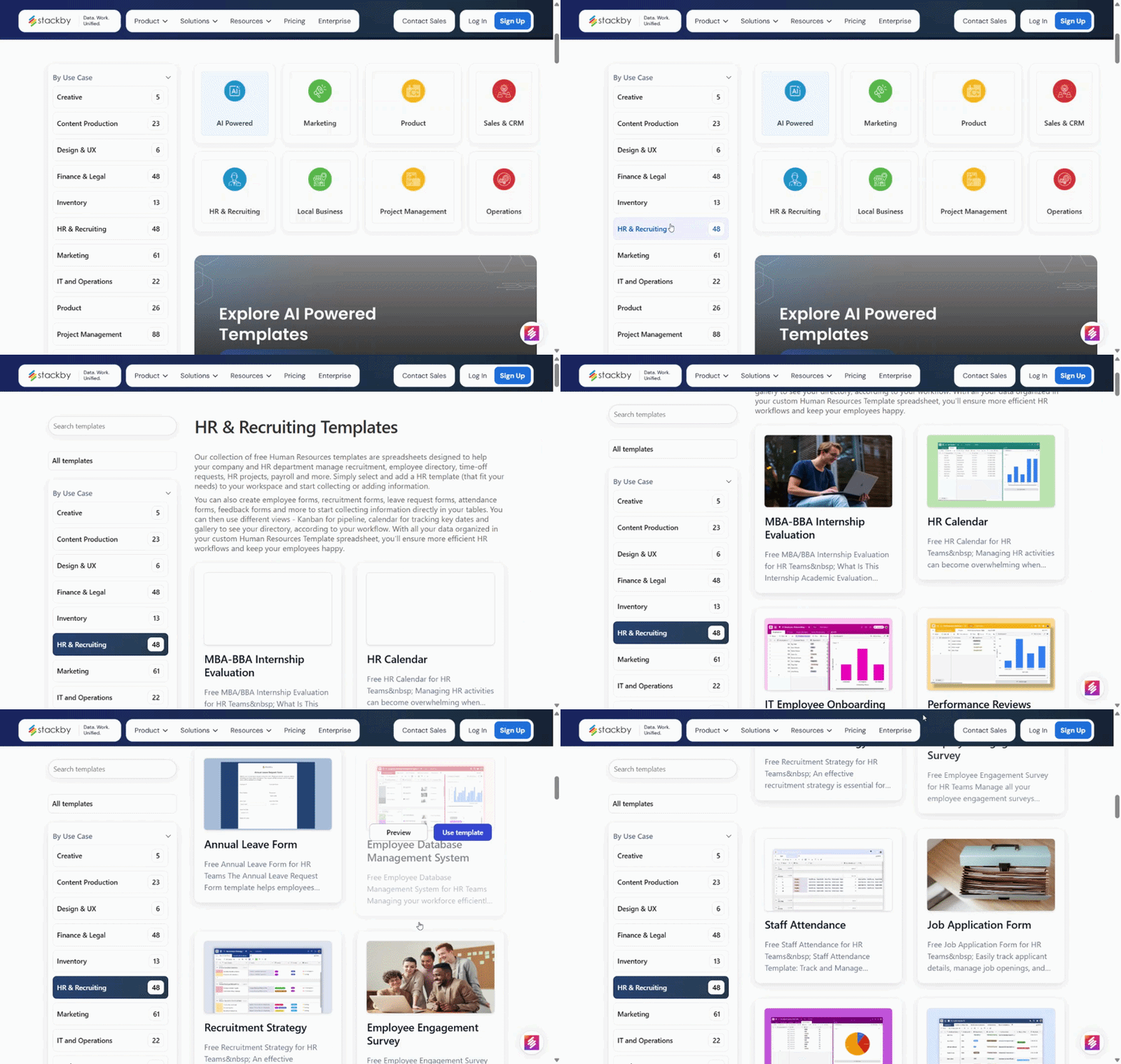
For this guide, we’ll use the Simple Applicant Tracker as the base, since it covers a complete hiring workflow. You can also explore more advanced setups like the AI Resume Scanner, which already includes AI-powered candidate evaluation.
Instead of building everything manually, the template comes pre-structured with 3 tables:
- Applicants → all incoming candidates
- Interviewer→ hiring team members
- Open Profiles/ Departments → open positions, applicants and team member assigned
- (Optional) Interviews / Feedback tables
Within these tables, define columns such as:
- Name, email, phone
- Resume (file or link column)
- Status (Applied, Shortlisted, Interviewed, Hired)
- Skills, experience
- Notes or feedback
This is your foundation. Everything else like, automation, AI, workflows, it all depends on how well this is structured.
Step 2: Use Forms to Collect Candidate & Employee Data
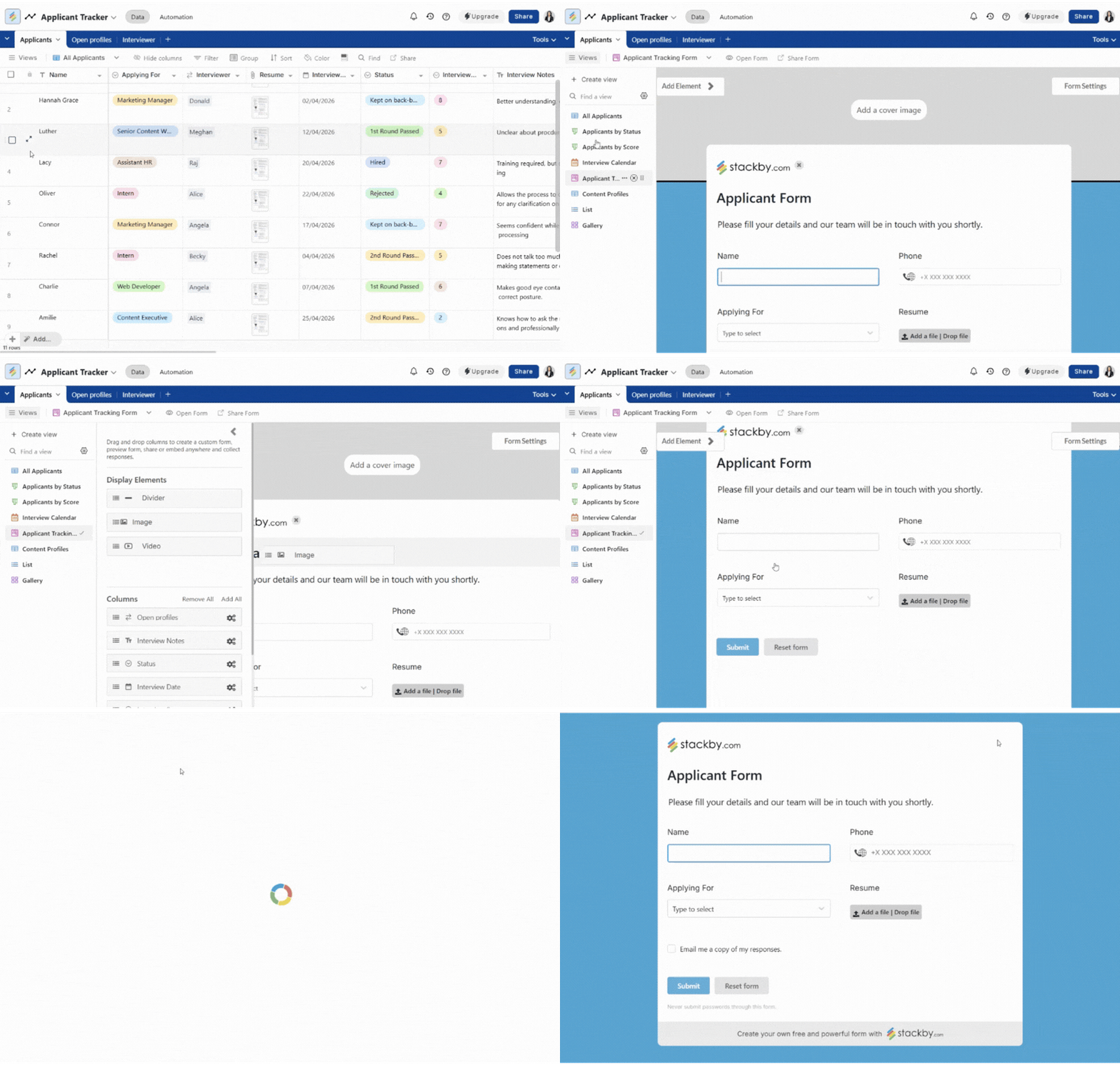
Instead of manually entering data, let it flow in automatically. Create a form connected to your "Applicants table":
- Add fields for name, contact details, resume upload, role applied
- Share this form in job postings or career pages
Every submission:
- Automatically creates a new record
- Keeps data consistent
- Removes manual entry completely
You can also use forms internally for:
- Employee data updates
- Feedback submissions
- Performance inputs
Step 3: Structure Your Hiring Workflow
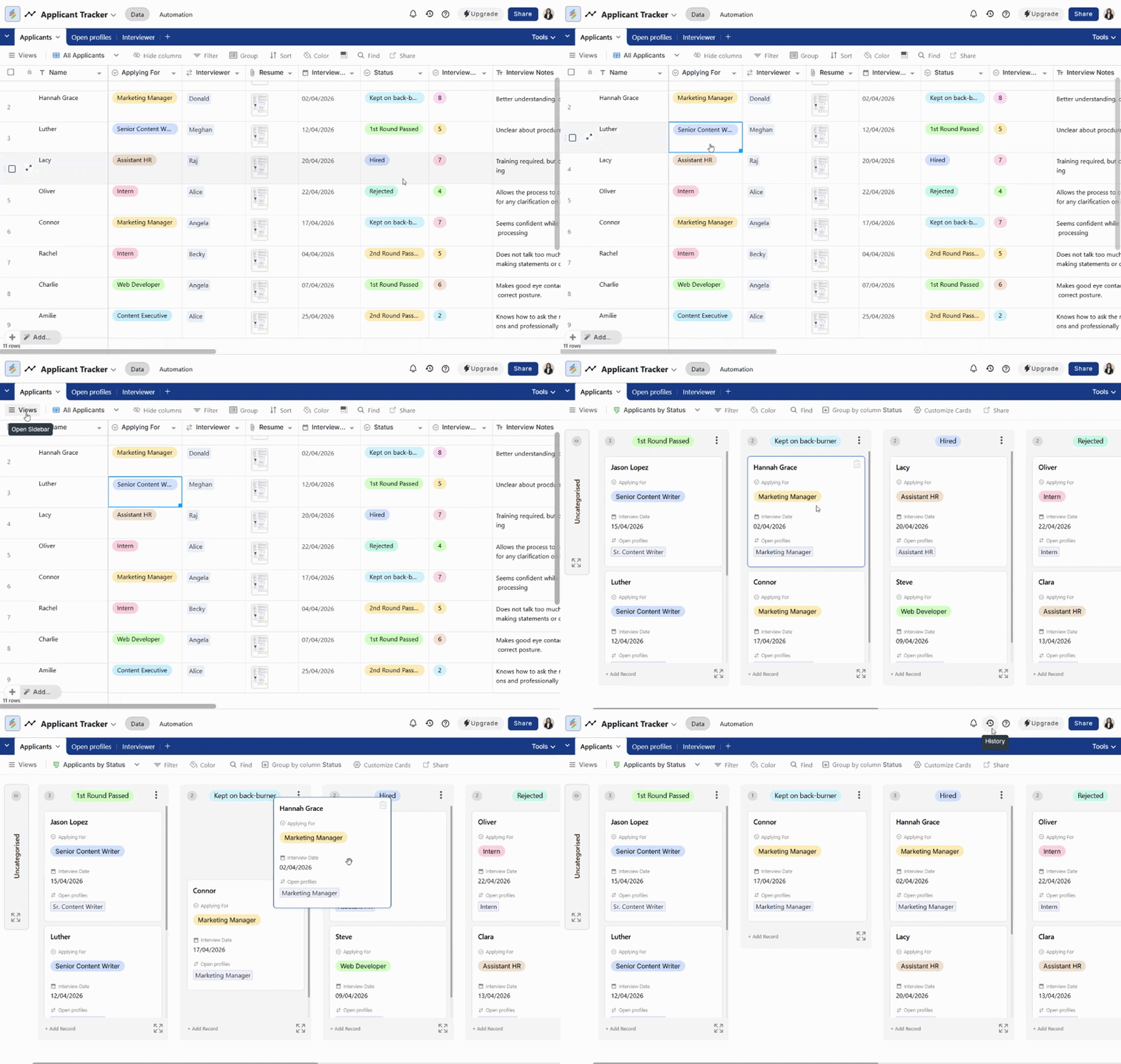
Now define how candidates move through your pipeline. Use a status column with stages like:
- Applied
- Screening
- Shortlisted
- Interviewed
- Selected / Rejected
Then visualize this using Kanban view. This gives you:
- A clear pipeline view
- Drag-and-drop movement between stages
- Instant visibility into bottlenecks
At this point, even without automation, your workflow becomes more organized.
Step 4: Add AI to Simplify Screening
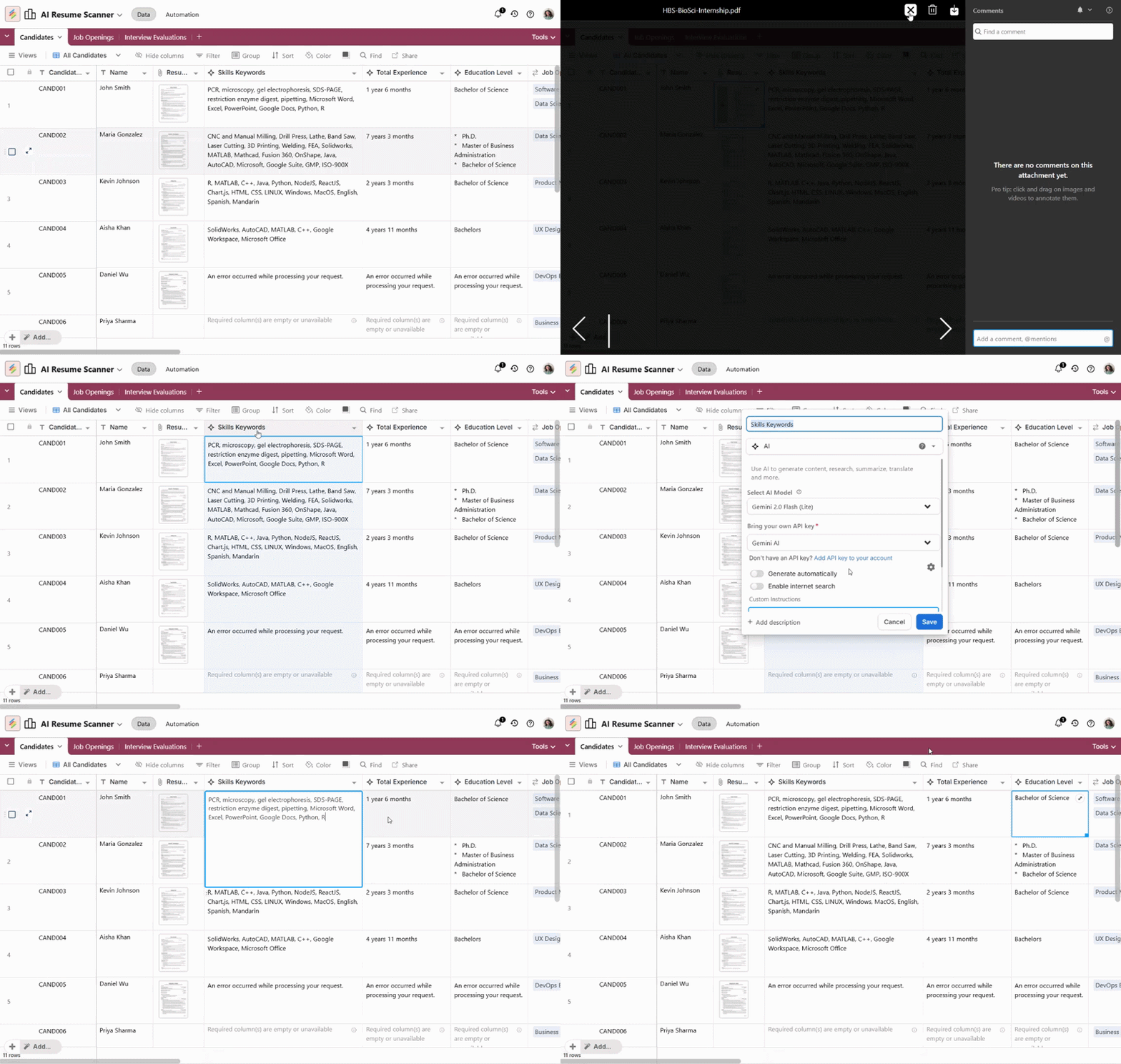
This is where things start saving real time. Using AI fields in Stackby, you can:
- Generate resume summaries
- Extract key skills or experience
- Create quick candidate evaluations
- Standardize how candidates are assessed
Instead of reading every resume in full, you get structured insights upfront.
One small but important thing to keep in mind is that AI works best as a support layer. It speeds up evaluation significantly, but a quick human review ensures that context and nuance aren’t missed.
Step 5: Automate Repetitive HR Actions
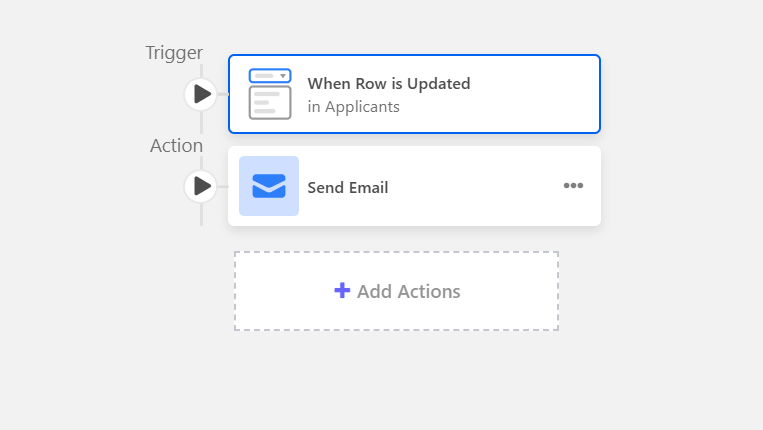
Now layer automation on top of your workflow. Set up simple triggers like:
- When status changes to “Shortlisted” → send interview email
- When candidate is marked “Selected” → move to employee table or trigger onboarding
- When new record is created → notify relevant team member
These automations remove:
- Manual follow-ups
- Missed updates
- Repetitive coordination
And the best part is that you don’t need complex logic to start. Even basic triggers make a noticeable difference.
Step 6: Build an Onboarding Workflow
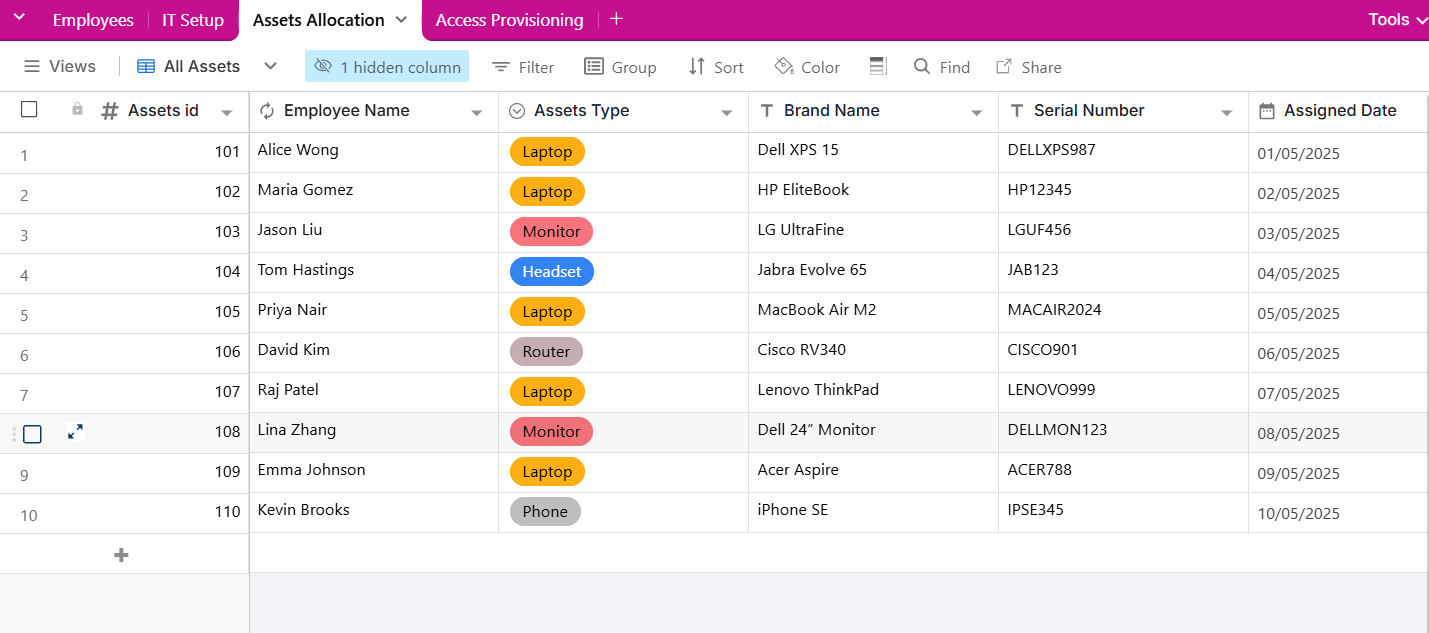
Once a candidate is hired, the next phase begins. Instead of handling onboarding manually each time, you can create a structured system.
Inside Stackby:
- Create or use a ready onboarding checklist template
- Include tasks like: document verification, account setup, training sessions, etc.
- Assign these tasks automatically when a new employee is added
Here you can track:
- Task completion
- Pending steps
- Delays in onboarding
Everything stays visible and consistent.
Step 7: Manage Employee Data & Performance
Now extend your system beyond hiring. Your Employees table becomes your central HR database.
Here, you can:
- Store structured employee records
- Link employees to departments or roles
- Track key dates (joining, reviews, milestones)
- Log feedback and performance inputs
If needed, AI can help:
- Summarize feedback
- Highlight patterns over time
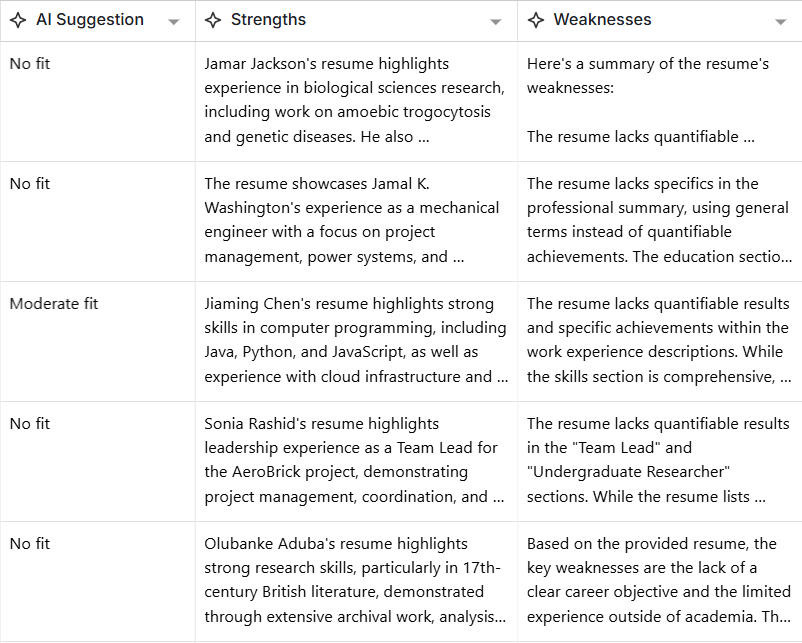
This removes the need to maintain separate systems for HR operations.
Step 8: Visualize & Track Everything
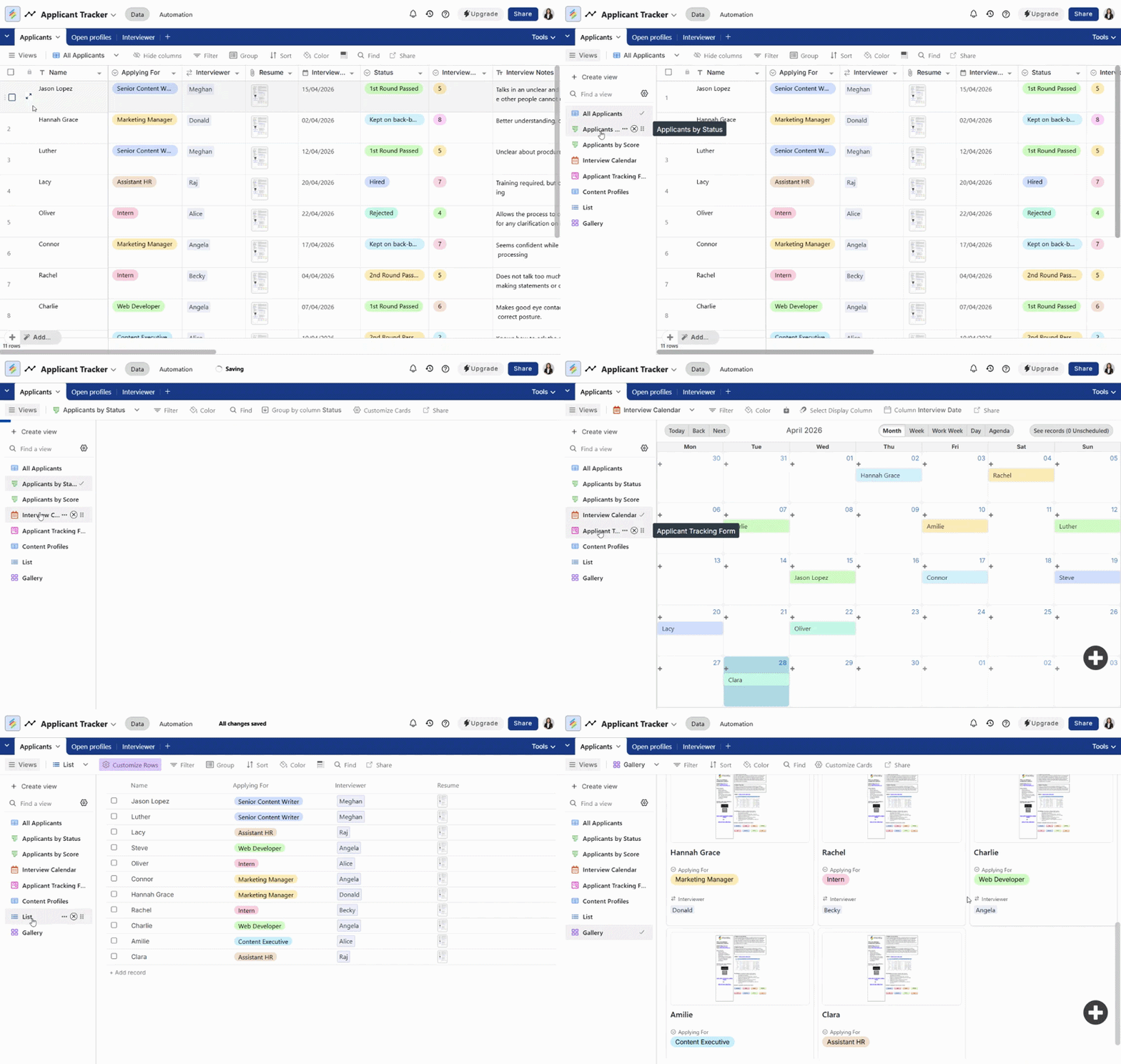
Finally, use different views to make your workflows easier to manage. Depending on the use case:
- Grid view → detailed records and editing
- Kanban view → hiring pipeline tracking
- Calendar view → interview schedules, onboarding timelines
- Timeline/List views → employee lifecycle tracking
Instead of switching between tools, everything stays connected and visible.
Step 9: Extend Your HR System as Your Needs Grow
Once your core workflows are in place, you can gradually expand your setup to handle more day-to-day HR operations without adding new tools.
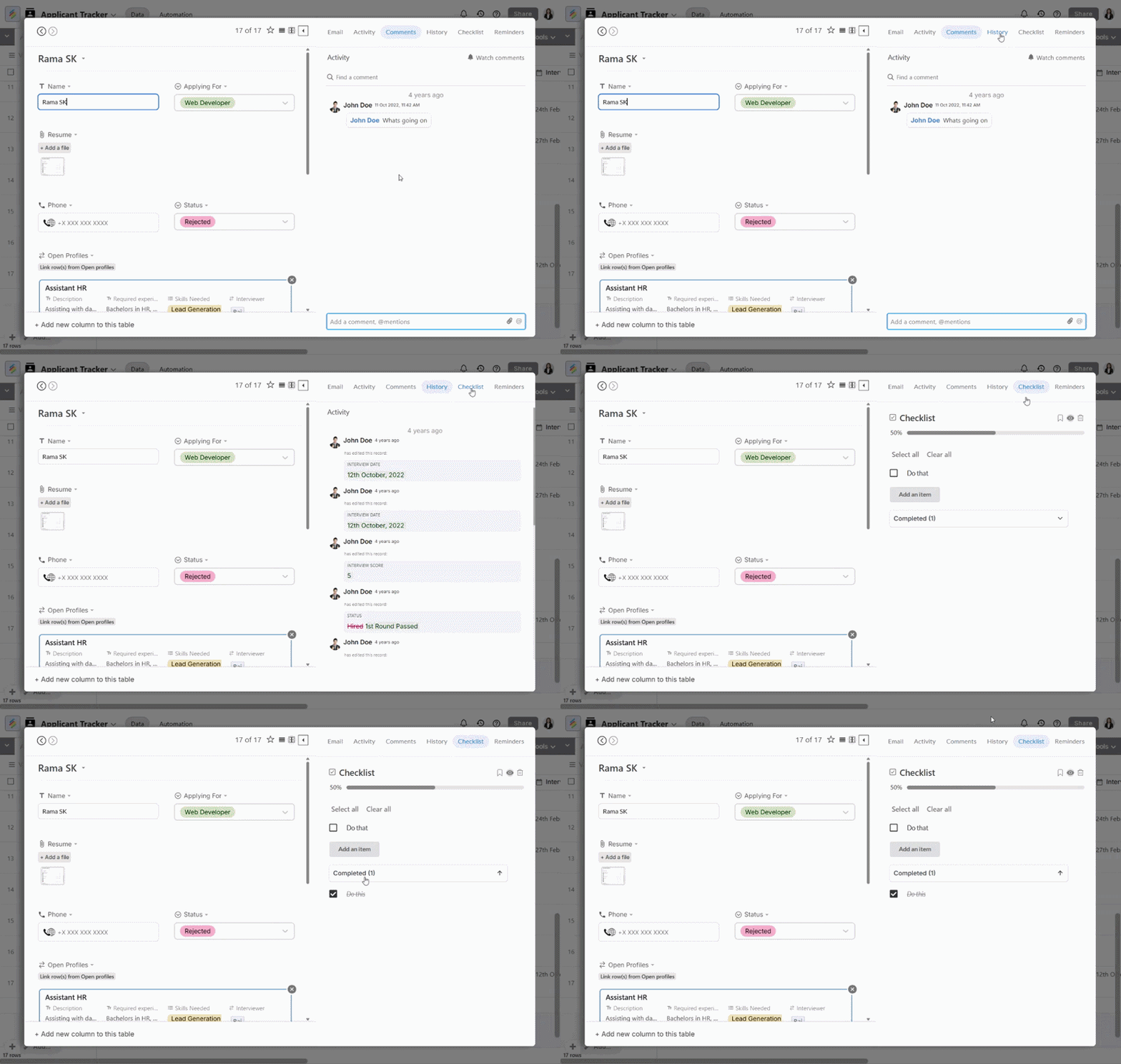
At a row level, you can manage ongoing work directly within your rows like, adding comments for discussions, using activity history to track changes, setting reminders, or assigning checklist items for tasks like onboarding and offboarding. It keeps context attached to the data instead of scattered across emails or chats.
You can also organize and visualize your data more effectively by using Stackby Powerups like coloring formatting on rows, filtering and grouping records, sorting data, table permissions and more.
Beyond that, Stackby’s apps and extensions let you build on top of your workflows when needed. For example:
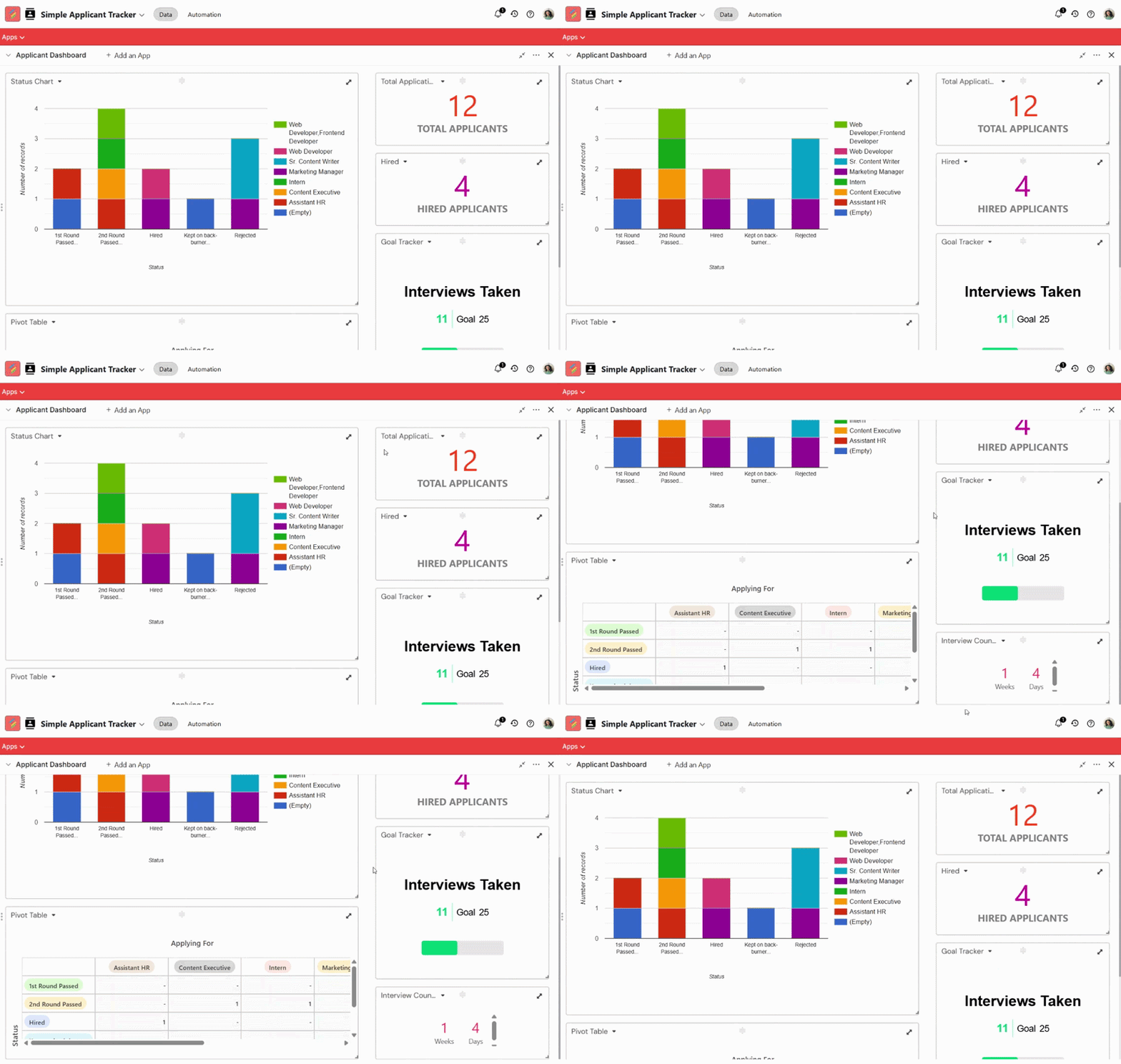
- Use charts or pivot-style views to analyze hiring trends
- Add goal tracking for HR targets
- Include description or documentation layers for internal processes
- Preview links and external data directly within your workspace
The idea isn’t to use everything at once, but to know that your system can evolve as your HR processes become more structured and complex, without needing to rebuild or switch tools.
Conclusion
HR automation doesn’t start with AI. It starts with structure. Once your data and workflows are clearly defined, AI and automation simply make them faster and easier to manage.
The real shift isn’t in replacing HR processes, it’s in removing the friction around them. With a system like Stackby, you’re not adding another tool to your stack. You’re creating a workspace where:
- Data stays connected
- Workflows move automatically
- And repetitive effort is significantly reduced
If you’re starting out, don’t try to automate everything at once. Pick one workflow, like hiring or onboarding, set it up properly, and build from there. That’s usually where the biggest impact begins.
HR Automation FAQs
Do I need a fully structured HR system before adding AI in Stackby?
Not necessarily but the more structured your data is, the better your results will be. You can start simple with basic tables and workflows, and gradually refine them as you go. The key is to avoid jumping straight into AI without clarity on your process. Even a moderately structured setup in Stackby can start delivering value, and you can layer AI on top as your workflows mature.
How customizable are HR workflows in Stackby compared to traditional HR tools?
That’s actually where Stackby stands out. Most HR tools come with predefined workflows, which work until your process slightly deviates. With Stackby, you’re building workflows from scratch, so you can adapt them to your hiring style, approval flows, or onboarding steps instead of adjusting your process to fit the tool. It’s especially useful for teams that don’t follow rigid HR structures.
Can Stackby handle both hiring and ongoing HR operations in the same system?
Yes, and that’s one of its biggest advantages. Instead of using separate tools for recruitment, onboarding, and employee management, you can manage everything within connected tables. Candidates can seamlessly move into employee records, onboarding workflows can trigger automatically, and performance tracking can continue in the same system, without duplicating data or switching tools.
What kind of HR teams benefit the most from this setup?
This approach works particularly well for:
- Startups and growing teams that don’t want to invest in multiple HR tools early on
- Teams with evolving processes that need flexibility
- HR professionals managing multiple roles (hiring + operations + coordination)
Larger teams can also use it, especially for specific workflows or departments, but the biggest impact is usually seen where agility and customization matter more than rigid structure.
How do you avoid over-automating HR processes?
A good rule is to automate actions, not decisions. Use automation for things like status updates, task assignments, and communication triggers but keep final evaluations, hiring decisions, and sensitive processes human-led. Stackby makes it easy to build this balance because you control the workflow logic, so you can automate repetitive steps without losing visibility or control over critical decisions.
![Best 14 HR Database Software for Recruitment Agency [Free+Paid] [2026]](/blog/content/images/size/w960/2024/04/stackby--hr-database-software-blog-post-5.3.jpg)
![A Simple Guide on Workflow Management Software [Updated 2026]](/blog/content/images/size/w960/2021/12/work-management-blog.png)
![Step by Step Guide on How to Build Forms in a Database [2026]](/blog/content/images/2022/03/form-database-blog.png)