8 Steps to Build a Personal Sales CRM in 2026
Discover how to build a fully customized Sales CRM in Stackby. Streamline your sales process with automation, integrations, and flexible templates.
Are you also struggling to manage your sales? Your CRM may be the problem! According to Hubspot’s ‘The State of Marketing Report’ around 40% of salespeople still use spreadsheets and emails to manage customer data.
Managing leads, contacts, follow-ups, and sales opportunities across spreadsheets can quickly become difficult as your business grows. A well-structured CRM brings this information into one place and gives sales teams a consistent way to manage their pipeline.
But not every business needs a rigid, off-the-shelf CRM. A custom sales CRM can be structured around your sales process, with the fields, views, automations, and integrations your team actually needs. This guide explains how to build a sales system in Stackby, from setting up your database to creating workflows, permissions, and sales dashboards.
For teams focused on improving lead acquisition, lead generation automation can help reduce manual data entry and keep prospect information organized within the CRM.
Many companies struggle with off-the-shelf CRM solutions that do not meet their requirements, which is why a custom sales CRM can provide more flexibility for different sales processes.
A custom sales tool should reflect the way your team manages leads, contacts, deals, follow-ups, and customer interactions. With a flexible database structure, customizable views, and automation, teams can create a sales workspace around their existing process rather than changing the process to fit generic CRM software.
Challenges without Proper Sales CRM
Your team might face certain challenges without a proper sales CRM. These includes:
1. Unorganized Customer Data
It is difficult to keep track of calls and follow-ups when customer information is scattered over emails, spreadsheets, and notes without a centralized system.
2. Missed Sales Opportunities
Without proper tracking and follow-up reminders, it's possible that you miss valuable customers. In the absence of a CRM it may happen that you overlook the lead follow-up.
3. Inefficient Communication & Automations
Sales team mostly struggles with coordinating the leads at the right time. This leads to repetitive efforts, missed follow-ups and lack of alignment on sales deal status.
4. No Sales Insights
You won't be able to make right decisions without proper reporting and analytics. It becomes difficult to track performance and identify trends.
5. Scaling Becomes Difficult for Team
Managing customer relationships without a proper CRM becomes difficult as businesses expand. It may also lead to inefficiencies and lost customers without a centralized management. Without proper management scaling within the team becomes difficult. It may result in lost opportunities, more efforts and inconsistent customer experiences. Using a CRM helps you manage a streamlined process for all your customers.
Teams currently managing customer information in spreadsheets can also see how to build a CRM in Excel before moving to a more structured CRM database.
How Stackby Works as a Custom Sales CRM Builder
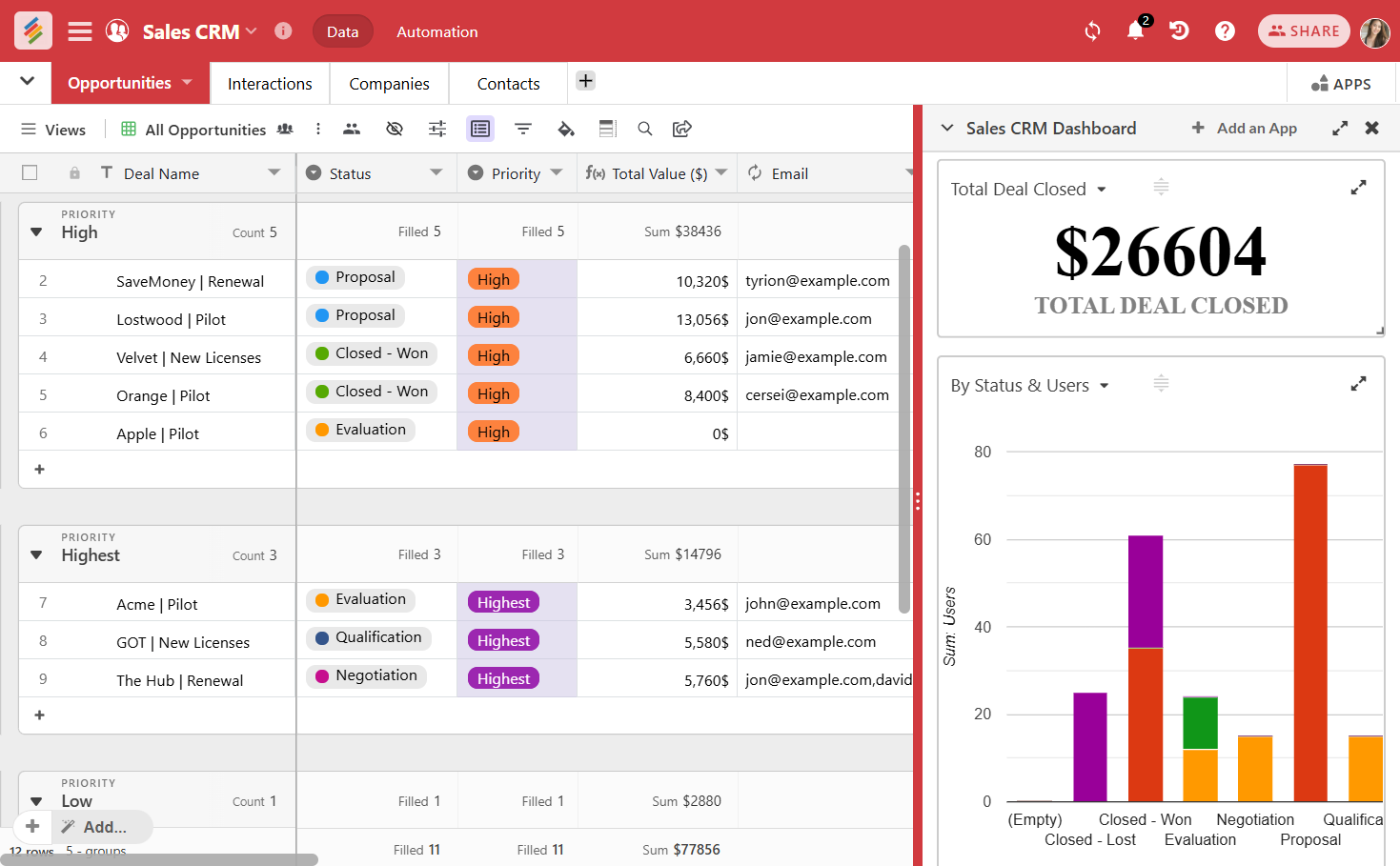
Stackby works as a flexible sales CRM builder, allowing teams to create a CRM around their sales process instead of adapting their workflow to a rigid system. Unlike rigid and expensive CRM systems, Stackby offers an affordable, customizable alternative that seamlessly integrates with a wide range of third-party tools.
Why Stackby?
Completely Customizable - You can build a CRM tailored to your sales workflow with 25+ column types and multiple view options. Whether you're in insurance, accounting, or real estate, Stackby adapts to your industry, making team collaboration seamless.
Easy to Use - Stackby is a no-code platform with a spreadsheet-like interface. It is a simple platform for anyone to set up and use - with custom views like Grid, Kanban, Calendar of Forms. If you're considering how to build a custom CRM without code, a flexible database structure can provide a practical foundation for contacts, deals, activities, and follow-ups.
Automation and Integrations - You can easily connect Stackby’s CRM with popular lead management APIs and integrate the CRM with third party tools to save time.
Affordable Pricing - Stackby offers a free version to start with. Or else you can also customize your CRM as per your business needs. Avoid buying costly CRM subscriptions. Our basic plan starts at $149 for 3 users annually - most cost effective than other CRM software. A well-structured CRM makes it easier to understand how to build a scalable CRM workflow that can adapt as your sales process grows.
Now here's a step-by-step guide to using Stackby as a sales CRM builder and creating a CRM around your team's sales process. The steps below also provide a practical framework for how to build a sales system that keeps customer data, follow-ups, and sales activities connected.
Begin your sales workflow automation with a simple crm template that can be customized for any team size or industry.
A Guide to Build your CRM in Stackby
Step 1: Defining Requirements
- Before setting up your CRM, outline your sales process, customer data, team responsibilities, and automation requirements. This provides the foundation for how to build a sales system that your team can use consistently as the business grows. Some of the questions to keep in mind are mentioned below:
- Which data do you need to track?
- How will the CRM be used by the sales team and other members?
- What will be the necessary integrations for your needs?
- What permissions will each team member require to access any specific information?
Step 2: Creating a New Database (Stack)
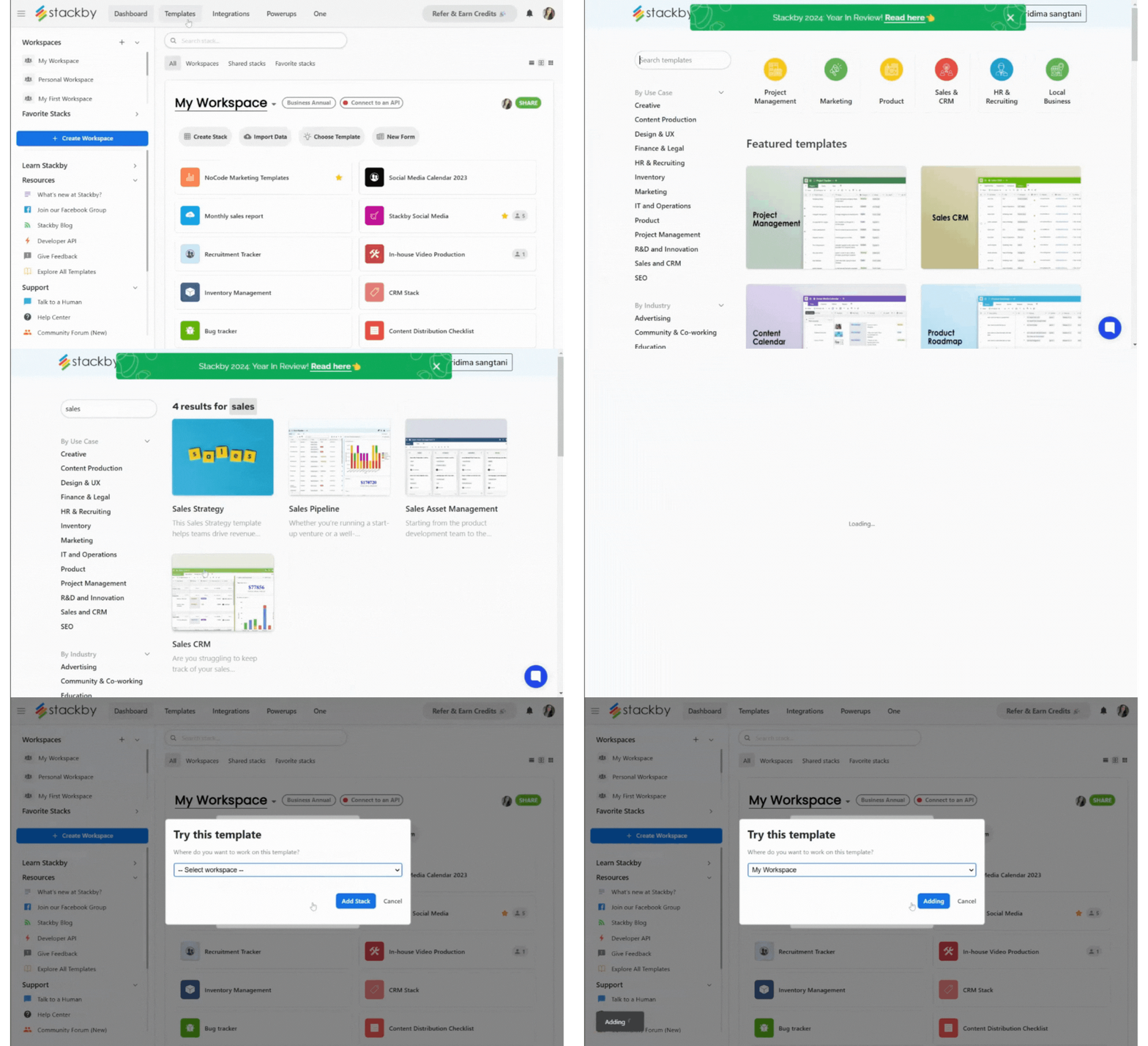
- Login to your Stackby account for free and create a new Stack.
- You can start from scratch or choose a customizable CRM template as per your business needs. For a faster setup, the Sales CRM template provides a structured starting point for managing leads, contacts, deals, and follow-ups.
- Then customize the template to meet the needs of your team's workflow and collaborate. If you're considering how to build a custom sales tool, Stackby lets you tailor tables, fields, views, and automations around your team's requirements.
Step 3: Design Your Custom Sales CRM Structure
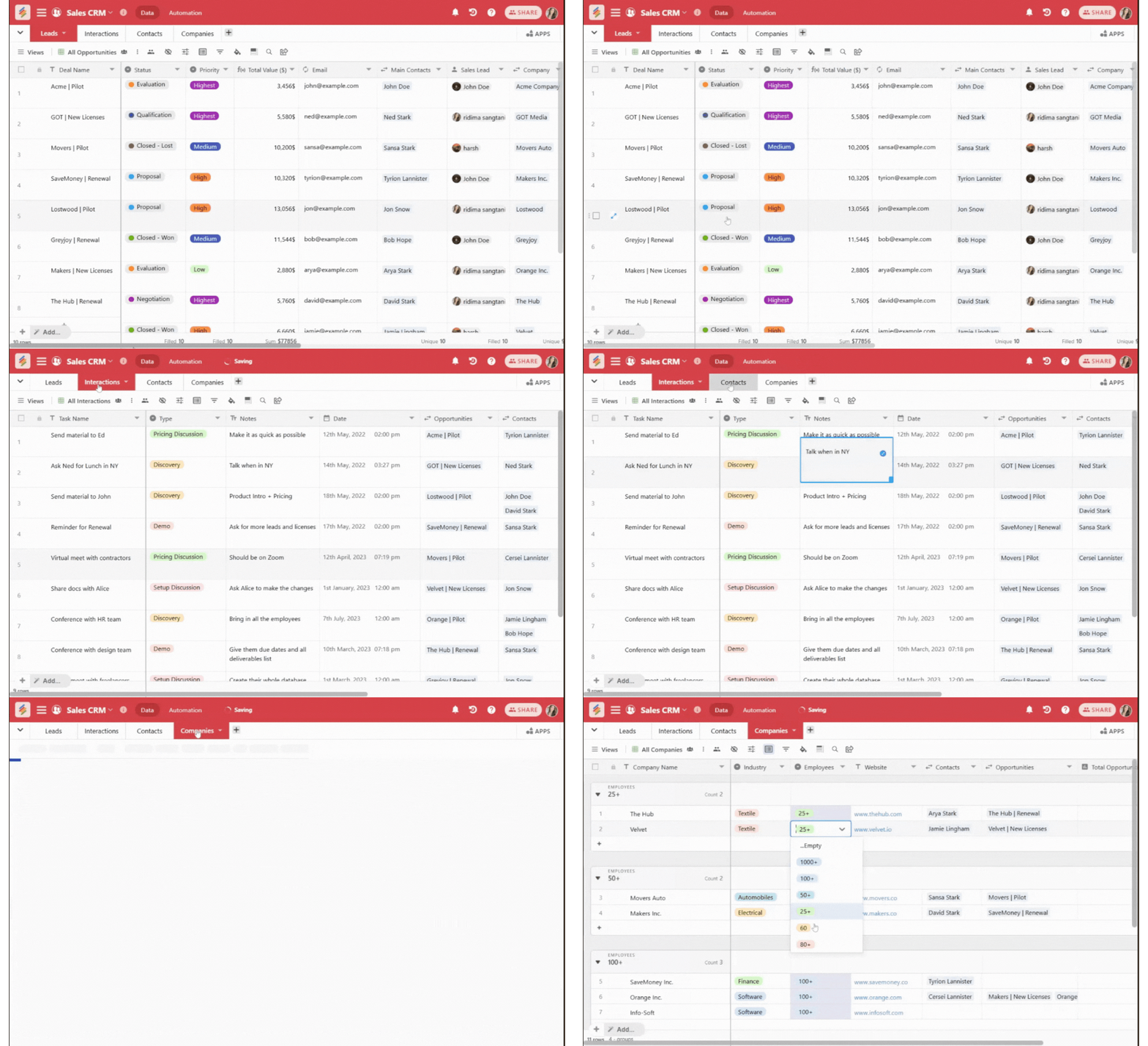
To effectively manage your sales process, your CRM should be structured with dedicated tables for different aspects of customer interactions. In Stackby’s Sales CRM, we recommend organizing your data into the following four key tables:
- Leads Table – Store all potential leads, including their details, status, and source, to track their journey through the sales pipeline.
- Interactions Table – Log every interaction with leads and customers, such as emails, calls, meetings, and follow-ups, ensuring seamless communication.
- Contacts Table – Maintain a database of all contacts associated with specific companies and deals, allowing for better relationship management.
- Companies Table – Keep a record of all businesses you engage with, including key details, industry type, and associated contacts and deals.
Stackby also works as a flexible sales CRM builder that can be customized around your sales process, data structure, and team workflows.
Step 4: Customize Views and Columns
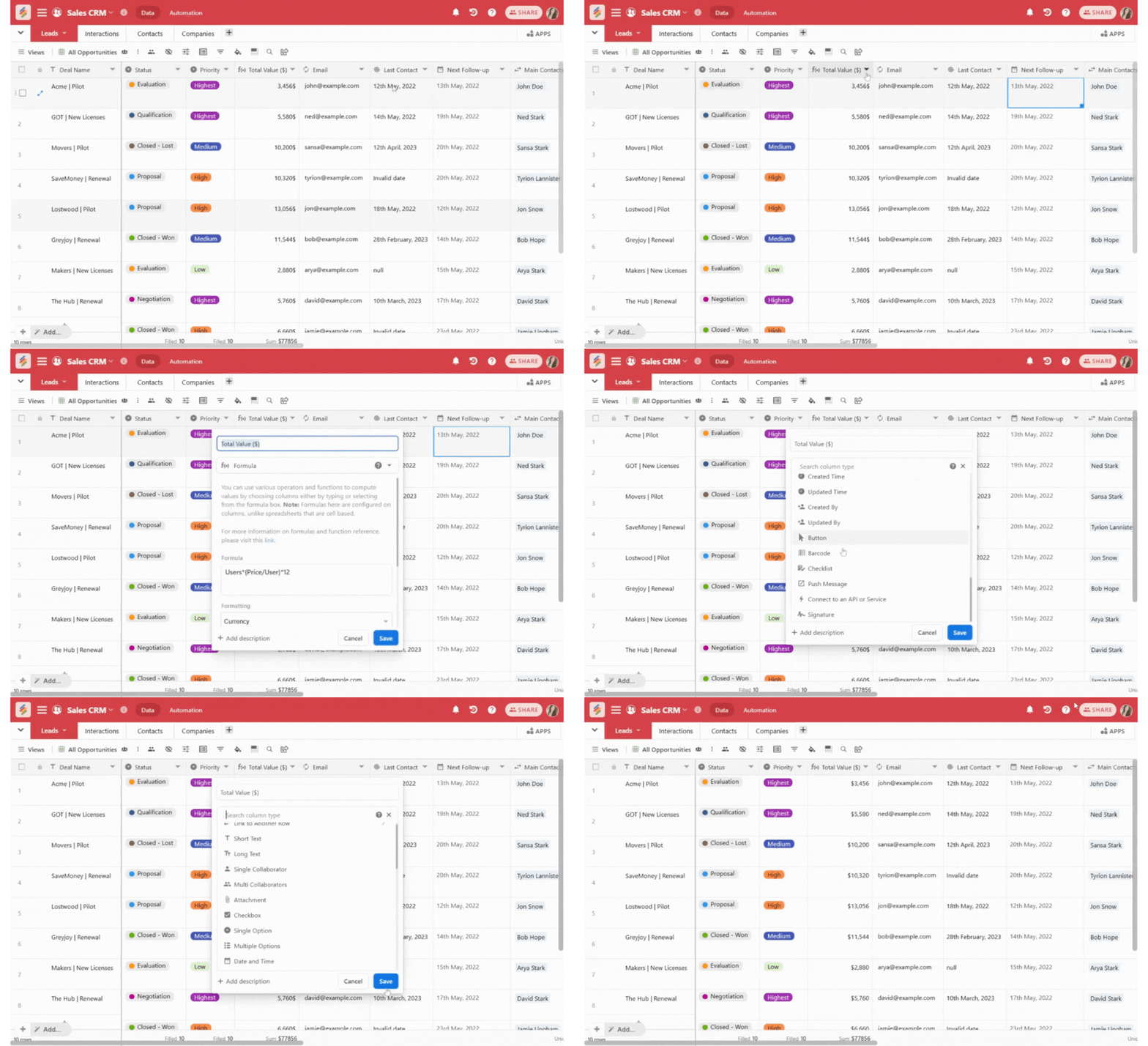
Stackby offers 25+ columns that allows you to customize your CRM's database. You can use them as per your needs:
- Such as text columns can be used for customer name and info.
- Dropdown menu can be used for different types of sales stages such as lead, negotiation and closed.
- Date columns can be used as follow up reminders.
- Checkboxes can be used to mark completed tasks.
- Formulas can be used to calculate the revenue forecasts.
- Attachments columns can be used to store invoices, contracts and other important documents of that deal.
For individual sales professionals and smaller relationship-management workflows, the Personal CRM template can help organize contacts, interactions, and follow-up reminders.
You need to choose the best view for your workflow. Stackby offers multiple view options to organize your data, including:
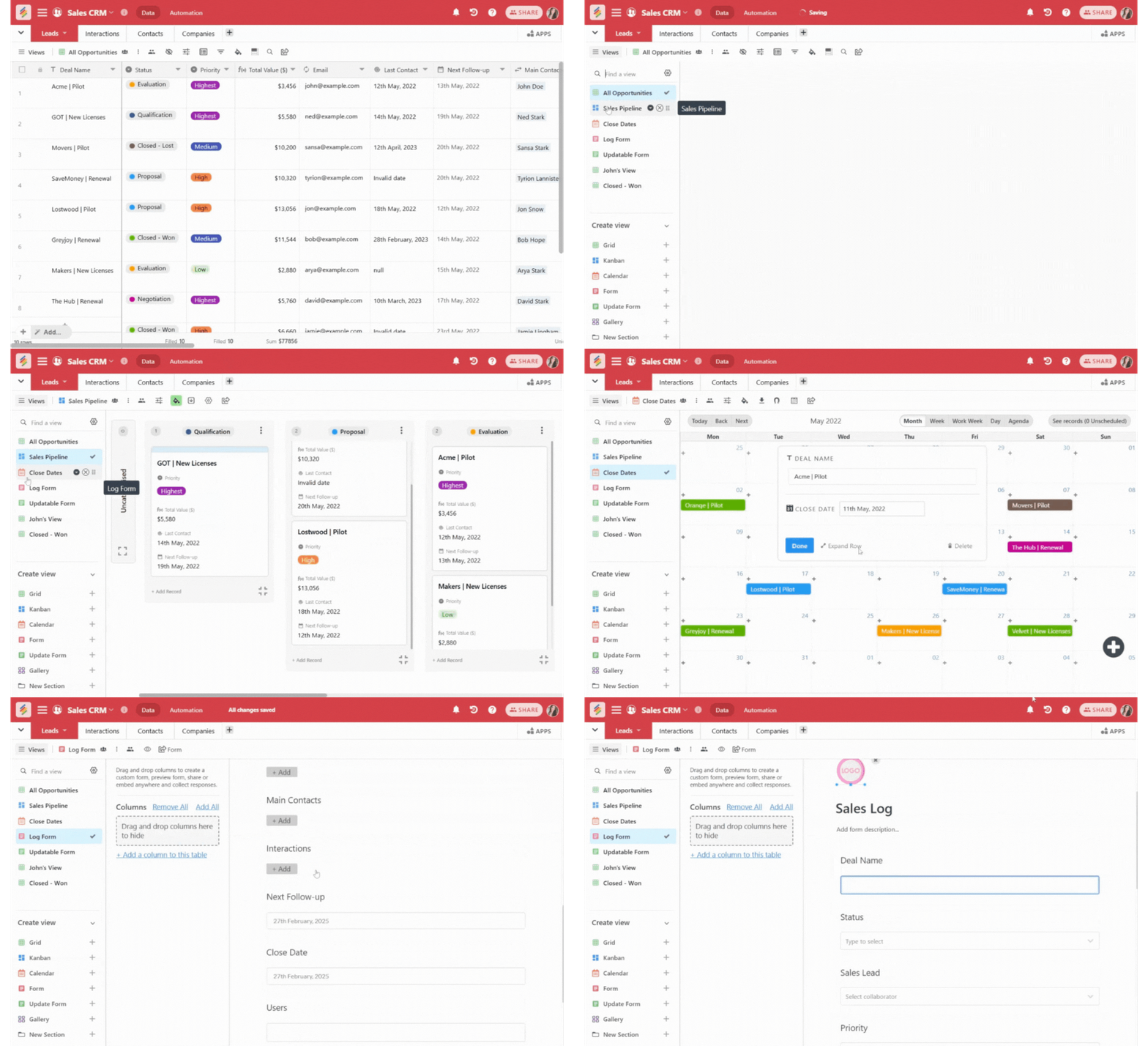
- Grid View - A spreadsheet style format for detailed data view.
- Calendar View - If you want to keep track of calls, meetings and follow-ups.
- Kanban View - To visualize deals across different pipeline stages. The Sales Pipeline template is another useful option for organizing deal stages, expected values, priorities, and sales progress in one place.
- Gallery View - To display customer profiles and deals visually.
- Form View - To easily collect lead information through forms.
- List view - This is to easily view your data in a list format.
You also get a Pivot Table App that lets you effortlessly summarize, analyze, and break down your sales data, helping you spot trends, track performance, and make data-driven decisions.
Step 5: Automate Your Sales CRM Workflow
Now here’s how you can use your Stackby CRM.
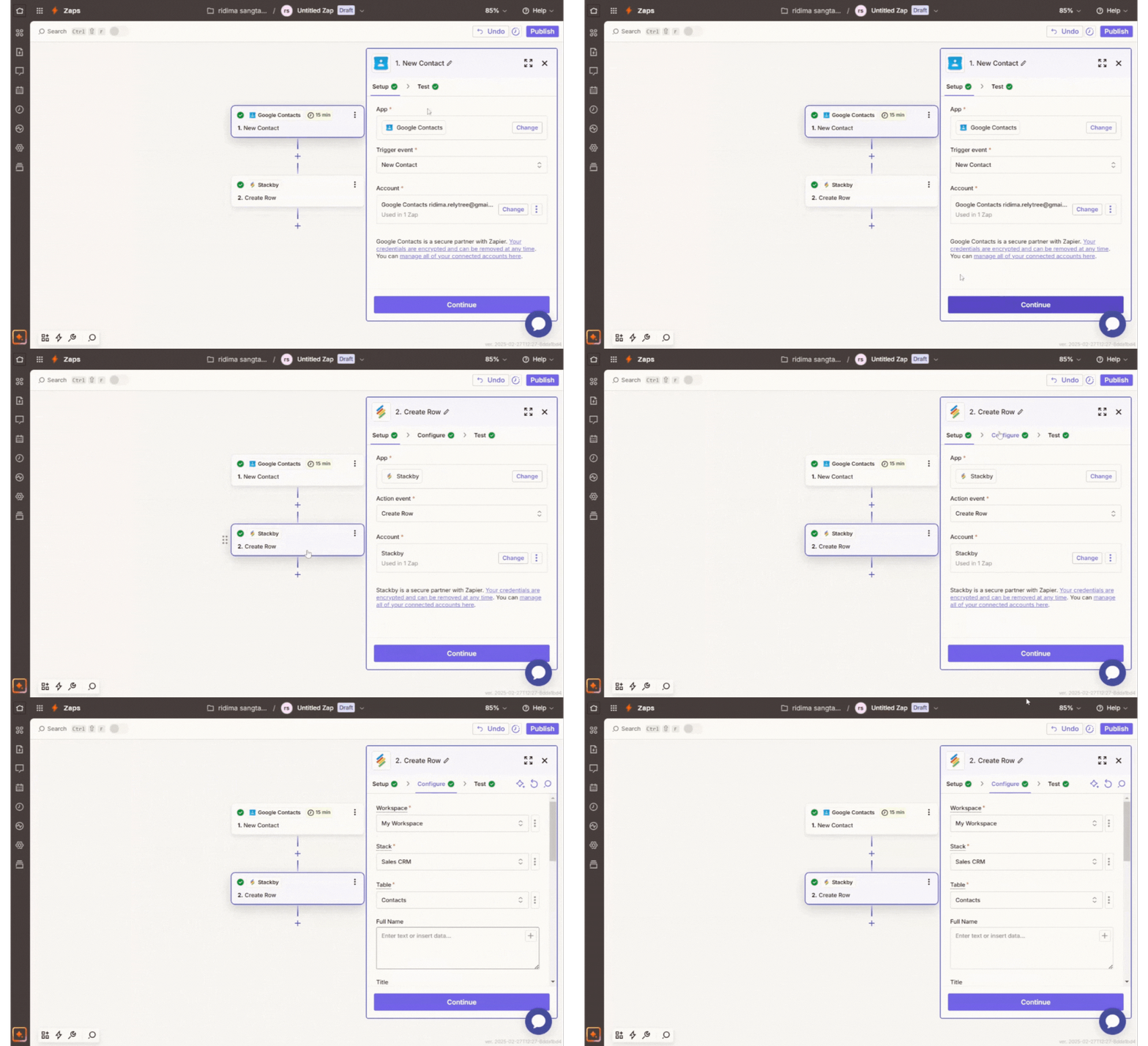
- You can connect Stackby to third party tools such as Gmail, Slack and Zapier for easy automation.
- You can use Stackby API connections to extract live data from platforms like LinkedIn and Google Analytics.
- You can automate follow-ups with Stackby’s internal automation, triggering actions when a lead form is filled or a deal reaches a certain stage.
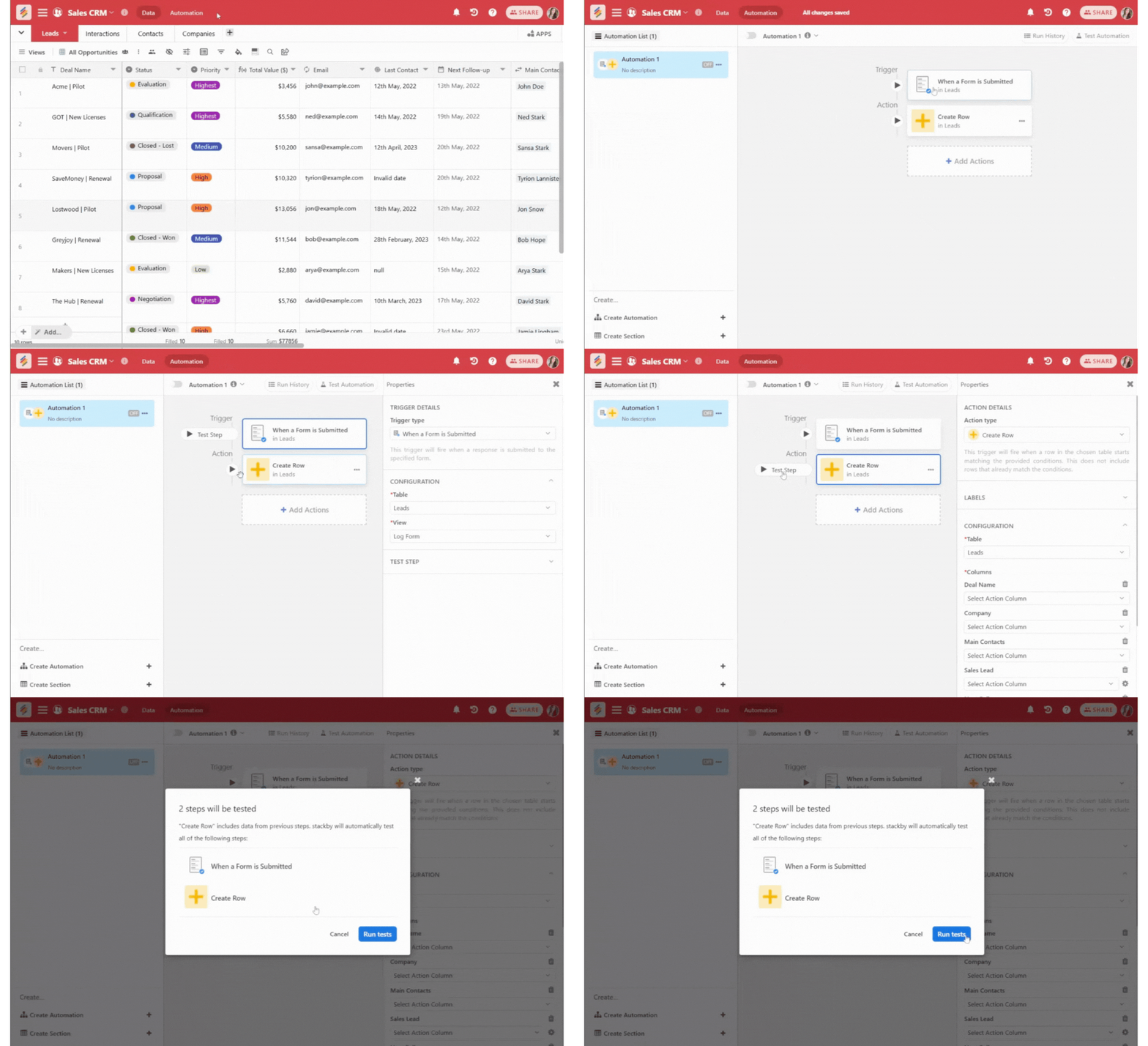
- You can easily integrate your sales tech stack, such as HeyReach MCP, with Google Sheets to share real-time sales data among team members.
- You can even set automated notifications to remind the team members of pending follow-ups.
- You can leverage Stackby CRM data by feeding it into different tools to enhance productivity. For example, Connecting it to AI sales roleplay tools, helps teams practice realistic selling scenarios at scale.
Step 6: Assign Team Roles and Permissions
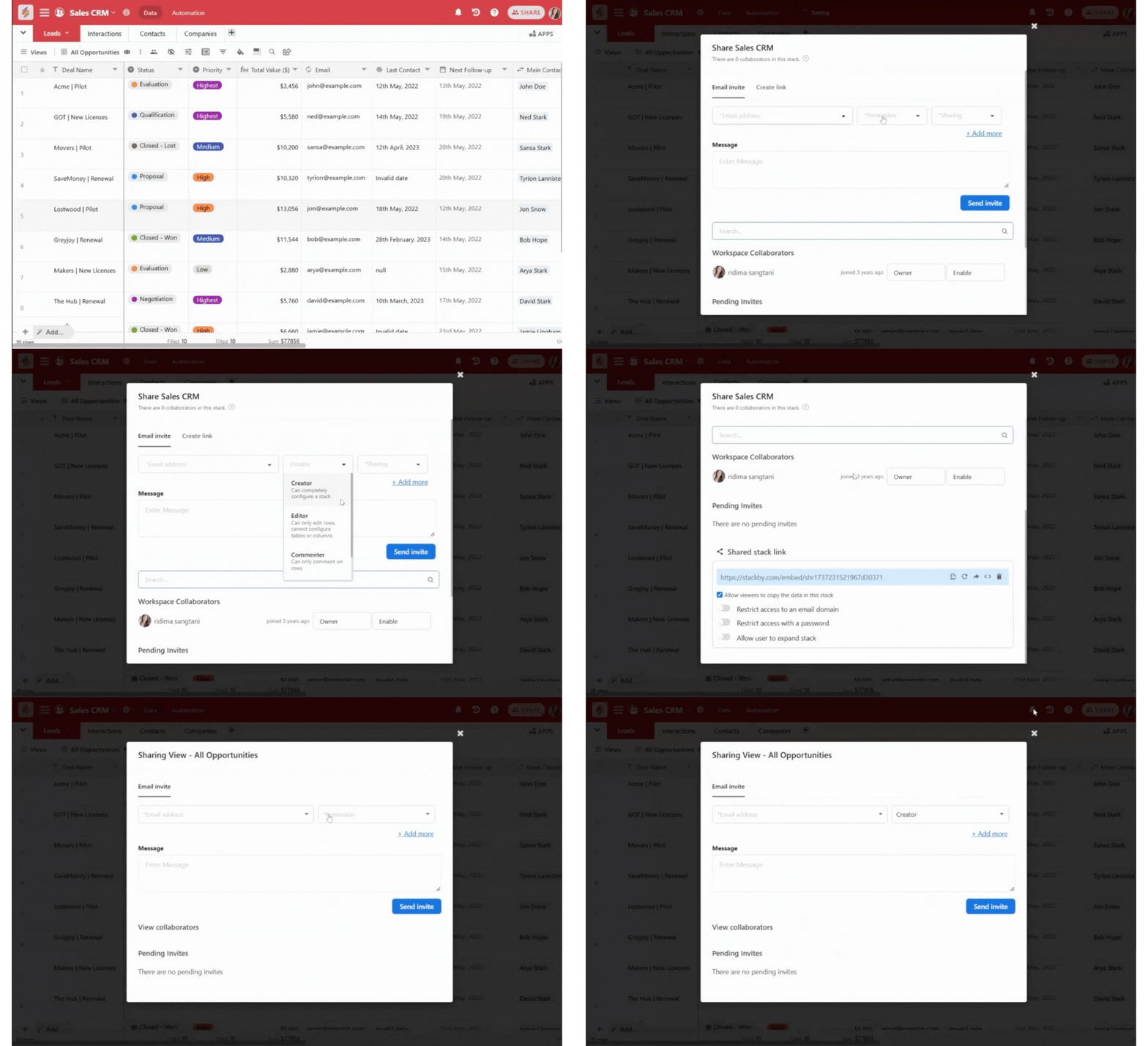
You can ensure a secure collaboration by assigning specific user roles for your sales CRM:
- Admin - Person with full access to edit and manage CRM settings.
- Managers - They can access reports and analytics for better decision-making.
- Editor - This person can add and update records.
- Viewer - This person can view but not edit the data. This will be helpful for members who need to take follow-ups.Sales Representatives - People assigned with limited access to leads and follow-ups, only added to a particular view assigned to them.
Step 7: Track Your Sales System With Dashboards
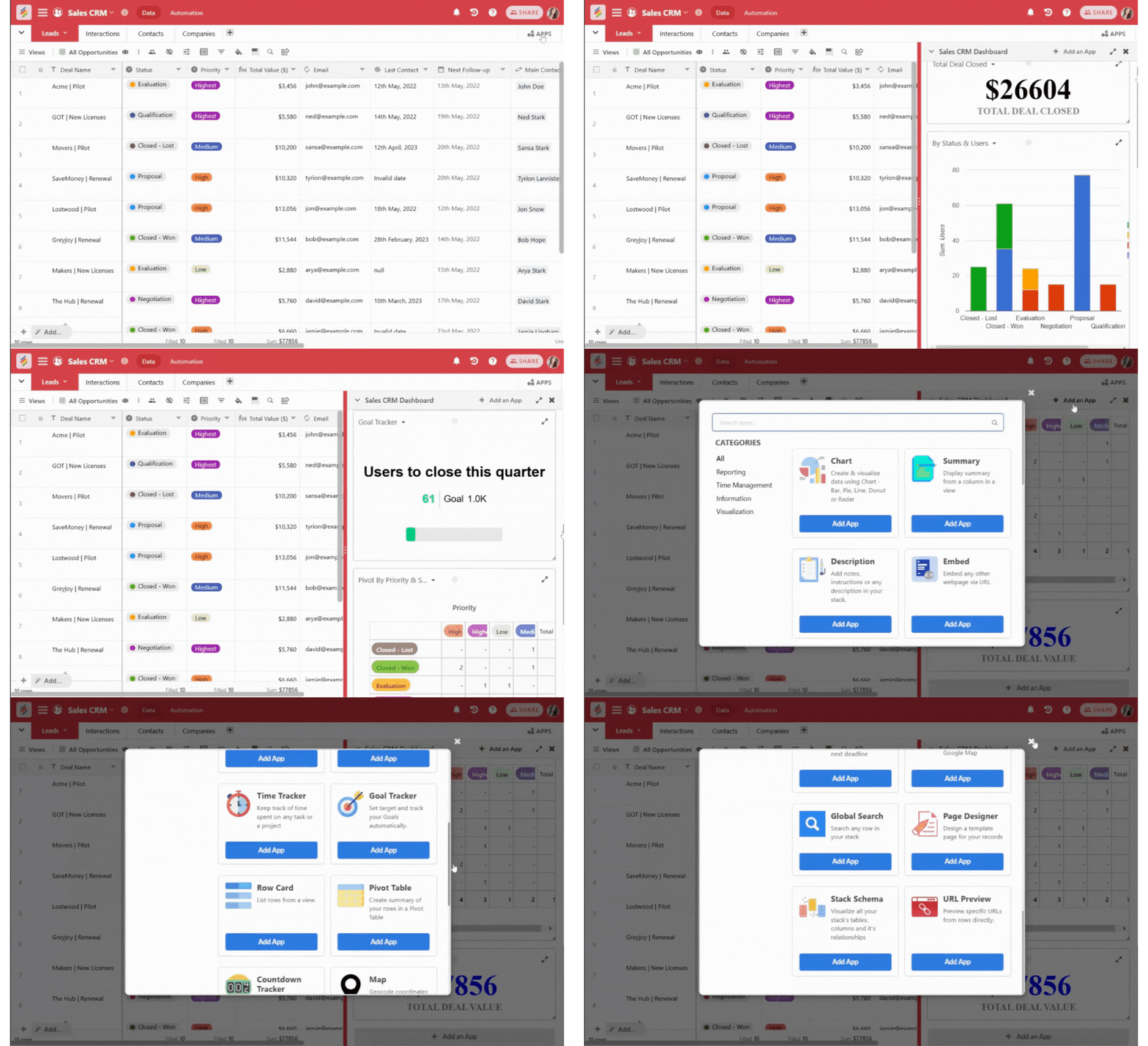
- You can create a sales dashboard to visualize the performance of your customers.
- With the help of reporting features of Stackby you can generate custom insights with charts, summary boxes and pivot tables. Stackby’s reporting features make it easier to turn CRM data into dashboards and performance insights for sales teams.
- You can track all the leads, deal value and customer engagement in real time with Stackby’s sales CRM.
- You can easily monitor monthly and quarterly sales goals and measure team productivity with the help of a proper CRM.
- You can set trend analysis to identify the periodic fluctuations in sales performance.
Step 8: Test, Improve and Build a Scalable CRM Workflow
- Collect feedback from your team and make any necessary improvements if needed.
- As your sales team grows, review your CRM structure, automations, permissions, and integrations to ensure the workflow can support increasing leads, customers, and sales activity.
- Adjust the column types, views and automations as your business expands for better management.
- Scale your CRM by adding new automations and integrations as required.
- Continuously analyze the CRM’s usage reports to optimize the workflow.
Frequently Asked Questions About Custom Sales CRM
What is a custom sales CRM?
A custom sales CRM is a customer relationship management system that can be configured around a company's specific sales process, data structure, workflows, and reporting requirements.
How do you build a scalable CRM workflow?
A scalable CRM workflow starts with a structured database and clearly defined sales stages. As the team grows, automations, permissions, integrations, and reporting can be added so the CRM continues supporting increasing sales activity.
Can you build a CRM without coding?
Yes. No-code database and application platforms can be used to create CRM systems without traditional software development. Teams can configure tables, fields, views, forms, automations, and dashboards through visual interfaces.
What is a sales CRM builder?
A sales CRM builder is a platform that lets teams create and customize their own CRM system without having to develop one from scratch. The right platform can provide databases, views, workflows, automations, integrations, and reporting.
How do you build a custom sales CRM?
Building a custom sales CRM typically involves defining the sales process, creating tables for leads and contacts, adding relevant fields, creating pipeline views, setting up automations, connecting integrations, and building dashboards for reporting.
Conclusion: Take your Sales Control with Stackby
Stackby's custom CRM gives you the ability to manage your sales pipeline efficiently and improve customer relations of your business. It also helps boost revenue all without the limitations that you find in a traditional CRM software.
By following the above guide you can create a customizable customer management system that evolves your business globally.
So are you ready to build your custom CRM? Then don’t wait, Get started with Stackby today and sign up for free to build your CRM.
![Best 14 HR Database Software for Recruitment Agency [Free+Paid] [2026]](/blog/content/images/size/w960/2024/04/stackby--hr-database-software-blog-post-5.3.jpg)
![A Simple Guide on Workflow Management Software [Updated 2026]](/blog/content/images/size/w960/2021/12/work-management-blog.png)
![Step by Step Guide on How to Build Forms in a Database [2026]](/blog/content/images/2022/03/form-database-blog.png)